Implicit Conversion
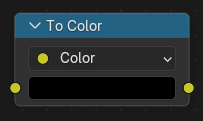
The Implicit Conversion node converts an input value to another socket type.
Blender normally performs compatible type conversions automatically when connecting sockets of different types. This node allows those conversions to be represented explicitly in the node tree, making the conversion visible and controllable.
It can be useful for debugging node setups, clarifying how values are converted, or forcing a specific conversion behavior.
See also
To understand the behavior and supported socket conversions, see Conversion.
Inputs
- Value
The value to be converted.
The input socket type corresponds to the selected Data Type.
Properties
- Data Type
Determines the socket type that the input value will be converted to. See Sockets for a full list of socket types.
The available options depend on the node tree type.
Outputs
- Value
The converted value.
The output socket type matches the selected Data Type.