Hair Dynamics
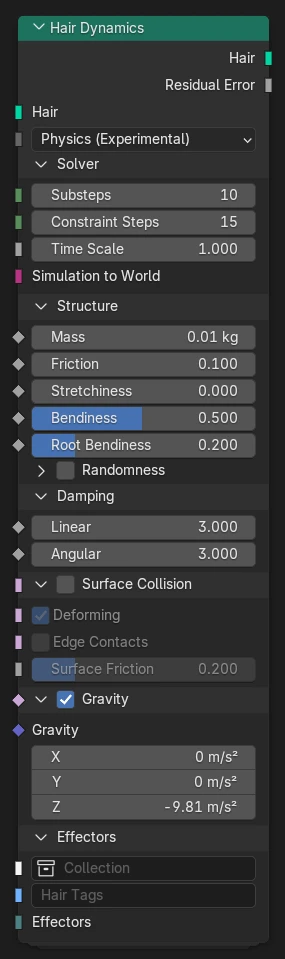
The Hair Dynamics node creates movement of curve geometry as animated or dynamic physical strands.
The node has two general modes:
- Animated:
Curves follow animation of the surface to which hair is attached.
- Physics:
Curves are simulated as a flexible, thin rods, attached to the hair surface.
The motion of the hair curves simulated over time using the XPBD Solver node. The Hair Dynamics node takes care of setting up the necessary structural constraints and common effectors, such as gravity, daming, and collision with the surface mesh. Additional effects can be added through typed bundles.
Warning
Physics simulation for hair dynamics is an experimental feature and may change significantly in the future.
Inputs
- Hair
Curve geometry that should be animated or simulated. The shape of the hair curves defines the natural rest shape.
- Mode
Select between Animated and Physics behavior.
Solver Physics
General settings for the physics solver.
- Substeps
Number of substeps used by the simulation. Increasing substeps can help improve stability in some cases, but also increases cost due to repeated collision detection.
- Constraint Iterations
Number of iterations performed by the constraint solver to ensure all constraints are satisfied. If the residual error is larger than 1 then increasing the constraint iterations is recommended.
- Time Scale
General scale factor for time steps. Larger time scale factor results in faster hair movement.
- Simulation to World
Optional transform from object space into simulation space. This defines the space in which all physical simulation takes place. If no transform is specified the object should usually be stationary.
Structure Physics
Configure the internal physical properties of hair geometry.
- Mass
Mass attribute of curve points.
This value does not have to be “realistic” based on physical hair density, but should be considered an influence factor for external forces. Extreme values can lead to numerical instability.
- Friction
Coefficient for static and dynamic friction. Small friction coefficients model a slippery material while larger values create sticky behavior.
The exact meaning of the coefficient can be understood as the tangent of the friction angle (wikipedia): When the angle of the contact force to the surface normal is small the contact is in static friction and sticks the surface. Once the contact force exceeds the friction angle it enters dynamic friction and slows down proportional to the tangential velocity.
- Stretchiness
Factor describing the amount of stretching allowed for hair curves relative to their rest length. A stretchiness factor of 0 does not allow any stretching, while a stretchiness of 1 allows curves to grow up to 10 times their rest length under their own gravity.
- Bendiness
Factor describing the amount of bending allowed between hair segments relative to their rest orientation. A bendiness factor of 0 creates a stiff curve that resists all bending, while a factor of 1 corresponds to a soft curve that has almost no bending resistance.
Root Bendiness
Separate bending stiffness factor for hair roots. Root bendiness 0 keeps hair roots stiff relative to the surface normal, while bendiness 1 allows arbitrary bending away from the normal.
Structure Randomness Physics
If enabled a random offset is added to the stretchiness and bendiness factors at each point.
- Stretchiness
Range of random offset added to the Stretchiness input.
- Bendiness
Range of random offset added to the Bendiness input.
- Root Bendiness
Range of random offset added to the Root Bendiness input.
Damping Physics
Simple general damping feature that reduces velocity of any moving point, emulating drag in air or another medium. Damping coefficients describe the relative reduction of velocity per second, approximating exponential damping.
- Linear
Damping coefficient for linear velocity.
- Angular
Damping coefficient for angular velocity.
Surface Collision Physics
Enables collision of hair curves with the surface mesh they are attached to.
- Deforming
Should be enabled if the surface mesh is deforming over time. In this case each point of the collider is interpolated individually.
If the surface mesh is not deforming then this option can be disabled for improved performance. This is also possible when the surface is transformed as an instance without changing local positions.
- Edge Contacts
Enable contact detection between hair segments and collision mesh edges. This prevents intersection in case of thin, long hair segments and/or colliders with sharp angles.
In case of smooth colliders where slight intersection isn’t critical this may be disabled for improved performance.
- Surface Friction
Friction coeffcient of the surface material. See Friction for the meaning of the coefficient value.
The effective friction coefficient of a contact is the geometric mean (square root of the product) of the coefficients of the contacting materials.
Gravity Physics
Enable gravity.
- Gravity
Acceleration vector in simulation space, typically in negative Z direction.
Effectors Physics
Additional external effectors to add to the simulation. Effectors can be external force fields, colliders, or custom effectors that get executed at some stage of the simulation (see Custom Effector)
- Collection
A collection of objects with effectors.
Effectors can be added to object geometry using the Set Effector node.
- Hair tags
Filter tags to set on the hair geometry. These tags can be used to limit effectors, in case an effector is used in multiple simulation contexts.
- Effectors
A bundle of locally defined effectors. These can be created in a node tree and passed directly into the simulation node.
Outputs
- Hair
Curve geometry after deformation by animation or physics.
- Residual error Physics
Average relative error at the end of the last substep. This indicates the quality of the simulation:
An error value of 1 or less is considered a good result.
If the error is consistently greater than 1 the solver may need more constraint iterations, and possibly more substeps, to yield an accurate result.
If the error value exceeds 1 only in certain situations it can indicate an over-constrained simulation, for example due to overlapping colliders or extreme forces.
If the value is very small then the number of iterations or substeps is unnecessarily large and performance can be improved by lowering the iteration count.
Note
The relative error is based on threshold values defined for each constraint type. These thresholds are not currently exposed by the node asset and are fixed at 1 millimeter for distance-based constraints and 0.01 radian ≈ 0.57° for rotation constraints. The final value is computed as the root mean square of the sum of all relative constraint errors.
Common Issues
Insufficient constraint iterations
The more complex a simulation setup becomes, the more Constraint Iterations the solver needs to arrive at a correct solution. A simulation with insufficient iterations can look physically plausible, but can exhibit much more stretching and bending than should be expected.
Check the Residual Error value to confirm that the solution is accurate enough. The value should ideally not exceed 1.
Open collider boundaries
Only colliders with closed meshes are supported at this point. A collider must be a manifold mesh (no open boundaries), at least in areas where collision is expected.
Collider meshes with open boundaries can lead to sudden jumping. A point can move around an open boundary without generating a contact and approach a mesh face from the back. When it gets close to the mesh a contact is then suddenly detected and the point gets ejected from the mesh.
Example bug report: #159657.
Tunneling through colliders
Fast moving geometry may not reliably collide with thin meshes (“tunneling”).
Colliders must have a certain thickness to avoid tunneling, depending on the speed of collision and the number of substeps: with more substeps thinner colliders are possible, up to a certain point (see Too many substeps).
Stretchiness without bendiness
Hair curve simulation with high stretchiness but low bendiness values can lead to un-physical deformations, as if the hair is curling upwards.

This is caused by excessive shearing, where positions are allowed to deviate from the forward direction of rotation (blue arrows in the figure below), but rotation remains stiff.

This case is not well supported by the Cosserat model for thin rods, where stretching and bending are directly related. Future constraint models may support such configurations better.
Too many substeps
Using too many substeps can lead to numerical errors, resulting in sudden changes of constraint response with changing stretchiness or bendiness. It is recommended to keep Substeps below 20 and instead increase the Constraint Iterations if more accuracy is needed.
The root cause is multiplicative factors using the inverse square of the time (sub)step, leading to rounding errors.