Push/Pull
Reference
- Mode:
Object and Edit Modes
- Tool:
- Menu:
Moves the selected elements further away from or closer to the Pivot Point, all by the same distance.
When using the tool, simply drag the yellow pin.
When using the menu item, move the mouse down to Push or up to Pull (Alternatively, type a number for the Distance option.) Then press LMB or Return to confirm, or RMB or Esc to cancel.
After confirming, the distance can still be changed in the Adjust Last Operation panel.
Options
- Distance
How far to push (negative) or pull (positive) the selected items.
- Mirror Editing
Whether to also affect matching geometry on the other side of the mesh. Mesh Symmetry needs to be enabled for this to work.
- Proportional Editing
See Proportional Editing.
Example
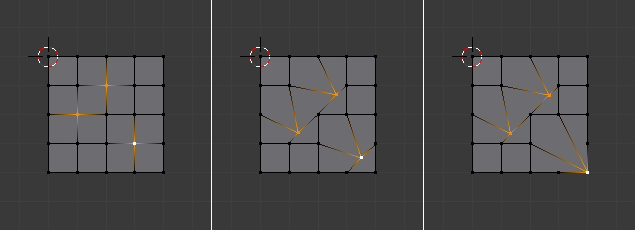
Pushing vertices away from the 3D Cursor (middle) compared to scaling (right).