In-Betweens
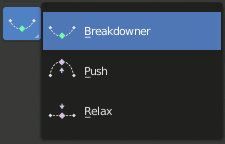
In-Betweens Tools.
These tools create a new pose which is based on the keys surrounding the current frame. This can help to quickly build up in-betweens from already existing key poses.
Blend Pose with Rest Pose
Riferimento
- Modalità:
Pose Mode and Object Mode
- Menù:
- Menù:
Blend with Rest Pose linearly interpolates the current pose to the rest position. When blending with a negative factor, the pose is moved away from the rest position. Only one keyframe is needed for this tool unlike two for the other.
Push Pose from Breakdown
Riferimento
- Modalità:
Pose Mode and Object Mode
- Strumento:
- Menù:
- Menù:
- Scorciatoia:
Ctrl-E
Push Pose interpolates the current pose away from the linear interpolation between the surrounding keys. On your current frame, imagine a pose that is linearly interpolated from the surrounding keys. That is the base pose that this tool interpolates away from.
Relax Pose to Breakdown
Riferimento
- Modalità:
Pose Mode and Object Mode
- Strumento:
- Menù:
- Menù:
- Scorciatoia:
Alt-E
Relax Pose is the opposite of Push Pose from Breakdown. Hence at full influence, the resulting pose will be identical to a linear interpolation between the surrounding keys.
Pose Breakdowner
Riferimento
- Modalità:
Pose Mode and Object Mode
- Strumento:
- Menù:
- Menù:
- Scorciatoia:
Shift-E
Creates a suitable breakdown pose on the current frame.
The Breakdowner tool can be constrained to work on specific transforms and axes, by pressing the following keys while the tool is active:
G, R, S: move, rotate, scale
B: Bendy bones
C: custom properties
X, Y, Z: to the corresponding axes
Blend to Neighbor
Riferimento
- Modalità:
Pose Mode and Object Mode
- Menù:
- Menù:
- Scorciatoia:
Shift-Alt-E
Transitions the current pose with the neighboring keyframes in the timeline. In order for this operator to work, there must be a keyframe before and after the current frame.