Slide Vertices
Riferimento
- Modalità:
Modalità Modifica
- Menù:
- Scorciatoia:
G twice or Shift-V
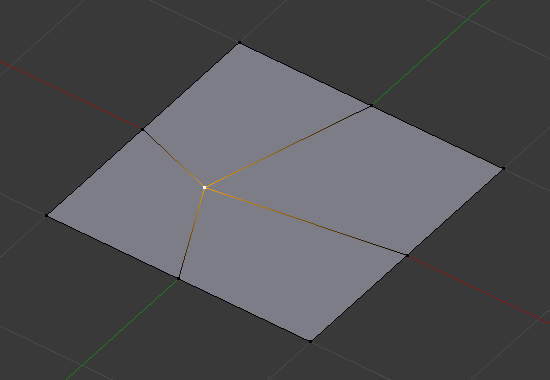
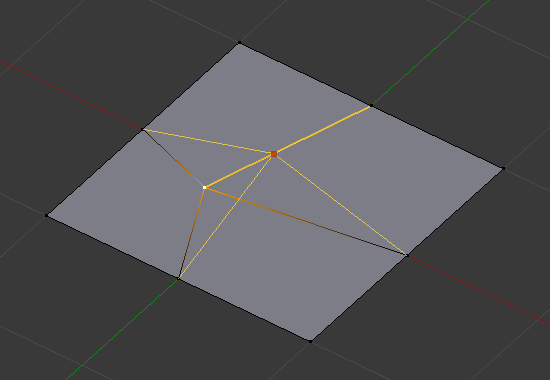
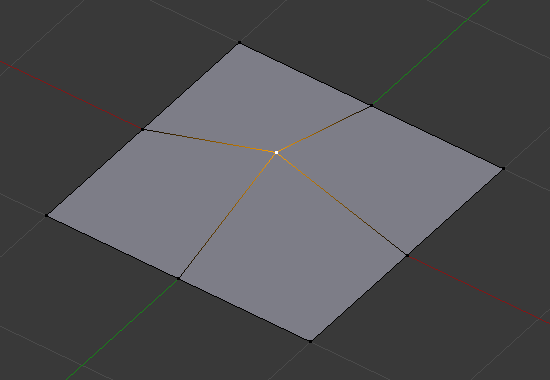
Moves each selected vertex along one of its adjacent edges. After activating the tool, move the mouse along the direction of the desired edge, then click LMB to confirm (or RMB to cancel).
The following options are available in the Regola Ultima Operazione panel after confirming. The ones with a shortcut can also be changed while moving – the shortcuts and current settings are displayed in the status bar.
- Fattore
Relative movement distance.
- Even E
By default, each vertex is moved by the same percentage along the length of its edge. Use Even to move all vertices by the same absolute distance instead. (The Factor input is still a relative number, however.)
- Flipped F
Move each vertex to the same absolute distance from its «opposing» vertex (on the other end of its sliding edge). Only available when Even is active.
- Clamp Alt or C
When disabled, vertices are allowed to go outside the original boundaries of their edge.
- Mirror Editing
Also slide matching vertices on the other side of the mesh. Mesh Symmetry needs to be enabled for this to work.
- Correct UVs
Correct the UV coordinates of the moved vertices to avoid texture distortion.
Vedi anche