Set NURBS Order Node
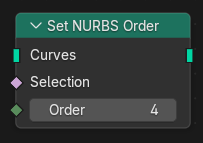
Controls how many control points influence each evaluated point of a NURBS curve
by modifying the nurbs_order attribute.
Higher order values result in smoother curves with broader influence from control points, while lower values make the curve follow control points more closely.
Typical use cases include:
Increasing smoothness for organic or flowing shapes.
Reducing order to tighten control around sharp features.
Matching curve behavior between different NURBS splines.
Refining procedural curve generation.
Ingressi
- Curva
Input curves. The node only affects curves of type NURBS.
- Selezione
The points whose NURBS order will be changed.
- Order
The number of control points influencing each evaluated point.
Valid values depend on the number of control points in the spline. Higher values increase smoothness but require more points.
Uscite
- Curva
Standard curve output.