Camera Solver Constraint
The Camera Solver constraint makes a Blender camera imitate the motion of a real-world camera.
사용법
Start by loading a video file into the Movie Clip Editor and using motion tracking to track at least eight markers in the real-world scene. Then use Solve Camera/Object Motion to reconstruct the motion of the physical camera, and finally add this constraint to a Blender camera.
Options
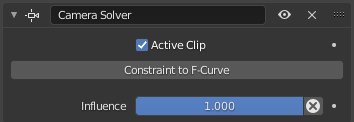
Camera Solver constraint.
- 활성 클립
Whether to follow the physical camera of the scene’s Active Clip. If unchecked, a selector appears for choosing another clip.
- F-곡선에 대한 Constraint
Replaces the constraint by a set of equivalent keyframes.
- 영향
How strongly the constraint affects the Blender camera.