Image Node
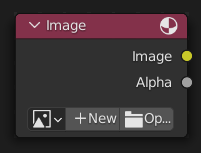
The Image node injects any image format that is supported by Blender.
შენატანები
This node has no input sockets.
თვისებები (Properties)
- გამოსახულება (Image)
Selection of different types of media. For controls see მონაცემთა ბლოკების მენიუ. For the options see Image Settings.
- Source
Type of image (Single Image, Movie...). See Image Settings.
- Frames
How many frames of the Movie-type image (video) to play. Past this point, the video will be paused (unless Cyclic is enabled).
If you want to play the whole video, you can click Match Movie Length in the Image Editor's Sidebar, then copy the Frames from there to the node.
- საწყისი კადრი (Start Frame)
Scene frame at which the video should start playing.
- აცდენა (Offset)
Number of frames to offset the video to an earlier point in time. (Put differently: how many frames at the start of the video to skip.)
მინიშნება
Blender plays video textures at the scene frame rate, not their original frame rate, meaning they'll be faster or slower than intended if these frame rates don't match up. You can put a Driver on the Offset to work around this. Simply type the following into the field, replacing StartFrame, VideoFrameRate and SceneFrameRate by their respective numbers:
#(frame - StartFrame) * (VideoFrameRate - SceneFrameRate) / SceneFrameRate
- ციკლური (Cyclic)
Start over after the last frame to create a continuous loop.
- ავტო-განახლება (Auto-Refresh)
Update the video texture in the 3D Viewport when moving through the timeline.
- ფერითი სივრცე (Color Space)
The Color Space the image file was saved in. See Image Settings for details.
- ალფა (Alpha)
How the image uses its Alpha Channel. See Image Settings for details.
გამონატანები
The first two sockets are the minimum.
- გამოსახულება (Image)
Standard color output.
- ალფა (Alpha)
Separate Alpha value.
ნოტი
Multi-Layer Format
When a multi-layer file format, like EXR, is loaded,
each layer is made available as a socket.