Environment Texture Node
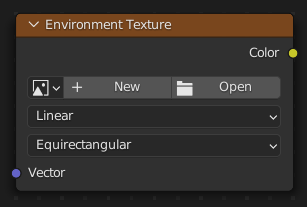
The Node Environmental Texture is used to light your scene using an environment map image file as a texture.
შენატანები
- Vector
Texture coordinate for texture look-up. If this socket is left unconnected, the image is mapped as environment with the Z axis as up.
თვისებები (Properties)
- გამოსახულება (Image)
Image data-block used as the image source. Additional settings can be found in : These include options to control the alpha channel along with addition options for the color space. These addition options are documented with the rest of Common Image Settings.
- ფერითი სივრცე (Color Space)
Type of data that the image contains, either Color or Non-Color Data. For most color textures the default of Color should be used, but in case of e.g. a bump or alpha map, the pixel values should be interpreted as Non-Color Data, to avoid doing any unwanted color space conversions.
ფერების სია აქტიურ OCIO კონფიგურაციაზეა დამოკიდებული. ნაგულისხმები ფერითი სივრცეები დეტალურად აქაა განხილული: ნაგულისხმები OpenColorIO კონფიგურაცია
- Texture Interpolation
Interpolation method used for the environment texture. The following interpolations are available:
- წრფივი (Linear):
Regular quality interpolation.
- Closest:
No interpolation, use closest pixel.
- Cubic:
Smoother, better quality interpolation.
- Smart:
Bicubic when magnifying, otherwise Bilinear is used. This is only available for OSL.
- Projection Method
Allows you to use different types of environmental maps. The following methods are supported:
- Equirectangular:
Projection from an Equirectangular photo.
- Mirror Ball:
Projection from an orthographic photo or mirror ball.
გამონატანები
- ფერი (Color)
RGB color from the image.
მაგალითები

HDR image from OpenFootage.net.