Delete Geometry Node
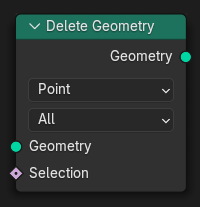
The Delete Geometry node removes the selected part of a geometry. It behaves similarly to the Delete tool in Edit Mode. The type of elements to be deleted can be specified with the domain and mode properties.
შენატანები
- გეომეტრია (Geometry)
Standard geometry input.
- მონიშვნა
Boolean field that is true for parts of the geometry to be deleted.
თვისებები (Properties)
- Domain
The domain on which the selection field is evaluated.
- Point:
The selection is on the points, control points, and vertices of the geometry.
- წიბო (Edge):
The selection is on the edges of the mesh component. The other components are not modified.
- წახნაგი (Face):
The selection is on the faces of the mesh component. The other components are not modified.
- Spline:
The selection is on the splines in the curve component. For each spline, it will either be deleted entirely or not at all. The other components are not modified.
- Instance:
The selection is on the top-level instances, and the entire instance is removed if it is selected. If the input also contains realized geometry, that will be unaffected.
- რეჟიმი (Mode)
The type of elements to be affected. This only applies to the mesh component.
- ყველა (All):
Vertices, edges, and faces in the selection will be deleted.
- მხოლოდ წიბოები და წახნაგები (Only Edges & Faces):
Vertices won't be deleted, even if they are in the selection.
- მხოლოდ წახნაგები (Only Faces):
Only faces in the selection will be deleted.
გამონატანი (Output)
- გეომეტრია (Geometry)
Standard geometry output.