Switch Node
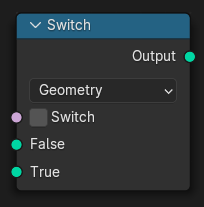
The Switch node outputs one of two inputs depending on a condition.
When the inputs are regular values, only the input that is passed through the node is evaluated. This means the unused input is not computed.
Notitie
For Geometry Nodes:
When the inputs are Invoervelden, both inputs may be evaluated before the switch is applied. The switch then selects which result is used for each element. Because of this, the node should not be relied on to avoid evaluating expensive field inputs.
Zie ook
The Menu Switch Node and Index Switch Node can be used to switch between an arbitrary amount of inputs.
Inputs (Inputs)
- Switch
Determines which of the two inputs below will be passed through.
- False
Is passed through when the switch is set to false.
- True
Is passed through when the switch is set to true.
Properties (Eigenschappen)
- Type (Type)
Determines the type of the data that is handled by the node.
Outputs (Outputs)
- Output
One of the two inputs without any modifications.