Usage (Gebruik)
Relations Management
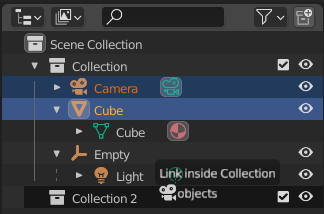
Objectens koppelen naar een collectie.
Objects and collections can be reorganized, linked, or parented directly in the Outliner using drag-and-drop operations. This provides an intuitive way to manage scene hierarchies and relationships.
Moving and Linking
Move: Drag an object or collection onto another collection to move it there.
Link: Drag an object (or collection) while holding Ctrl and drop it onto a collection to link it instead of moving it. This allows the same object or collection to be part of multiple parent collections at once.
Parenting
Parent to Object: Drag an object onto another object to make it a child of that object. Hold Alt while dropping to not keep the transform relationship (i.e. the child retains its world position).
Clear Parent: Drag the child object out of its parent hierarchy to remove the parent relationship. Hold Alt while dropping to clear the parent while preserving the parent’s transform on the child.
Parent Across Collections: To parent an object that resides in a different collection, hold Shift while dragging.
See Parenting Objects (Ouderschap Objecten) for more information on parenting and transformation inheritance.
Notitie
Drag-and-drop operations apply to the entire current selection. If some selected data-blocks are incompatible with the operation, they are left unchanged.
Modifiers, Constraints, and Visual Effects
Men kan Modifiers, Constraints, en Visual Effects op verschillende manieren beheren vanuit de Outliner:
Men kan individuele items slepen en droppen om hun volgorde binnen de stack te veranderen of om ze naar een ander object te kopiëren.
Men kan het groepsitem (bijv. Modifiers) slepen en neerzetten om de hele stack naar een ander object te kopiëren. De bestaande stack van het doelobject wordt vervangen.
Je kunt items toepassen en verwijderen via het contextmenu.
Drag & Dropping to 3D Viewport (Slepen en Droppen naar de 3D Viewport)
Door een object vanuit de Outliner naar de 3D Viewport te slepen, wordt een duplicate gemaakt – een nieuw object met een eigen kopie van de onderliggende objectgegevens.
Het slepen van objectgegevens vanuit de Outliner naar de 3D Viewport maakt een linked duplicate – een nieuw object dat dezelfde onderliggende objectgegevens verwijst.