Line Art (Lijnkunst)
Reference (Referentie)
- Mode (Modus):
Object Mode (Objectmodus)
- Panel (Paneel):
The Line Art panel is used to enable extra display options for customizing Line Art rendering for a specific object.
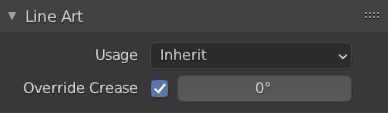
Line Art panel.
- Usage (Gebruik)
How the object is loaded into Line Art. This property overrides the parent collection’s Line Art (Lijnkunst) usage.
- Inherit:
No special loading strategy for Line Art. Loading of the object is controlled by parent collection’s Line Art settings.
- Include:
Force include the object into Line Art calculation even if its parent collection specifies otherwise.
- Intersection Only (Alleen Snijlijnen):
The object will only produce intersection lines in the scene and its own geometry stays invisible.
- Occlusion Only (Alleen Occlusie):
The object will only cause occlusion to existing feature lines and its geometry stays invisible.
- Exclude (Uitzonderen):
The object will not be loaded into Line Art at all.
- No Instersection (Geen Snijlijnen):
The object will not generate intersection lines on itself or with other objects in scene.
- Force Intersection(Forceer Snijlijnen):
Genereer snijlijnen, zelfs met objecten die snijlijnen uitschakelen.
- Override Crease
Allows the object to have a different crease value than the global one set in the Line Art modifier.
- Crease (Vouw)
Override crease value for the object.
- Intersection Priority (Intersectie Prioriteit)
Assigns an intersection priority value for this object. The intersection line will be included into the object with the higher intersection priority value.