Normal Edit Modifier
The Normal Edit modifier affects (or generates) custom normals. It uses a few simple parametric methods to compute them (quite useful in game development and architecture areas), and mixes back those generated normals with existing ones.
Opcions

Normal Edit Modifier.
- Radial
Alinea normals amb el vector
(origen, vèrtex_coordenades), és a dir, totes les normals semblen radiar des del punt central donat, com si s’emetessin des d’una superfície el·lipsoide.- Direccional
Makes all normals point (converge) towards a given target object.
- Referent
Uses this object’s origin as reference point when generating normals.
Optional in Radial mode, mandatory in Directional one.
- Parallel Normals
Makes all normals parallel to the line between both objects” origins, instead of converging towards target’s origin.
Only relevant in Directional mode.
Mesclar
- Mix Mode
How to affect existing normals with newly generated ones.
Note that the Multiply option is not a cross product, but a faster component-by-component multiplication.
- Factor de mescla
How much of the generated normals get mixed into existing ones.
- Grup de vèrtexs
Allows per-item fine control of the mix factor. The vertex group influence can be inverted by using the arrow button to the right.
- Angle màx
Forbids new generated normals to have an angle to the original normal above that given threshold. This is useful to prevent extreme changes, that can even lead to inverting the front/back sides of a face, and consequently to shading artifacts.
- Lock Polygon Normals (padlock icon)
Prevents flipping (reversing front/back sides) of polygons which normal does not match anymore the side to which point its corners” custom normals. Can also help to avoid shading issues.
Desplaçament
Gives modified object’s origin an offset before using it to generate normals.
Only relevant in Radial mode if no Target Object is set, and in Directional mode when Parallel Normals is set.
Utilització
This modifier can be used to quickly generate radial normals for low-poly tree foliage or «fix» shading of toon-like rendering by partially bending default normals…
Truc
Es poden aconseguir manipulacions de normals més complexes copiant normals d’una malla a una altra, vegeu el modificador de transferència de dades. Alguns efectes d’aspecció poden també fer ús del Modificador de normals ponderades.
Exemple
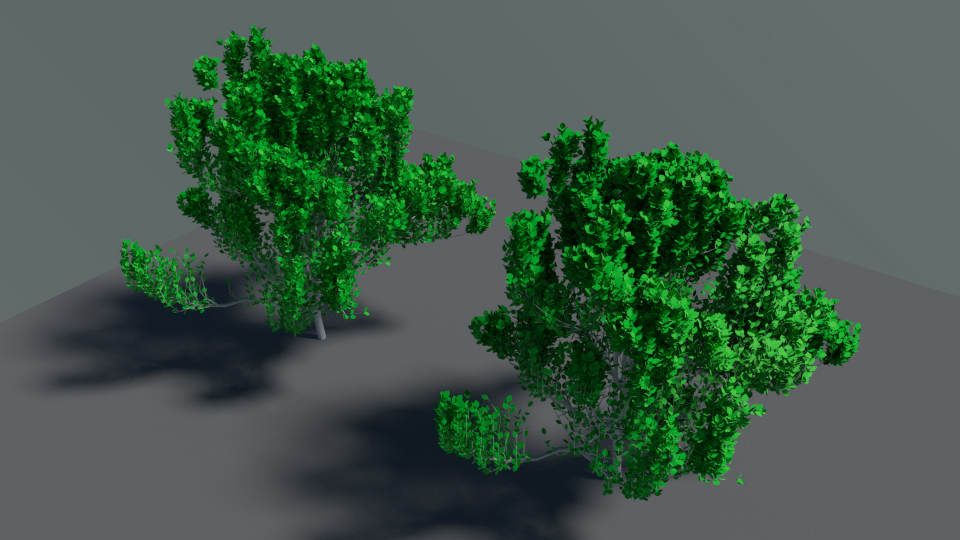
Editing custom normals to point towards a given direction (blend-file).
The left tree mesh has unmodified normals, while on the right one a Normal Edit modifier is used to bend them towards the camera. This shading trick is often used in games to fake scattering in trees and other vegetation.