Light Path Node
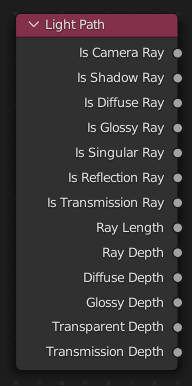
The Light Path node is used to find out for which kind of incoming ray the shader is being executed; particularly useful for non-physically-based tricks. More information about the meaning of each type is in the Light Paths documentation.
Entrades
Aquest node no té entrades.
Propietats
Aquest node no té cap propietat.
Sortides
- Is Camera Ray
1.0 if shading is executed for a camera ray, otherwise 0.0.
- Is Shadow Ray
1.0 if shading is executed for a shadow ray, otherwise 0.0.
- Is Diffuse Ray
1.0 if shading is executed for a diffuse ray, otherwise 0.0.
- Is Glossy Ray
1.0 if shading is executed for a glossy ray, otherwise 0.0.
- Is Singular Ray Cycles Only
1.0 if shading is executed for a singular ray, otherwise 0.0.
- Is Reflection Ray Cycles Only
1.0 if shading is executed for a reflection ray, otherwise 0.0.
- Is Transmission Ray Cycles Only
1.0 if shading is executed for a transmission ray, otherwise 0.0.
- Ray Length Cycles Only
Distance traveled by the light ray from the last bounce or camera.
- Ray Depth
Number of times the ray has been reflected or transmitted on interaction with a surface.
Nota
Passar per un aspector transparent no compta com un «rebot» normal.
- Diffuse Depth Cycles Only
Number of times the ray has gone through diffuse reflection or transmission.
- Glossy Depth Cycles Only
Number of times the ray has gone through glossy reflection or transmission.
- Transparent Depth Cycles Only
Number of times the ray has gone through a transparent surface.
- Transmission Depth Cycles Only
Nombre de vegades que el raig ha passat per una superfície transmissiva. Un cas d’ús típic és evitar punts negres en el revelat (causats pels raigs que impacten al límit de rebot) passant d’un aspector transmissiu a un de difusiu més enllà d’un punt determinat. Vegeu Mix Shader.
EEVEE Support
EEVEE no té un concepte real de raigs. Però per tal de facilitar la procedimentació entre Cycles i EEVEE, s’admeten algunes de les sortides en casos particulars.
Is Camera: Supported.
Is Shadow: Supported.
Is Diffuse: Supported.
Is Glossy: Supported.
Is Singular: Not supported. Same as Is Glossy.
Is Reflection: Not supported. Same as Is Glossy.
Is Transmission: Not supported. Same as Is Glossy.
Ray Length: Distance from the camera to the shading point.
Ray Depth: Indicates the current bounce when baking the light cache.
Diffuse Depth: Same as Ray Depth but only when baking diffuse light.
Glossy Depth: Same as Ray Depth but only when baking specular light.
Transparent Depth: Not supported. Defaults to 0.
Transmission Depth: Not supported. Same as Glossy Depth.
Nota
Is Glossy does not work with Screen Space Reflections/Refractions but does work with reflection planes (whether used with SSR or not).