Principled BSDF
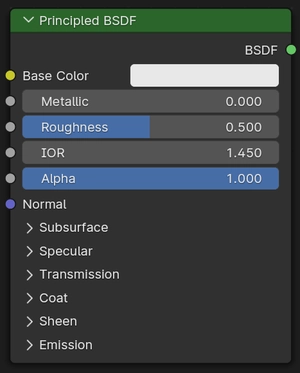
The Principled BSDF that combines multiple layers into a single easy to use node. It can model a wide variety of materials.
It is based on the OpenPBR Surface shading model, and provides parameters compatible with similar PBR shaders found in other software, such as the Disney and Standard Surface models. Image textures painted or baked from software like Substance Painter may be directly linked to the corresponding input in this shader.
Capes
The base layer is a mix between metal, diffuse, subsurface, and transmission components. Most materials will use one of these components, though it is possible to smoothly mix between them.

The metal component is opaque and only reflect lights. Diffuse is fully opaque, while subsurface also involves light scattering just below the surface. Both diffuse and subsurface sit below a specular layer. The transmission component includes both specular reflection and refraction.
On top of all base layers there is an optional glossy coat. And finally the sheen layer sits on top of all other layers, to add fuzz or dust.
Light emission can also be added. Light emits from below the coat and sheen layers, to model for example emissive displays with a coat or dust.
Entrades
- Color base
Overall color of the material used for diffuse, subsurface, metal and transmission.

Same base color for multiple materials types
- Rugositat
Specifies microfacet roughness of the surface for specular reflection and transmission. A value of 0.0 gives a perfectly sharp reflection, while 1.0 gives a diffuse reflection.

Roughness from 0.0 to 1.0
- Metàl·lic
Blends between a dielectric and metallic material model. At 0.0 the material consists of a diffuse or transmissive base layer, with a specular reflection layer on top. A value of 1.0 gives a fully specular reflection tinted with the base color, without diffuse reflection or transmission.

Metallic from 0.0 to 1.0
- IDR
Index of refraction (IOR) for specular reflection and transmission. For most materials, the IOR is between 1.0 (vacuum and air) and 4.0 (germanium). The default value of 1.5 is a good approximation for glass.

IOR from 1.0 to 2.0
- Alfa
Controls the transparency of the surface, with 1.0 fully opaque. Usually linked to the Alpha output of an Image Texture node.

Alpha from 0.0 to 1.0
- Normal
Controls the normals of the base layers.
Difusiva
- Roughness Cycles Only
Surface roughness; 0.0 gives standard Lambertian reflection, higher values activate the Oren-Nayar BSDF.
Subsurface
Subsurface scattering is used to render materials such as skin, milk and wax. Light scatters below the surface to create a soft appearance.
- Mètode
Rendering method to simulate Subsurface scattering.
- Christensen-Burley:
An approximation to physically-based volume scattering. This method is less accurate than Random Walk however, in some situations this method will resolve noise faster.
- Random Walk:
:guilabel:`Només Cycles». Proporciona resultats precisos per a objectes fins i corbats. El Caminar aleatori se serveix de la dispersió volumètrica real dins de la malla, que implica que funciona millor per a malles tancades. La superposició de cares i forats en la malla pot ser causa de problemes.
- Random Walk (Skin):
guilabel:Només Cycles. Mètode de caminar aleatori optimitzat per al revelat de pell. El radi s’ajusta automàticament en funció de la textura del color, i la direcció d’entrada de subsuperfície utilitza una mescla de transmissió difusiva i especular amb IDR personalitzat. Això tendeix a retenir un major detall i color de superfície, amb què s’assembla més a pell.
- Pes
Blend between diffuse surface and subsurface scattering. Typically should be zero or one (either fully diffuse or subsurface).

Weight from 0.0 to 1.0
- Radi
Average distance that light scatters below the surface. Higher radius gives a softer appearance, as light bleeds into shadows and through the object. The scattering distance is specified separately for the RGB channels, to render materials such as skin where red light scatters deeper. The X, Y and Z values are mapped to the R, G and B values, respectively.

Radius from white to red
- Escalar
Scale applied to the radius.

Scale from 0 cm to 50 cm
- IOR Cycles Only
Index of refraction (IOR) used for rays that enter the subsurface component. This may be set to a different value than the global IOR to simulate different layers of skin.

IOR from 1.0 to 2.0
- Anisotropy Cycles Only
Directionality of volume scattering within the subsurface medium. Zero scatters uniformly in all directions, with higher values scattering more strongly forward. For example, skin has been measured to have an anisotropy of 0.8.

Anisotropy from 0.0 to 1.0
Especular
Controls for both the metallic component and specular layer on top of diffuse and subsurface.
- Distribution
Microfacet distribution to use.
- GGX:
A method that is faster than Multiple-scattering GGX but is less physically accurate.
- Multidispersió GGX:
Té en compte múltiples episodis de dispersió entre microfacetes. Això dona més resultats de conservació d’energia, que d’altra manera es farien visibles com un enfosquiment excessiu.
- IOR Level
Adjustment to the IOR to increase or decrease intensity of the specular layer. 0.5 means no adjustment, 0 removes all reflections, 1 doubles them at normal incidence.
This input is designed for conveniently texturing the IOR and amount of specular reflection.

IOR level from 0.0 to 1.0
- Tenyit
Color tint for specular and metallic reflection.
For non-metallic tints provides artistic control over the color specular reflections at normal incidence, while grazing reflections remain white. In reality non-metallic specular reflection is fully white.
For metallic materials tints the edges to simulate complex IOR as found in materials such as gold or copper.

Tint from white to orange
- Anisotropic Cycles Only
Amount of anisotropy for specular reflection. Higher values give elongated highlights along the tangent direction; negative values give highlights shaped perpendicular to the tangent direction.

Anisotropic from 0.0 to 1.0
- Anisotropic Rotation Cycles Only
Rotates the direction of anisotropy, with 1.0 going full circle.
Compared to the Glossy BSDF node, the direction of highlight elongation is rotated by 90°. Add 0.25 to the value to correct.

Anisotropic rotation from 0.0 to 1.0
- Tangent
Controls the tangent direction for anisotropy.
Transmissió
Transmission is used to render materials like glass and liquids, where the surface both reflects light and transmits it into the interior of the object
- Pes
Mix between fully opaque surface at zero and fully transmissive at one.

Weight from 0.0 to 1.0
Vernissat
Coat on top of the materials, to simulate for example a clearcoat, lacquer or car paint.
- Pes
Controls the intensity of the coat layer, both the reflection and the tinting. Typically should be zero or one for physically-based materials, but may be textured to vary the amount of coating across the surface.

Weight from 0.0 to 1.0
- Rugositat
Roughness of the coat layer.

Roughness from 0.0 to 1.0
- IDR
Index of refraction (IOR) of the coat layer. Affects its reflectivity as well as the falloff of coat tinting.

IOR from 1.0 to 2.0
- Tenyit
Adds a colored tint to the coat layer by modeling absorption in the layer. Saturation increases at shallower angles, as the light travels farther through the medium, depending on the IOR.

Tint from white to blue
- Normal
Controls the normals of the Coat layer, for example to add a smooth coating on a rough surface.
Llustre
Sheen simulates very small fibers on the surface. For cloth this adds a soft velvet like reflection near edges. It can also be used to simulate dust on arbitrary materials.


Emission
Light emission from the surface.


Thin Film Cycles Only
Aquesta Cinta simula l’efecte de la interferència amb una película prima ubicada damunt del material. Fa que el reflex especular s’acoloreixi de forma que depèn moltíssim de l’angles de visió així com del gruix de la cinta i l’índex de refracció (IDR) de la cinta i del propi material.
L’efecte es veu habitualment en regalims d’oli, bombolles de sabó o recobriments de vidre. Per bé que la influència és més òbvia en ressaltats especulars, també afecta a la transmissió.
Nota
Aquest interferència de cinta s’aplica ara mateix només a materials dielèctrics. Es preveu introduir suport en el futur per a cintes primes sobre Metàl·lic.
- Gruix
El gruix de la cinta en nanòmetres. Un valor de 0 inhabilita la simulació. L’efecte interferència és més fort entre aproximadament 100 i 1000 nanòmetres, ja que és a prop de les longituds d’ona de la llum visible.
- IDR
Índex de refracció (IDR) de la cinta prima. L’interval més habitual per a aquest valor és d’entre 1,0 (buit i aire) i aproximadament 2,0, tot i que alguns materials poden assolir valors més alts. El valor per defecte d’1,33 és una bona aproximació per a l’aigua. Tingueu en compte que quan el valor es posa a 1,0 o a l’IDR principal del material, l’efecte de cinta prima desapareix perquè la cinta es fusiona òpticament amb l’aire o el material.
Sortides
- BSDF
Standard shader output.