Environment Texture Node
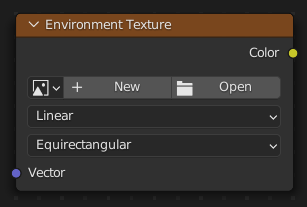
The Node Environmental Texture is used to light your scene using an environment map image file as a texture.
Entrades
- Vector
Texture coordinate for texture look-up. If this socket is left unconnected, the image is mapped as environment with the Z axis as up.
Propietats
- Imatge
Image data-block used as the image source. Additional settings can be found in : These include options to control the alpha channel along with addition options for the color space. These addition options are documented with the rest of Common Image Settings.
- Espai de color
Type of data that the image contains, either Color or Non-Color Data. For most color textures the default of Color should be used, but in case of e.g. a bump or alpha map, the pixel values should be interpreted as Non-Color Data, to avoid doing any unwanted color space conversions.
La llista d’espais de color depèn de la configuració activa de OCIO. Els espais de color admesos per defecte es descriuen detalladament aquí: Configuració per defecte d’OpenColorIO
- Texture Interpolation
Interpolation method used for the environment texture. The following interpolations are available:
- Lineal:
Interpolació de qualitat regular.
- El més pròxim:
No interpolation, use closest pixel.
- Cúbica:
Smoother, better quality interpolation.
- Llesta:
Bicubic when magnifying, otherwise Bilinear is used. This is only available for OSL.
- Projection Method
Allows you to use different types of environmental maps. The following methods are supported:
- Equirectangular:
Projection from an Equirectangular photo.
- Mirror Ball:
Projection from an orthographic photo or mirror ball.
Sortides
- Color
RGB color from the image.
Exemples

HDR image from OpenFootage.net.