Limitar distância
The Limit Distance constraint forces an object or bone to stay further from, nearer to, or exactly at a given distance from a target. In other words, the owner’s location is constrained to be either outside, inside, or on the surface of a sphere centered on the target.
Importante
This constraint has no effect on connected bones as their position is determined by their parent bone.
Opções
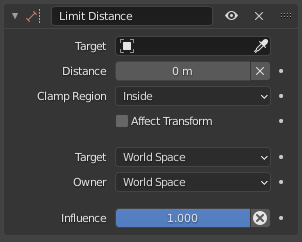
Limit Distance constraint.
- Target
The object or bone to stay close to/keep away from.
- Distância
The limit distance, i.e. the radius of the constraining sphere. It’s calculated automatically when selecting the first target.
- (Reset Distance)
Set the Distance to the current distance between owner and target.
- Região de limitação
How to constrain the owner relative to the spherical boundary:
- Lado interno:
Keep the owner trapped within the sphere.
- Lado externo:
Prevent the owner from entering the sphere.
- On Surface:
Constrain the owner to the surface of the sphere.
- Affect Transform
When the owner is manually moved around, restrict not just its visual position but also its Location in the Properties Editor’s Transform panel.
- Target/Owner
The spaces for retrieving the position of the target and for applying the constrained result to the owner.
- Influência
How strongly the constraint affects the owner.
Dica
Evaluating both owner and target in a Custom Space will automatically scale the Distance according to the scale of the space’s object/bone.