Contents Menu Expand Light mode Dark mode Auto light/dark, in light mode Auto light/dark, in dark mode Skip to content
Blender 5.3 Manual
Logo
Blender 5.3 Manual

Getting Started

  • Sobre o Blender
    • A história do Blender
    • Sobre o software livre e a licença pública geral (GPL)
    • A comunidade do Blender
  • Instalando o Blender
    • Instalando no Linux
    • Instalando no macOS
    • Instalando no Windows
    • Installing from Steam
  • Configurando o Blender
    • Introdução
    • Configurando periféricos
    • Defaults
  • Sistema de ajuda

Seções

  • Interface do usuário
    • Sistema de janelas
      • Introdução
      • Tela de abertura
      • Topbar
      • Workspaces
      • Status Bar
      • Áreas
      • Regiões
      • Abas e painéis
    • Keymap
      • Teclas de atalho padrão
      • Industry Compatible Keymap
    • UI Elements
      • Botões
      • Input Fields
      • Menus
      • Eyedropper
      • Decorators
      • Menu de blocos de dados
      • List View
      • Tree View
      • Color Picker
      • Gradiente de cores
      • Color Palette
      • Assistente de curvas
    • Tools & Operators
      • Tool System
      • Operadores
      • Desfazer e refazer
      • Anotações
      • Selecting
    • Nós
      • Node Editors
      • Componentes dos nós
      • Selecting
      • Organizando nodes (nós)
      • Editing
      • Common Nodes
        • Saída
          • Enable Output Node
        • Utilities
          • Bundle
            • Combine Bundle Node
            • Separate Bundle Node
            • Get Bundle Item Node
            • Store Bundle Item Node
            • Join Bundle Node
          • Closure
            • Closure
            • Evaluate Closure
          • Implicit Conversion
        • Nós para organização
          • Quadro
          • Redirecionar
      • Node Groups
  • Editors
    • 3D Viewport
      • Introdução
      • Tela inicial
      • Object Modes
      • Navegação
        • Introdução
        • Navegação
        • Fly/Walk Navigation
        • Align View
        • Perspective/Orthographic
        • Visualização local.
        • Visão de câmera
        • Viewpoint
        • View Regions
        • Contextual Views
      • Cursor 3D
      • Selecting Objects
      • Controles
        • Transform Orientation
        • Transform Pivot Point
          • Centro da caixa circundante
          • Cursor 3D
          • Origens individuais
          • Ponto mediano
          • Elemento ativo
        • Atração para elementos
        • Edição proporcional
      • Display
        • Object Type Visibility
        • Viewport Gizmos
        • Viewport Overlays
        • Viewport Shading
      • Toolbar
        • Measure
        • Add Cube
        • Add Cone
        • Add Cylinder
        • Add UV Sphere
        • Add Icosphere
      • Sidebar
        • Animação
          • Global Transform
      • Viewport Render
    • Image Editor
      • Introdução
      • Navegação
      • Sidebar
      • Sobreposições
      • Configurações de imagem
      • Editing
    • UV Editor
      • Introdução
      • Navegação
      • Sobreposições
      • Sidebar
      • Selecting UVs
      • Controles
        • Atração para elementos
    • Compositor
    • Texture Nodes
      • Introdução
      • Texture Nodes Types
        • Color Nodes
          • Combine Color Node
          • Invert Color Node
          • Misturar
          • Curvas RGB
          • Hue/Saturation/Value Node
          • Separate Color Node
        • Nós de conversão
          • Color Ramp Node
          • Distance Node
          • Math Node
          • RGB to BW Node
          • Value to Normal Node
        • Nós de distorção
          • At Node
          • Rotacionar
          • Escala
          • Mover
        • Input Nodes
          • Coordinates Node
          • Imagem
          • Texturas
          • Time Curve Node
        • Output Nodes
          • Output Node
          • Viewer Node
        • Pattern Nodes
          • Checker Node
          • Bricks Node
        • Texture Nodes
          • Blend Node
          • Clouds Node
          • Distorted Noise Node
          • Magic Node
          • Marble Node
          • Musgrave Node
          • Noise Node
          • Stucci Node
          • Voronoi Node
          • Wood Node
        • Group
    • Geometry Node Editor
    • Shader Editor
    • Editor de sequências de vídeo
      • Introdução
      • Sequencer
        • Introdução
        • Canais
        • Navegação
        • Toolbar
        • Sidebar
          • Cache
          • Proxy
        • Display
      • Preview
        • Introdução
        • Header
        • Toolbar
        • Sidebar
        • Controles
          • Pivot Point
          • Preview Snapping
        • Display
          • Modo de visualização
          • Gizmos
          • Sobreposições
      • Sequencer & Preview
    • Editor de clipes de filme
      • Introdução
      • Display
        • Viewport Gizmos
        • Mostrador de máscara
        • Clip Display
      • Sidebar Region
    • Tabela de animação
      • Introdução
      • Navegação
      • Display
        • Sobreposições
      • Editing
      • Modos
        • Editor de ações
        • Shape Key Editor
        • Lápis de cera
        • Máscara
      • Sidebar
    • Linha do tempo
    • Editor gráfico
      • Introdução
      • Canais
        • Introdução
        • Editing
      • F-Curves
        • Introdução
        • Editing
        • Propriedades
        • Modificadores de curvas-f
    • Drivers Editor
    • Nonlinear Animation (animação não linear)
      • Introdução
      • Trilhas
      • Faixas
      • Editing
        • Track
        • Faixa
      • Sidebar
    • Editor de texto
    • Console Python
    • Editor de Informações
    • Outliner
      • Introdução
      • Interface
      • Selecting
      • Editing
      • Uso
    • Properties Editor
    • File Browser
    • Asset Browser
    • Spreadsheet
    • Preferencias
      • Introdução
      • Interface
      • Porta de visão
      • Lights
      • Editing
      • Animação
      • Get Extensions
      • Complementos
      • Temas
      • Entrada
      • Navegação
      • Keymap
      • Sistema
      • Salvar & Abrir
      • Caminhos doe Ficheiro
      • Developer Tools
      • Experimental
  • Scenes & Objects
    • Cenas
      • Introdução
      • Propriedades da cena
    • Objetos
      • Introdução
      • Tipos de objetos
      • Object Origin
      • Selecting
      • Editing
        • Transformar
          • Introdução
          • Controles de transformação
            • Entrada numérica
            • Bloqueio de eixos
            • Precisão
          • Mover
          • Rotate
          • Escala
          • Move/Scale Texture Space
          • Align to Transform Orientation
          • Aleatorizar
          • Align Objects
        • Espelhar
        • Limpar
        • Aplicar
        • Snap
        • Duplicar
        • Duplicate Linked
        • Join
        • Asset
        • Parentesco entre objetos
        • Modificadores
        • Restrições
        • Track
        • Relations
          • Tornar usuário único
        • Link/Transfer Data
          • Link Data
          • Transfer Mesh Data
          • Transfer Mesh Data Layout
        • Shading
        • Corpo rígido
        • Converter
        • Mostrar ou ocultar
        • Clean Up
        • Apagar
      • Object Properties
        • Transformar
        • Relations
        • Collections
          • Introdução
          • Collections
        • Instâncias
          • Vértices
          • Faces
          • Collection (coleção)
        • Visibilidade
        • Viewport Display
        • Line Art
      • Ferramentas
        • Toolbar
        • Tool Settings
        • Scale Cage
    • Collections
      • Introdução
      • Collections
  • Modelagem
    • Introdução
    • Malhas
      • Introdução
      • Structure
      • Primitives
        • Mesh Plane
      • Ferramentas
        • Toolbar
        • Tool Settings
        • Extrude Region
        • Extrude Manifold
        • Extrude to Cursor
        • Loop Cut
        • Poly Build
        • Spin
      • Selecting
        • Introdução
        • Select Mirror
        • Select Random
        • Checker Deselect
        • Selecionar mais ou menos
        • Selecionar por similaridades
        • Select All by Trait
        • Select Linked
        • Select Loops
        • Select Sharp Edges
        • Side of Active
        • By Attribute
      • Editing
        • Introdução
        • Mesh Operators
          • Transformações
            • Move, Rotate, Scale
            • Para esfera
            • To Circle
            • Flatten
            • Aparar
            • Bend
            • Empurrar ou puxar
            • Conformar em curva
            • Aleatorizar
            • Shrink/Fatten
            • Skin Resize
            • Move/Scale Texture Space
          • Espelhar
          • Duplicar
          • Extrusão
          • Fundir
          • Split
          • Separate
          • Bi-seccionar
          • Knife Project
          • Knife Topology Tool
          • Convex Hull
          • Simetrizar
          • Atrair para simetria
          • Normais
          • Shading
          • Pesos de influência
          • Set Attribute
          • Sort Elements
          • Clean Up
          • Apagando e dissolvendo
        • Vertex Operators
          • Extrude Vertices
          • Extrude to Cursor or Add
          • Bevel
          • New Edge/Face from Vertices
          • Connect Vertex Path
          • Connect Vertex Pairs
          • Rip Vertices
          • Rip Vertices and Fill
          • Rip Vertices and Extend
          • Slide Vertices
          • Smooth Vertices
          • Smooth Vertices (Laplacian)
          • Vertex Crease
          • Blend from Shape
          • Propagate to Shapes
          • Vertex Groups
          • Hooks
          • Make Vertex Parent
        • Edge Operators
          • Extrude Edges
          • Bevel
          • Bridge Edge Loops
          • Rosquear
          • Subdividir
          • Subdivide Edge-Ring
          • (De-)Subdividir
          • Rotate Edge
          • Edge Slide
          • Loop Cut and Slide
          • Offset Edge Slide
          • Edge Data
        • Face Operators
          • Extrude Faces
          • Extrude Faces Along Normals
          • Extrude Individual Faces
          • Inset Faces
          • Poke Faces
          • Triangulate Faces
          • Triangles to Quads
          • Solidify Faces
          • Wireframe
          • Preencher
          • Grid Fill
          • Beautify Faces
          • Intersect (Knife)
          • Intersect (Boolean)
          • Weld Edges into Faces
          • Shade Smooth & Flat
          • Face Data
        • UV Operators
      • Propriedades
        • Object Data
        • Vertex Groups
          • Introdução
          • Painel de grupos de vértices
          • Atribuindo um grupo de vértices
          • Vertex Weights
        • Dados da geometria
      • UVs
        • UVs & Texture Space
        • Desdobramento
          • Introdução
          • Costuras
        • Ferramentas
          • Toolbar
          • Rip Region
          • Grab
          • Relax
          • Pinch
        • Editing
        • Workflows
          • Layout Workflow
          • UDIMs
        • Using UV Maps
      • Análise de malha
      • Remeshing
    • Curvas
      • Introdução
      • Structure
      • Primitives
      • Ferramentas
        • Toolbar
        • Draw
        • Curve Pen
      • Selecting
      • Editing
        • Painel Transformações
        • Curve
        • Pontos de controle
        • Segmentos
        • Other
      • Propriedades
        • Shape
        • Geometria
        • Path Animation
        • Controles da Spline ativa
      • Exibição de curvas
    • Curves (New)
      • Structure
      • Primitives
      • Ferramentas
        • Toolbar
        • Draw
        • Curve Pen
      • Selecting
      • Editing
        • Curvas
        • Pontos de controle
        • Segmentos
      • Propriedades
      • Exibição de curvas
    • Superfícies
      • Introdução
      • Toolbar
      • Structure
      • Primitives
      • Selecting
      • Editing
        • Superfície
        • Pontos de controle
        • Segmentos
      • Propriedades
        • Shape
        • Painel Transformações
        • Controles da Spline ativa
    • Metaball
      • Introdução
      • Toolbar
      • Structure
      • Primitives
      • Editing
      • Propriedades
    • Text
      • Introdução
      • Selecting
      • Editing
      • Propriedades
    • Point Cloud
      • Ferramentas
      • Selecting
      • Editing
      • Propriedades
    • Volumes
      • Introdução
      • Propriedades
    • Vazios
    • Modificadores
      • Introdução
      • Common Modifier Options
      • Edição
        • Transferência de dados
        • Cache de malha
        • Sequência de cache de malhas
        • Projeção UV
        • Modificador Conformar UV (curvar)
        • Edição dos pesos de vértices
        • Misturar pesos de vértices
        • Modificador Vertex Weight Proximity
      • Generate
        • Modificador Array
        • Array (Legacy) Modifier
        • Chanfro
        • Operação booliana
        • Modificador Build
        • Curve to Tube Modifier
        • Decimar
        • Edge Split Modifier
        • Máscara
        • Mesh to Volume Modifier
        • Modificador Mirror
        • Multirresolução
        • Reestruturar malha
        • Scatter on Surface Modifier
        • Rosquear
        • Cobertura
        • Solidificar
        • Subdivision Surface Modifier
        • Triangular
        • Volume to Mesh Modifier
        • Weld Modifier
        • Aramado
      • Deformar
        • Armação
        • Modificador Projetar
        • Modificador Curva
        • Deslocamento
        • Modificador Hook
        • Deformação laplaciana
        • Lattice Modifier
        • Modificador Deformação de Malha
        • Modificador Envelopar
        • Deformação simples
        • Modificador Smooth
        • Smooth Corrective Modifier
        • Smooth Laplacian Modifier
        • Modificador Deformação de Superfície
        • Volume Displace Modifier
        • Conformar
        • Modificador Ondas
      • Normais
        • Edição de normais
        • Weighted Normal Modifier
        • Smooth By Angle Modifier
      • Físicas
        • Cloth Modifier
        • Collision Modifier
        • Dynamic Paint Modifier
        • Explode Modifier
        • Fluid Modifier
        • Ocean Modifier
        • Particle Instance Modifier
        • Particle System Modifier
        • Soft Body Modifier
      • Geometry Nodes Modifier
    • Geometry Nodes
      • Introdução
      • Inspeção
      • Atributos
      • Campos
      • Instances
      • Gerar e gravar
      • Node-Based Tools
      • Gizmos
      • Performance
      • Input Nodes
        • Constante
          • Boolean Node
          • Collection Node
          • Color Node
          • Font Node
          • Imagem
          • Integer Node
          • Nó Saída de material
          • Menu Node
          • Object Node
          • Rotation Node
          • String Node
          • Value Node
          • Vector Node
        • Gizmo
          • Dial Gizmo
          • Linear Gizmo
          • Transform Gizmo
        • Import
          • CSV (.csv)
          • Wavefront (.obj)
          • Stanford PLY (.ply)
          • STL (.stl)
          • Text (.txt)
          • OpenVDB (.vdb)
        • Cena
          • 3D Cursor Node
          • Active Camera Node
          • Bone Info Node
          • Camera Info Node
          • Collection Children Node
          • Collection Info Node
          • Image Info Node
          • Is Viewport Node
          • Mouse Position Node
          • Object Info Node
          • Scene Time Node
          • Self Object Node
          • Viewport Transform Node
      • Output Nodes
        • Enable Output Node
        • Warning Node
        • Viewer Node
      • Attribute Nodes
        • Attribute Statistic Node
        • Domain Size Node
        • Blur Attribute Node
        • Capture Attribute Node
        • Remove Named Attribute Node
        • Rename Attribute Node
        • Store Named Attribute Node
      • Geometry Nodes
        • Read
          • ID Node
          • Index Node
          • Named Attribute Node
          • Normal Node
          • Position Node
          • Radius Node
          • Selection Node
          • Active Element Node
        • Sample
          • Geometry Proximity Node
          • Index of Nearest
          • Raycast Node
          • Sample Index Node
          • Sample Nearest Node
        • Write
          • Set Geometry Name Node
          • Set ID Node
          • Set Position Node
          • Set Selection Node
        • Material Nodes
          • Nó Replace Material
          • Nó Material Index
          • Nó Material Selection
          • Nó Set Material
          • Nó Set Material Index
        • Operações
          • Bake Node
          • Bounding Box Node
          • Convex Hull Node
          • Delete Geometry Node
          • Duplicate Elements Node
          • Merge by Distance Node
          • Split To Instances Node
          • Sort Elements Node
          • Transform Geometry Node
          • Separate Components Node
          • Separate Geometry Node
          • Displace Geometry Node
          • Smooth Geometry Node
        • Geometry to Instance Node
        • Join Geometry Node
        • Geometry Input Node
        • Selection Nodes
          • Box Selection Node
          • Normal Selection Node
          • Sphere Selection Node
      • Curve Nodes
        • Read
          • Curve Handle Positions Node
          • Curve Length Node
          • Curve Tangent Node
          • Curve Tilt Node
          • Endpoint Selection Node
          • Handle Type Selection Node
          • Is Spline Cyclic Node
          • Spline Length Node
          • Spline Parameter Node
          • Spline Resolution Node
        • Sample
          • Sample Curve Node
        • Write
          • Set Curve Normal Node
          • Set Curve Radius Node
          • Set Curve Tilt Node
          • Set Handle Positions Node
          • Set Handle Type Node
          • Set NURBS Order Node
          • Set NURBS Weight Node
          • Set Spline Cyclic Node
          • Set Spline Resolution Node
          • Set Spline Type Node
        • Operações
          • Curve to Mesh Node
          • Curve to Points Node
          • Curves to Grease Pencil Node
          • Deform Curves on Surface Node
          • Fill Curve Node
          • Fillet Curve Node
          • Interpolate Curves Node
          • Resample Curve Node
          • Reverse Curve Node
          • Subdivide Curve Node
          • Trim Curve Node
        • Primitives
          • Arc Node
          • Bézier Segment Node
          • Curve Circle Node
          • Curve Line Node
          • Spiral Node
          • Quadratic Bézier Node
          • Quadrilateral Node
          • Star Node
        • Topologia
          • Curve of Point Node
          • Offset Point in Curve Node
          • Points of Curve Node
      • Grease Pencil Nodes
        • Read
          • Named Layer Selection Node
        • Write
          • Set Grease Pencil Color Node
          • Set Grease Pencil Depth Node
          • Set Grease Pencil Softness Node
        • Operações
          • Grease Pencil to Curves Node
          • Merge Layers Node
      • Instances Nodes
        • Instance on Points Node
        • Instances to Points Node
        • Realize Instances Node
        • Rotate Instances Node
        • Scale Instances Node
        • Nó Translate Instances
        • Nó Set Instance Transform
        • Instance Bounds Node
        • Instance Reference Node
        • Instance Transform Node
        • Instance Rotation Node
        • Instance Scale Node
        • Instance on Elements Node
        • Randomize Transforms Node
      • Mesh Nodes
        • Read
          • Nó Edge Angle Node
          • Nó Edge Neighbors
          • Edge Vertices Node
          • Edges to Face Groups Node
          • Face Area Node
          • Face Group Boundaries Node
          • Face Neighbors Node
          • Face Set Node
          • Is Face Planar Node
          • Is Edge Smooth Node
          • Is Face Smooth Node
          • Mesh Island Node
          • Shortest Edge Paths Node
          • Vertex Neighbors Node
          • Edge Length Node
          • Face Corner Angle Node
          • Is Edge Boundary Node
          • Is Edge Loose Node
          • Is Edge Manifold Node
          • Is UV Split Node
        • Sample
          • Sample Nearest Surface Node
          • Sample UV Surface Node
        • Write
          • Set Face Set Node
          • Set Mesh Normal Node
          • Set Shade Smooth Node
        • Operations
          • Nó Dual Mesh
          • Edge Paths to Curves Node
          • Edge Paths to Selection Node
          • Extrude Mesh Node
          • Flip Faces Node
          • Mesh Boolean Node
          • Mesh to Curve Node
          • Mesh to Density Grid Node
          • Mesh to Points Node
          • Mesh to SDF Grid Node
          • Mesh to Volume Node
          • Scale Elements Node
          • Split Edges Node
          • Subdivide Mesh Node
          • Subdivision Surface Node
          • Triangulate Node
        • Primitives
          • Cone Node
          • Cube Node
          • Cylinder Node
          • Grid Node
          • Icosphere Node
          • Mesh Circle Node
          • Mesh Line Node
          • UV Sphere Node
        • Topology
          • Corners of Edge Node
          • Corners of Face Node
          • Corners of Vertex Node
          • Edges of Corner Node
          • Edges of Vertex Node
          • Face of Corner Node
          • Offset Corner in Face Node
          • Vertex of Corner Node
        • UV
          • Pack UV Islands Node
          • UV Tangent Node
          • UV Unwrap Node
      • Point Nodes
        • Distribute Points in Volume
        • Distribute Points in Grid
        • Distribute Points on Faces
        • Points Node
        • Points to Curves Node
        • Points to SDF Grid
        • Points to Vertices Node
        • Points to Volume Node
        • Set Point Radius Node
      • Volume Nodes
        • Read
          • Get Named Grid Node
          • Grid Info Node
          • Voxel Index Node
        • Sample
          • Sample Grid Node
          • Sample Grid Index Node
          • Advect Grid Node
          • Grid Curl Node
          • Grid Divergence Node
          • Grid Gradient Node
          • Grid Laplacian Node
        • Write
          • Set Grid Background Node
          • Set Grid Transform Node
          • Store Named Grid Node
        • Operations
          • Grid to Mesh Node
          • Grid to Points Node
          • Volume to Mesh Node
          • SDF Grid Boolean Node
          • SDF Fillet Node
          • SDF Grid Laplacian Node
          • SDF Grid Mean Node
          • SDF Grid Mean Curvature Node
          • SDF Grid Median Node
          • SDF Grid Offset Node
          • Field to Grid Node
          • Clip Grid Node
          • Grid Dilate & Erode Node
          • Grid Mean Node
          • Grid Median Node
          • Prune Grid Node
          • Voxelize Grid Node
        • Primitives
          • Cube Grid Topology Node
          • Volume Cube Node
      • Simulation Zone
      • Color Utility Nodes
        • Nó Matéria escura
        • Gama
        • Color Ramp Node
        • Curvas RGB
        • Combine Color Node
        • Mix Color Node
        • Separate Color Node
      • Texture Nodes
        • Brick Texture Node
        • Checker Texture Node
        • Gabor Texture Node
        • Gradient Texture Node
        • Image Texture Node
        • Magic Texture Node
        • Musgrave Texture Node
        • Noise Texture Node
        • Voronoi Texture Node
        • Wave Texture Node
        • White Noise Texture Node
      • Utilities Nodes
        • Math
          • Bit Math Node
          • Boolean Math Node
          • Clamp Node
          • Compare Node
          • Float Curve
          • Float To Integer Node
          • Hash Value Node
          • Integer Math Node
          • Mapear intervalos
          • Math Node
          • Misturar
        • Text
          • Format String Node
          • Join Strings Node
          • Match String Node
          • Replace String Node
          • Slice String Node
          • Split String Node
          • Trim String Node
          • Find in String Node
          • String Length Node
          • String to Curves Node
          • String to Value Node
          • Value to String Node
          • Special Characters Node
        • Vector
          • Radial Tiling Node
          • Vector Curves Node
          • Nó Vector Math
          • Nó Vector Rotate
          • Combine XYZ Node
          • Mix Vector Node
          • Separate XYZ Node
          • Combine Cylindrical Node
          • Combine Spherical Node
          • Separate Cylindrical Node
          • Separate Spherical Node
        • Bundle
          • Combine Bundle Node
          • Separate Bundle Node
          • Get Bundle Item Node
          • Store Bundle Item Node
          • Join Bundle Node
        • Closure
          • Closure
          • Evaluate Closure
        • Field
          • Accumulate Field Node
          • Evaluate at Index Node
          • Evaluate on Domain Node
          • Field Average Node
          • Field Min & Max Node
          • Field Variance Node
        • Lista
          • Closure to List Node
          • Field to List Node
          • Filter List Node
          • Get List Item Node
          • List Length Node
        • Matrix
          • Combine Matrix Node
          • Combine Transform Node
          • Invert Matrix Node
          • Matrix Determinant Node
          • Matrix SVD Node
          • Multiply Matrices Node
          • Project Point Node
          • Separate Matrix Node
          • Separate Transform Node
          • Transform Direction Node
          • Transform Point Node
          • Transpose Matrix Node
        • Rotação
          • Align Rotation to Vector Node
          • Axes to Rotation Node
          • Axis Angle to Rotation Node
          • Euler to Rotation Node
          • Invert Rotation Node
          • Mix Rotation
          • Rotate Rotation Node
          • Rotate Vector Node
          • Rotation to Euler Node
          • Rotation to Quaternion Node
          • Quaternion to Rotation Node
        • Sound
          • Sample Sound Frequencies Node
        • Implicit Conversion
        • For Each Geometry Element Zone
        • Index Switch Node
        • Menu Switch Node
        • Random Value Node
        • Repeat Zone
        • Switch Node
        • Random Rotation Node
        • Deprecated
          • Align Euler to Vector Node
          • Rotate Euler Node
      • Group
      • Generate Nodes
        • Array Node
        • Curve to Tube Node
        • Scatter on Surface Node
      • Hair Nodes
        • Deformação
          • Blend Hair Curves
          • Displace Hair Curves
          • Frizz Hair Curves
          • Hair Curves Noise
          • Roll Hair Curves
          • Rotate Hair Curves
          • Shrinkwrap Hair Curves
          • Smooth Hair Curves
          • Straighten Hair Curves
          • Trim Hair Curves
        • Generation
          • Duplicate Hair Curves
          • Generate Hair Curves
          • Interpolate Hair Curves
        • Guides
          • Braid Hair Curves
          • Clump Hair Curves
          • Create Guide Index Map
          • Curl Hair Curves
        • Read
          • Curve Info
          • Curve Root
          • Curve Segment
          • Curve Tip
          • Hair Attachment Info
        • Utility
          • Attach Hair Curves to Surface
          • Redistribute Curve Points
          • Restore Curve Segment Length
        • Write
          • Set Hair Curve Profile
      • Normals Nodes
        • Smooth By Angle Node Group
    • Transformar
      • Introdução
      • Transform Modal Map
  • Esculpindo & Pintando
    • Introdução
    • Brushes
      • Introdução
      • Manage Brushes
      • Brush Settings
      • Texture & Texture Mask
      • Stroke
      • Decaimento
      • Cursor
    • Selection & Visibility
    • Navigating in Paint Modes
    • Escultura
      • Introdução
        • The Brush
        • Gesture Tools
        • Visibility, Masking & Face Sets
        • Filters
        • Transforming
        • Pintando
        • Working with Multiple Objects
        • Adaptive Resolution
        • Cloth Sculpting
      • Brushes
        • Brush Types
          • Draw
          • Draw Sharp
          • Clay
          • Clay Strips
          • Clay Thumb
          • Layer
          • Inflate
          • Blob
          • Crease
          • Suavizar
          • Plano
          • Scrape Multiplane
          • Pinch
          • Grab
          • Elastic Deform
          • Snake Hook
          • Thumb
          • Pose
          • Nudge
          • Rotate
          • Relax Slide
          • Boundary
          • Tecido
          • Density
          • Máscara
          • Draw Face Sets
          • Erase Multires Displacement
          • Smear Multires Displacement
          • Pintura
          • Borrar
          • Blur
        • Brush Assets
      • Toolbar
      • Ferramentas
        • Brush
        • Add Object Tools
        • Mask Gesture Tools
        • Hide Gesture Tools
        • Face Set Gesture Tools
        • Trim Gesture Tools
        • Line Project
        • Mesh Filter
        • Cloth Filter
        • Color Filter
        • Edit Face Set
        • Mask by Color
        • Transforms
      • Tool Settings
        • Brushes
          • Introdução
          • Manage Brushes
          • Brush Settings
          • Texture & Texture Mask
          • Stroke
          • Decaimento
          • Cursor
        • Brush Settings
          • Brush Settings
          • Texture
          • Stroke
          • Falloff
          • Cursor
        • Dyntopo
        • Remesh
        • Symmetry
        • Opções
      • Controles
      • Editing
        • Esculpir
        • Máscara
        • Conjuntos de faces
        • Expand
    • Texture Paint
      • Introdução
      • Brushes
      • Tool Settings
        • Texture Slots
        • Brushes
          • Introdução
          • Manage Brushes
          • Brush Settings
          • Texture & Texture Mask
          • Stroke
          • Decaimento
          • Cursor
        • Brush Settings
          • Texture
          • Stroke
          • Falloff
          • Cursor
        • Máscara
        • Symmetry
        • Opções
        • Tiling
      • Editing
    • Pintura de vértices
      • Introdução
      • Brushes
      • Ferramentas para a pintura de vértices
      • Tool Settings
        • Brushes
          • Introdução
          • Manage Brushes
          • Brush Settings
          • Texture & Texture Mask
          • Stroke
          • Decaimento
          • Cursor
        • Brush Settings
          • Texture
          • Stroke
          • Falloff
          • Cursor
        • Symmetry
      • Editing
    • Weight Paint
      • Introdução
      • Brushes
      • Weight Paint Tools
      • Tool Settings
        • Brushes
          • Introdução
          • Manage Brushes
          • Brush Settings
          • Texture & Texture Mask
          • Stroke
          • Decaimento
          • Cursor
        • Brush Settings
          • Stroke
          • Falloff
          • Cursor
        • Symmetry
        • Opções
      • Using Vertex Groups
      • Editing
    • Curves Sculpting
      • Introdução
      • Brushes
        • Pintura de Seleção
        • Add Curves
        • Delete Curves
        • Density Brush
        • Comb Curves
        • Snake Hook Curves
        • Grow / Shrink Curves
        • Pinch Curves
        • Puff Curves
        • Smooth Curves
        • Slide Curves
      • Common Settings
  • Lápis de cera
    • Introdução
    • Structure
    • Primitives
    • Propriedades
      • Object Properties
      • Data Properties
        • Camadas
        • Onion Skinning
        • Configurações
      • Curve Data
    • Modificadores
      • Introdução
      • Generate
        • Modificador Array
        • Modificador Build
        • Modificador Dot Dash
        • Envelope Modifier
        • Modificador Length
        • Line Art Modifier
        • Modificador Mirror
        • Multiple Strokes
        • Outline Modifier
        • Modificador Simplify
        • Modificador Subdivide
      • Deformar
        • Armação
        • Modificador Hook
        • Lattice Modifier
        • Noise Modifier
        • Modificador Offset
        • Modificador Envelopar
        • Modificador Smooth
        • Modificador Thickness
      • Color
        • Hue/Saturation Modifier
        • Opacity Modifier
        • Tint Modifier
      • Edição
        • Modificador Texture Mapping
        • Modificador Time Offset
        • Modificador Vertex Weight Angle
        • Modificador Vertex Weight Proximity
    • Visual Effects
      • Introdução
      • Blur Visual Effect
      • Colorize Visual Effect
      • Flip Visual Effect
      • Glow Visual Effect
      • Pixelate Visual Effect
      • Rim Visual Effect
      • Shadow Visual Effect
      • Swirl Visual Effect
      • Wave Distortion Visual Effect
    • Materiais
      • Propriedades
    • Multiframe
    • Animação
      • Introdução
      • Interpolation
      • Animation Tools
    • Object Modes
      • Draw Mode
        • Introdução
        • Brushes
          • Draw Brushes
          • Tint Brush
        • Drawing Tools
        • Ferramentas
          • Brush Tool
          • Erase Tool
          • Fill Tool
          • Trim Tool
          • Eyedropper
          • Line Tool
          • Polyline Tool
          • Arc Tool
          • Curve Tool
          • Box Tool
          • Circle Tool
          • Interpolate
        • Tools Settings
          • Brush Asset
          • Brush Settings
          • Color
        • Stroke Placement
        • Drawing Plane
        • Drawing Operations
      • Modo de escultura
        • Introdução
        • Sculpting Brushes
        • Sculpting Tools
        • Brush Settings
      • Edit Mode
        • Introdução
        • Selecting
        • Ferramentas
          • Editing Tools
          • Pen
        • Grease Pencil Menu
        • Stroke Menu
        • Point Menu
      • Vertex Paint Mode
        • Introdução
        • Vertex Paint Brushes
        • Ferramentas para a pintura de vértices
        • Brush Settings
        • Editing
      • Modo Weight Paint
        • Introdução
        • Weight Paint Brushes
        • Weight Paint Tools
        • Tool Settings
          • Brush Settings
          • Opções
        • Menu Weights
      • Modo de Objeto
        • Trace Image to Grease Pencil
  • Animação e Rigging
    • Introdução
    • Animation Editors
    • Quadros-chave
      • Introdução
      • Editing
      • Conjuntos de inserção de chaves
    • Armações de ossos
      • Introdução
      • Ossos
        • Introdução
        • Bone Collections
        • Structure
        • Ferramentas
          • Toolbar
          • Tool Settings
        • Selecting
        • Editing
          • Introdução
          • Transformar
          • Rolagem de ossos
          • Extrusão
          • Duplicar
          • Fill Between Joints
          • Split
          • Separate Bones
          • Subdividir
          • Trocar direção
          • Simetrizar
          • Nomenclatura
          • Parenteamento
          • Propriedades
          • Apagar
        • Propriedades
          • Transformar
          • Ossos maleáveis
          • Relations
          • Inverse Kinematics
          • Deformar
          • Viewport Display
          • Propriedades personalizadas
      • Propriedades
        • Introdução
        • Bone Collections
        • Selection Sets
        • Viewport Display
      • Structure
      • Skinning
        • Introdução
        • Parentesco de deformação por armação
      • Posing
        • Introdução
        • Selecting
        • Editing
          • Introdução
          • Clear Transform
          • Aplicar
          • In-Betweens
          • Propagate
          • Copy/Paste Pose
          • Pose Library
          • Add IK to Bone
          • Remove IK
          • Flip Quats
          • Mostrar ou ocultar
        • Tool Settings
        • Restrições para ossos
          • Introdução
          • Inverse Kinematics
          • Spline IK
    • Lattice
    • Restrições
      • Introdução
      • Interface
        • Header
        • Common
        • Stack
      • Rastreamento de movimentos
        • Solucionador de câmera
        • Seguir rastro
        • Solucionador de objeto
      • Transformar
        • Copiar posicionamento
        • Copiar rotação
        • Copiar escala
        • Copiar transformações
        • Limitar distância
        • Limitar posicionamento
        • Limitar rotação
        • Limitar escala
        • Manter volume
        • Transformações
        • Cache de transformações
      • Rastreamento
        • Clamp To Constraint
        • Damped Track Constraint
        • Inverse Kinematics Constraint
        • Locked Track Constraint
        • Cinemática por curvas
        • Stretch To Constraint
        • Track To Constraint
      • Relacionamento
        • Ação
        • Armature Constraint
        • Criança de
        • Piso
        • Follow Path Constraint
        • Geometry Attribute Constraint
        • Pivô
        • Envelopar
    • Ações
    • Drivers
      • Introdução
      • Uso
      • O painel de controladores
      • Fluxo de trabalho & Exemplos
      • Resolução de problemas
    • Marcadores
    • Shape Keys
      • Introdução
      • Painel Chaves de formato
      • Workflow
    • Caminhos de movimento
  • Físicas
    • Introdução
    • Corpo rígido
      • Introdução
      • Rigid Body Properties
        • Configurações
        • Colisões
        • Dynamics
      • Rigid Body World
      • Restrição para corpos rígidos
        • Introdução
        • Tipos
          • Fixed Constraint
          • Point Constraint
          • Hinge Constraint
          • Slider Constraint
          • Piston Constraint
          • Generic Constraint
          • Generic Spring Constraint
          • Motor Constraint
      • Dicas
    • Tecido
      • Introdução
      • Configurações
        • Physical Properties
        • Cache
        • Shape
        • Colisões
        • Property Weights
        • Pesos dos campos de força
      • Examples
    • Corpo macio
      • Introdução
      • Configurações
        • Objeto
        • Simulation
        • Cache
        • Goal
        • Arestas
        • Self Collision
        • Solucionador
      • Forças
        • Exterior
        • Interior
      • Collision
      • Examples
    • Fluid
      • Introdução
      • Tipo
        • Domínio
          • Configurações
          • Gas Settings
            • Adaptive Domain
            • Ruído
            • Viewport Display
          • Liquid Settings
            • Diffusion
            • Particles
            • Mesh
          • Guides
          • Collections
          • Cache
          • Pesos dos campos de força
        • Fluxo
        • Effector
      • Materiais
    • Sistema de partículas
      • Introdução
      • Painel Sistema de partículas
      • Emissor
        • Emissão
        • Cache
        • Velocidade
        • Rotação
        • Físicas
          • Introdução
          • Newtonian
          • Keyed
          • Boids
          • Fluid
        • Render
        • Viewport Display
        • Crianças
        • Campos de força
        • Vertex Groups
      • Hair
        • Introdução
        • Emissão
        • Hair Dynamics
        • Render
        • Shape
        • Crianças
        • Viewport Display
      • Influência por texturas
      • Modo de edição de partículas
    • Pintura dinâmica
      • Introdução
      • Brush
      • Lonas
    • Forças
      • Gravidade
      • Campos de força
        • Introdução
        • Force Fields Types
          • Revoada
          • Carga
          • Curva guia
          • Arrasto
          • Fluid Flow
          • Força
          • Harmônico
          • Lennard-Jones
          • Magnético
          • Texture
          • Turbulência
          • Vórtice
          • Vento
    • Collision
    • Gerando e gravando simulações físicas
    • Simulation Nodes
  • Renderização
    • Introdução
    • Render Engines
      • EEVEE
        • Definições do Render
          • Amostragem
          • Caminhos de luz
          • Raytracing
          • Volumes
          • Curvas
          • Depth of Field
          • Desfoque de movimento
          • Filme
          • Performance
          • Lápis de cera
        • Scene Settings
        • World Settings
        • Definições de objeto
          • Object Properties
        • Materiais
        • Light Settings
        • Light Probes
          • Sphere
          • Plane
          • Volume
        • Limitações
          • Limitações
          • Supported Nodes
      • Cíclico(a)
        • Definições do Render
          • Amostragem
          • Caminhos de luz
          • Volumes
          • Subdivisão
          • Curvas
          • Simplificar
          • Desfoque de movimento
          • Filme
          • Performance
          • Lápis de cera
        • World Settings
        • Definições de objeto
          • Objeto
          • Câmeras
        • Configurações de material
        • Light Settings
        • Renderização por GPU
        • Gerar e gravar renderização
        • Otimizando as renderizações
          • Reduzindo Ruído
          • Shader Nodes
        • Open Shading Language
        • Custom Camera
      • Workbench
        • Performance
        • Amostragem
        • Iluminação
        • Object Color
        • Opções
        • Lápis de cera
        • Viewport Display
    • Câmeras
    • Lights
      • Light Objects
      • Light Linking
      • World Environment
    • Materiais
      • Introdução
      • Components
        • Superfícies
        • Volumes
        • Deslocamento
      • Assignment
      • Preview
      • Configurações
      • Line Art
      • Legacy Textures
        • Introdução
        • Cores
        • Legacy Texture Types
          • Blend
          • Clouds
          • Distorted Noise
          • Image or Movie
          • Magic
          • Marble
          • Musgrave
          • Ruído
          • Stucci
          • Voronoi
          • Wood
    • Shader Nodes
      • Introdução
      • Entrada
        • Constante
          • Boolean Node
          • Color Node
          • Integer Node
          • Menu Node
          • Value Node
          • Vector Node
        • Ambient Occlusion Node
        • Attribute Node
        • Bevel Node
        • Camera Data Node
        • Fresnel Node
        • Geometry Node
        • Curves Info Node
        • Layer Weight Node
        • Light Path Node
        • Object Info Node
        • Particle Info Node
        • Point Info
        • Raycast Node
        • Tangent Node
        • Texture Coordinate Node
        • UV Map Node
        • Color Attribute Node
        • Volume Info Node
        • Wireframe Node
      • Saída
        • AOV Output Node
        • Material Output Node
        • Light Output Node
        • World Output Node
      • Shader
        • Add Shader
        • Background
        • Diffuse BSDF
        • Emissão
        • Glass BSDF
        • Glossy BSDF
        • Hair BSDF
        • Holdout
        • Mix Shader
        • Metallic BSDF
        • Principled BSDF
        • Principled Hair BSDF
        • Principled Volume
        • Ray Portal BSDF
        • Refraction BSDF
        • Specular BSDF
        • Subsurface Scattering
        • Toon BSDF
        • Translucent BSDF
        • Transparent BSDF
        • Sheen BSDF
        • Volume Absorption
        • Espalhamento de volume
        • Volume Coefficients
      • Deslocamento
        • Bump Node
        • Displacement Node
        • Nó Mapa para normais
        • Nó Vetor Deslocamento
      • Texture
        • Brick Texture Node
        • Checker Texture Node
        • Environment Texture Node
        • Gabor Texture Node
        • Gradient Texture Node
        • IES Texture Node
        • Image Texture Node
        • Magic Texture Node
        • Noise Texture Node
        • Nó Textura de céu
        • Voronoi Texture Node
        • Wave Texture Node
        • White Noise Texture Node
      • Color
        • Nó Matéria escura
        • Brightness/Contrast Node
        • Color Ramp Node
        • Gama
        • Hue/Saturation/Value Node
        • Invert Color Node
        • Light Falloff Node
        • Mix Color Node
        • Curvas RGB
        • Nó Comprimento de onda
        • Combine Color Node
        • Separate Color Node
        • RGB to BW Node
        • Shader To RGB Node
      • Utilities
        • Math Nodes
          • Clamp Node
          • Float Curve
          • Mapear intervalos
          • Math Node
          • Misturar
        • Vector Nodes
          • Combine XYZ Node
          • Mix Vector Node
          • Separate XYZ Node
          • Nó Mapeamento
          • Normal Node
          • Vector Curves Node
          • Radial Tiling Node
          • Nó Vector Rotate
          • Vector Transform Node
          • Combine Cylindrical Node
          • Combine Spherical Node
          • Separate Cylindrical Node
          • Separate Spherical Node
        • Repeat Zone
        • Implicit Conversion
        • Closure
        • Evaluate Closure
        • Combine Bundle Node
        • Separate Bundle Node
        • Join Bundle Node
        • Menu Switch Node
        • Nó Script
      • Group
    • Gerenciamento de cores
      • Color Spaces
      • Displays and Views
      • OpenColorIO
      • System Configuration
    • Freestyle
      • Introdução
      • Render Properties
      • View Layer Properties
        • Freestyle
        • Conjunto de linhas
        • Line Style
          • Strokes
          • Color
          • Alfa
          • Espessura
          • Geometria
          • Texture
          • Line Style Modifiers
            • Color Modifiers
              • Along Stroke
              • Crease Angle
              • Curvature 3D
              • Distance from Camera
              • Distance from Object
              • Material
              • Ruído
              • Tangente
            • Alpha Modifiers
              • Along Stroke
              • Crease Angle
              • Curvature 3D
              • Distance from Camera
              • Distance from Object
              • Material
              • Ruído
              • Tangente
            • Thickness Modifiers
              • Along Stroke
              • Calligraphy
              • Crease Angle
              • Curvature 3D
              • Distance from Camera
              • Distance from Object
              • Material
              • Ruído
              • Tangente
            • Geometry Modifiers
              • 2D Offset
              • 2D Transform
              • Backbone Stretcher
              • Bézier Curve
              • Blueprint
              • Guiding Lines
              • Perlin Noise 1D
              • Perlin Noise 2D
              • Polygonization
              • Amostragem
              • Simplification
              • Sinus Displacement
              • Spatial Noise
              • Tip Remover
      • Material Properties
      • Fazendo scripts em Python
    • View Layers & Passes
      • Introdução
      • View Layer
      • Passos
      • Filter
      • View Layer Override
    • Saída de renderização
      • Introdução
      • Output Properties
        • Formato
        • Frame Range
        • Stereoscopy
          • Introdução
          • Uso
        • Saída
        • Metadata
        • Post Processing
      • Renderização de áudio
        • Introdução
        • Speaker Objects
      • Renderizando animações
      • Reprodutor de animação
  • Composição
    • Introdução
    • Compositing Workspace
    • Sidebar
    • Compositor System
    • Image Kernels
    • Limitações
    • Compositing Nodes
      • Input Nodes
        • Constante
          • Boolean Node
          • Color Node
          • Font Node
          • Integer Node
          • Integer Vector Node
          • Menu Node
          • Normal Node
          • Object Node
          • String Node
          • Value Node
          • Vector Node
        • Blank Image Node
        • Imagem flocada
        • Group Input Node
        • Imagem
        • Image Info Node
        • Image Coordinates Node
        • Máscara
        • Clipe de filme
        • Sequencer Strip Info Node
        • String to Image Node
        • Cena
          • Active Camera Node
          • Camera Info Node
          • Object Info Node
          • Camadas de renderização
          • Scene Time Node
          • Time Curve Node
      • Output Nodes
        • Enable Output Node
        • Group Output
        • Viewer Node
        • Saída de arquivo
      • Color Nodes
        • Adjust
          • Brightness/Contrast Node
          • Balanço de cor
          • Correção de cor
          • Exposure Node
          • Gama
          • Correção de matiz
          • Hue/Saturation/Value Node
          • Curvas RGB
          • Mapa de tonalidade
        • Conversão de alfa
        • Alfa por cima
        • Definir alfa
        • Combine Color Node
        • Separate Color Node
        • Depth Combine Node
        • Mix Color
        • Nó Matéria escura
        • Color Ramp Node
        • Convert Colorspace Node
        • Convert to Display Node
        • Invert Color Node
        • RGB to BW Node
      • Creative Nodes
        • Kuwahara Node
        • Pixelar
        • Posterize
        • Sepia Node
        • Split Toning Node
        • Tune Image Node
        • Unsharp Mask Node
      • Nós de filtro
        • Blur Filter Nodes
          • Desfocagem bilateral
          • Desfocar (via filtro)
          • Desfocagem flocada
          • Desfocar (via efeito)
          • Desfocagem direcional
          • Vector Blur Node
        • Anti-Aliasing Node
        • Convolve Node
        • Denoise Node
        • Remover granulação e manchas
        • Dilatar ou erodir
        • Mask To SDF Node
        • Pintura interna
        • Filtrar
        • Ofuscar
      • Keying Nodes
        • Chave de canal
        • Chave de crominância
        • Chave de cor
        • Derramamento de cor
        • Chave de diferença
        • Chave de distância
        • Inserção de chaves
        • Inserção de chaves de tela
        • Chave de luminância
      • Mask Nodes
        • Cryptomatte Node
        • Cryptomatte Node (Legacy)
        • Máscara em caixa
        • Máscara em elipse
        • Máscara de aresta dupla
        • Identificador de máscara
      • Tracking Nodes
        • Deformação de rastreamento de plano
        • Estabilizar 2D
        • Posição de rastreamento
      • Texture Nodes
        • Brick Texture Node
        • Checker Texture Node
        • Gabor Texture Node
        • Gradient Texture Node
        • Magic Texture Node
        • Noise Texture Node
        • Voronoi Texture Node
        • Wave Texture Node
        • White Noise Texture Node
      • Transform Nodes
        • Rotacionar
        • Escala
        • Transformações
        • Mover
        • Afixar as laterais
        • Recortar
        • Deslocar
        • Inverter
        • Mapear UV
        • Distorção de lentes
        • Distorção de filme
      • Utilities Nodes
        • Math Nodes
          • Clamp Node
          • Float Curve
          • Mapear intervalos
          • Math Node
          • Misturar
        • Vector Nodes
          • Combine XYZ Node
          • Separate XYZ Node
          • Mix Vector Node
          • Radial Tiling Node
          • Vector Curves Node
          • Nó Vector Math
          • Nó Vector Rotate
          • Combine Cylindrical Node
          • Combine Spherical Node
          • Separate Cylindrical Node
          • Separate Spherical Node
        • Matrix Utility Nodes
          • Combine Matrix Node
          • Invert Matrix Node
          • Matrix Determinant Node
          • Multiply Matrices Node
          • Project Point Node
          • Separate Matrix Node
          • Transform Direction Node
          • Transform Point Node
          • Transpose Matrix Node
        • Text Utility Nodes
          • Format String Node
          • Match String Node
          • Replace String Node
          • Slice String Node
          • Trim String Node
          • Find in String Node
          • String Length Node
          • String to Value Node
          • Value to String Node
          • Special Characters Node
        • Níveis
        • Normalizar
        • Implicit Conversion
        • Split Node
        • Switch Node
        • Index Switch Node
        • Menu Switch Node
        • Alternar visualização
        • Relative To Pixel Node
        • Retime Node
      • Camera & Lens Effects Nodes
        • Chromatic Aberration Node
        • Sensor Noise Node
        • Vignette Node
      • Group
      • Nós para organização
  • Motion Tracking & Masking
    • Movie Clip Data-Blocks
    • Rastreamento de movimentos
      • Introdução
      • Visualização de clipes
        • Introdução
        • Marcadores de rastreamento
        • Toolbar
          • Track
          • Solve
        • Selecting
        • Editing
          • Clip
          • Track
          • Reconstruction
        • Sidebar
          • Track
            • Track
            • Objects Panel
            • Plano de rastreamento
            • Câmera
            • Marker
          • Estabilização 2D
            • Introdução
            • Painel Estabilização 2D
            • Workflow
          • Visualização
      • Graph View
      • Visualização da tabela de animação
    • Masking
      • Introdução
      • Curvas-S
      • Selecting
      • Editing
      • Sidebar
  • Video Editing
    • Sequencer Scene
    • Setting Your Project
      • Video Editing App Template
      • Estrutura de Diretório
    • Editing Your Project
      • Montage
        • Faixas
          • Introdução
          • Strip Properties
          • Scene Strip
          • Clip Strip
          • Mask Strip
          • Movie Strip
          • Sound Strip
          • Image/Sequence Strip
          • Color Strip
          • Text Strip
          • Adjustment Layer Strip
          • Compositor Strip
          • Faixas de efeito
            • Multicam Selector Strip
            • Speed Control Strip
            • Glow Strip
            • Gaussian Blur Strip
            • Add Strip
            • Subtract Strip
            • Multiply Strip
            • Alpha Over & Alpha Under Strips
            • Color Mix Strip
          • Transições
            • Sound Crossfade
            • Cross Strip
            • Gamma Cross Strip
            • Wipe Strip
        • Strip Modifiers
        • Selecting
        • Editing
        • Faixas meta
    • Storyboarding
      • Storyboarding App Template
  • Assets, Files, & Data System
    • Introdução
    • Arquivos Blender
      • Opening & Saving
      • Compatibilidade
      • Packed Data
      • Blend-Files Previews
      • Renomear
    • Blocos de dados
    • Propriedades personalizadas
    • Caminhos doe Ficheiro
    • Linked Libraries
      • Link & Append
      • Library Overrides
    • Asset Libraries
      • Introdução
      • Asset Catalogs
    • Formatos de mídia
      • Formatos gráficos suportados
      • Supported Video & Audio Formats
    • Importando e exportando arquivos
      • Alembic
      • Motion Capture (BVH)
      • Universal Scene Description
      • Wavefront OBJ
      • Stanford PLY
      • STL
      • FBX
      • FBX (Legacy)
      • Import SVG as Curves (.svg)
      • Import/Export SVG as Grease Pencil
      • Export Grease Pencil as PDF
  • Complementos
    • Node Wrangler
    • Rigify
      • Introdução
      • Uso Básico
      • Bone Positioning Guide
      • Generated Rig Features
      • Creating Meta-rigs
      • Rig Types
        • Basic
        • Spines
        • Limbs
        • Faces
        • Skin
        • Face
      • Feature Sets
    • glTF 2.0
    • Gerenciar UI Translations
    • Inspecção de Cena RV
  • Avançado
    • Using Blender From The Command Line
      • Lançamento a partir da Linha de Comando
        • Linux
        • macOS
        • Windows
      • Arguments
      • Extensions Command Line Arguments
      • Rendering From The Command Line
    • Construindo scripts e estendendo o Blender
      • Introdução
      • Confecção de scripts e segurança
      • Tutorial sobre complementos
    • Creating Extensions
      • Getting started
      • Compatible licenses
      • Supported tags
      • Version Number Guidelines
      • Complementos
      • Python Wheels
      • Creating a Repository
        • Static Repository
        • Dynamic Repository
    • Modelos de aplicação
    • Personalização de teclas de atalho
    • Limites de funcionamento
    • Operadores
    • Blender’s Directory Layout
    • Deploying Blender in Production
    • Appendices
      • Rotation Modes
  • Resolução de problemas
    • Inicialização
    • 3D Viewport
    • Graphics Hardware
      • Windows
        • NVIDIA
        • AMD
        • Intel
        • Other GPU
      • Linux
        • NVIDIA
        • AMD
        • Intel
        • Other GPU
      • macOS
        • NVIDIA
        • AMD
        • Intel
        • Other GPU
    • Quebras ou travamentos
    • Network
    • Erros de Python
    • Recuperando dados
    • Reportando um Erro
  • Glossário
  • Manual Index

Participe

  • Contribute Documentation
    • Online Editing
    • Local Editing
      • Instalando as dependências
        • Linux
        • macOS
        • Windows
      • Building the Manual
      • Editando o manual
      • Pull Requests
    • Getting Started
    • Diretrizes
      • Guias de estilo de escrita
      • Guias de estilo para linguagem de marcação
        • Icons
      • Commit Guidelines
      • Templates
      • Icons
      • Manutenção
    • Documentation Todo List
    • Documenting New Features and Changes
  • Translate Blender
  • Translate the User Manual
    • Contribuir
    • Guias de estilo
    • Adicionando um idioma
  • Versões
    • Carregando...
    • Versões Anteriores
  • Idiomas
    • Carregando...
Back to top
Edit this page

Menus

Blender uses a variety of different menus for accessing options and Operadores. Menus can be interacted with in the following ways:

Seleção pelo mouse

Clique com o BEM no item desejado.

Seleção numérica

Você pode usar as teclas numéricas ou o numpad para inserir um item na lista para selecionar. Por exemplo, Numpad1 irá selecionar o primeiro item e assim por diante.

If a menu is too large to fit on the screen, a small scrolling triangle appears on the top or bottom. Scrolling is done by moving the mouse above or below this triangle.

Atalhos

  • Use Roda do mouse ao pairar sobre a lista com o cursor do mouse.

  • As teclas de seta podem ser usadas para a navegação.

  • Cada item de menu possui um caractere sublinhado o qual pode ser acionado para ativá-lo.

  • Number keys or numpad can also be used to activate menu items. (1 for the first menu item, 2 for the second etc. For larger menus, Alt-1 activates the 11th and so on, up to Alt-0 for the 20th.)

  • Pressione Return para ativar o item de menu selecionado.

  • Press Esc to close the menu without activating any menu item. This can also be done by moving the mouse cursor far away from the menu, or by LMB clicking anywhere outside of it.

Popup Menus
../../../_images/interface_controls_buttons_menus_menu-button.png

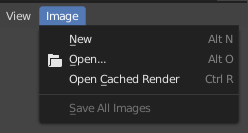
Image menu in the Header of the Image editor.

Popup menus list Operadores which can be executed by selecting with LMB or using the generated shortcut indicated by the underlined character of the operator name. All menu entries show any relevant shortcut keys, which can be executed without opening the menu.

All popup menus can be searched by pressing Spacebar and typing the name of the operator in the menu. If a popup menu has «Search» as one of the items, the menu can be searched without having to press Spacebar first.

All popup menus of an editor can be searched using the Menu Search feature.

Encolhendo menus

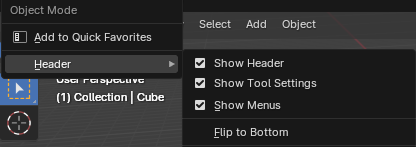
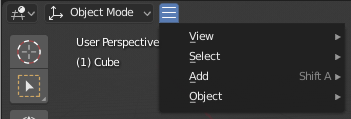
Sometimes it’s helpful to gain some extra horizontal space in the header by collapsing menus. This can be accessed from the header context menu: click RMB on the header and uncheck the Show Menus checkbox.
../../../_images/interface_controls_buttons_menu_header_uncheck_show_menus_checkbox.png

Clique com o botão direito em quaisquer dos menus de cabeçalho.

../../../_images/interface_controls_buttons_menus_header-menu-collapsed.png

Acesse o menu a partir do ícone encolhido.

Menus de seleção

../../../_images/interface_controls_buttons_menus_select-menu.png

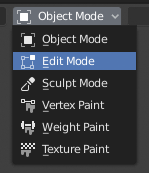
O menu de seleção do modo Viewport 3D.

A Select Menu (or «selector») allows you to choose from a predefined list of options. It appears as a text label and/or icon with a down arrow on the right.

Click with LMB to open the menu and choose an option. The selected option will then appear inside the button. You can also cycle through options without opening the menu by scrolling on top of the button with Ctrl-Wheel.

Expanded View

../../../_images/interface_controls_buttons_buttons_radio.png

Expanded menu view.

Some select menus use an expanded layout to show all available options at once. In this view, the active option is highlighted with a colored background.

In certain cases, you can select multiple options by holding Shift and clicking with LMB.

Popover Menus
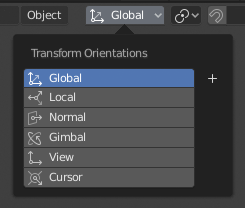
../../../_images/interface_controls_buttons_menus_popup-menu.png

The Transform Orientations popover menu.

Popover menus are similar to Select Menus, but can show more varied content such as a title, buttons, sliders, etc.

Context Menu

Context menus are pop-ups that can be opened with RMB. In most editors, it’s also possible to use the Menu key. The contents of the menu depend on the location of the mouse pointer.

When invoked in an editor, the menu contains a list of operators sensitive to the editor’s mode. When invoked over buttons and properties, common options include:

Único

Apply the change to a single value of a set (e.g. only the X coordinate of an object’s Location).

Todos

Apply the change to all values in a set (e.g. all coordinates of an object’s Location).

Reset to Default Value(s) Backspace

Replaces the current value by the default.

Copy Data Path Shift-Ctrl-C

Copies the Python property data path, relative to the data-block. Useful for Python scripting.

Copy Full Data Path Shift-Ctrl-Alt-C

Copies the full Python property data path including any needed context information.

Copy As New Driver

Creates a new driver using this property as input, and copies it to the clipboard. Use Paste Driver to add the driver to a different property, or Paste Driver Variables to extend an existing driver with a new input variable.

Copiar para selecionados

Copies the property value to the selected object’s corresponding property. A use case is if the Properties context is pinned.

Atribuir Atalho

Lets you define a keyboard or mouse shortcut for an operation. To define the shortcut you must first move the mouse cursor over the button that pops up. When «Press a key» appears you must press and/or click the desired shortcut. Press Esc to cancel.

Veja também

Keymap.

Alterar atalho

Permite que você redefina o atalho.

Remover atalho

Desvincula o atalho existente.

Open File Location, Open Location Externally

Opens the containing folder using the operating system’s file manager.

Online Manual F1

Opens an online page of the Blender Manual in a web browser.

Referência de Python na internet

Context-sensitive access to the Python API Reference.

Editar fontes

Para desenvolvimento da interface de usuário – Cria um bloco de dados de texto com o código fonte associado com o controle, neste caso o controle sendo embasado em um script Python. No editor de texto, ele aponta para a linha de código em que o elemento está definido.

Editar tradução (uso pessoal)

Para desenvolvimento da interface de usuário – Aponta para a linha de código de tradução. (Caso um erro de tradução seja encontrado, sugerimos que procure o mantenedor da tradução, para que os consertos sejam aplicados aos lançamentos futuros do Blender.)

Menus setorizados

A pie menu is a menu whose items are spread radially around the mouse.
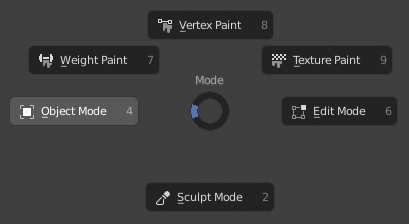
../../../_images/interface_controls_buttons_menus_pie-menu.png

O menu do modo Viewport 3D redondo tipo torta.

Dica

The fastest way to operate a Pie menu is to press down the key(s) that invoke the menu, move the mouse slightly towards a selection, and release the key(s) to activate the selection.

Releasing the key without moving the mouse will keep the menu open so you can click the desired item. If you do move the mouse before releasing, the item closest to the mouse will be activated instantly.

An open disc widget at the center of the pie menu shows the current direction of the pie menu. The selected item is also highlighted. A pie menu will only have a valid direction for item selection if the mouse is touching or extending beyond the disc widget at the center of the menu.

Pie menu items support key accelerators, which are the letters underlined on each menu item. Number keys can also be used.

Se houver sub menus redondos do tipo torta disponíveis, ele é indicado por um ícone de mais(+).

Veja também

Pie menu settings.

Next
Eyedropper
Previous
Input Fields
Copyright © : This page is licensed under a CC-BY-SA 4.0 Int. License
Made with Furo
Last updated on 2026-06-04
  • Ver Fonte
  • Ver Tradução
  • Reportar problema nesta página
On this page
  • Menus
    • Popup Menus
      • Encolhendo menus
    • Menus de seleção
      • Expanded View
    • Popover Menus
    • Context Menu
    • Menus setorizados