Introdução
Referência
- Menu:
- Atalho:
Ctrl-Comma
This chapter explains how to change Blender’s default configuration with the Preferences editor.
The Blender Preferences contains settings to control how Blender behaves. At the left of the editor, the available options are grouped into sections. A search field above the section list allows filtering preferences by name.
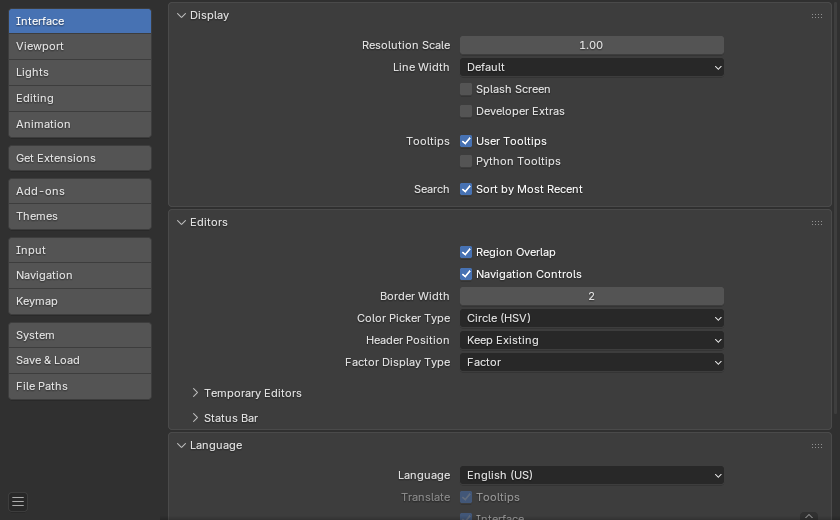
Blender Preferences window.
Managing Preferences
Default preferences are managed from the menu in the preferences window.
The following items are available in this menu:
- Auto-Save Preferences
By default changes to preferences are saved on exit, this allows changes to the keymap and Quick Favorites menu to be stored and used between Blender Sessions.
When disabled, a Save Preferences button is shown to manually perform the operation.
- Revert to Saved Preferences
Undoes any unsaved modifications, loading the previously saved state.
- Load Factory Preferences
Completely undo all the modifications made to the preferences, resetting to the state used before making customizations.
Nota
After running Load Factory Preferences, auto-save will be disabled for the current session.
This allows you to switch back to the factory settings for testing or following tutorials for example, without the risk of accidentally auto-saving over the preferences you have manually configured.
If you wish to save these as your preferences, run Save Preferences manually.
Nota
This only resets the preferences and will not affect settings stored in the startup file. This includes app templates, area locations, and any Blender properties not part of the preferences.
These must be reverted through .
Searching Preferences
The search field at the top of the Preferences editor filters sections and panels based on the entered text.
Matching categories and panel headers are highlighted, this makes it easy to locate specific settings in large sections.
Ctrl-F focuses the search field.
Alt-F clears the search text.
Nota
The Extensions and Add-ons sections are excluded from this filter, as they provide their own search functionality.
Dica
Pode ser de grande valia, salvar uma cópia de segurança de suas preferências para o caso de você haver perdido as suas configurações.
See the directory layout section to see where your preferences are stored.