Thanh Bên (Sidebar)
Góc Nhìn (View)
Tham Chiếu [Reference]
- Panel (Bảng):
Phông Nền (Backdrop)
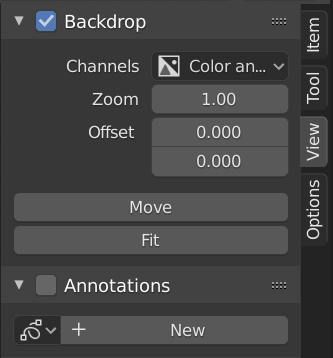
Backdrop panel.
The backdrop displays the output of a Viewer node behind the node editor in the Compositor. For example, pressing Shift-Ctrl-LMB on an Image node displays a preview of the image, while pressing it on a Mix node shows the result of the mixing operation.
The backdrop can be toggled by enabling the checkbox in the Backdrop panel header or by clicking the Backdrop button in the Compositor header.
The backdrop is useful for visually evaluating node results while editing, allowing direct comparison between the node graph and its output.
- Kênh (Channels)
Specifies which color channels of the backdrop image are displayed.
- Zoom Alt-V, V
Adjusts the display size of the backdrop image.
- Dịch Chuyển X, Y (Offset X, Y)
Offsets the backdrop image in screen space.
- Di Chuyển Alt-NCG (MMB) (Move Alt-MMB)
Interactively moves the backdrop image.
- Khít Vừa (Fit)
Scales the backdrop image to fit the Compositor view.
Các Tùy Chọn (Options)
Tham Chiếu [Reference]
- Panel (Bảng):
Hiệu Suất Thi Hành (Performance)
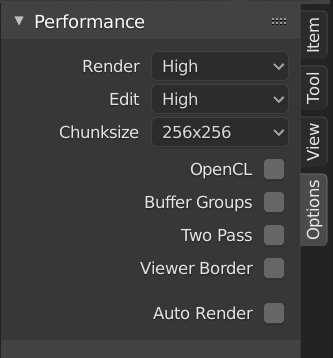
Bảng Hiệu Suất Hoạt Động.
This panel helps you tweak the performance of the Compositor.
- Thiết Bị [Device]
The thiết bị used cho/đối với tổng hợp.
- CPU [CENTRAL PROCESSING UNIT: BỘ XỬ LÝ TRUNG TÂM của MÁY TÍNH]:
Sử dụng the CPU cho/đối với Tổng Hợp.
- GPU:
Sử dụng the GPU cho/đối với Tổng Hợp.
- Precision GPU
The precision of compositor intermediate result.
- Tự Động (Auto):
Use full precision for final renders, half precision otherwise.
- Toàn Phần (Full):
Use full precision for final renders and viewport.