Nút hình ảnh (Image Node)
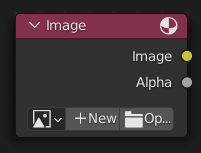
Nút "Hình Ảnh" sẽ chuyển tải bất kỳ hình ảnh nào trong định dạng mà Blender hỗ trợ (format that is supported by Blender).
Đầu Vào (Inputs)
Nút này không có ổ cắm đầu vào.
Tính Chất [Properties]
- Hình Ảnh (Image)
Lựa chọn các loại phương tiện truyền thông khác nhau. Để biết về các điều khiển, xin xem mục Trình Đơn Khối Dữ Liệu (Data-Block Menu). Để biết thêm về các tùy chọn, xin xem mục Các Sắp Đặt về Hình Ảnh (Image Settings).
- Nguồn (Source)
Thể Loại hình ảnh (Đơn Hình Ảnh). Xin Xem Các Sắp Đặt về Hình Ảnh (Image Settings).
- Số/Khung Hình (Frames)
How many frames of the Movie-type image (video) to play. Past this point, the video will be paused (unless Cyclic is enabled).
If you want to play the whole video, you can click Match Movie Length in the Image Editor's Sidebar, then copy the Frames from there to the node.
- Khung Hình Đầu [Start Frame]
Scene frame at which the video should start playing.
- Dịch Chuyển (Offset)
Number of frames to offset the video to an earlier point in time. (Put differently: how many frames at the start of the video to skip.)
Gợi ý
Blender plays video textures at the scene frame rate, not their original frame rate, meaning they'll be faster or slower than intended if these frame rates don't match up. You can put a Driver on the Offset to work around this. Simply type the following into the field, replacing StartFrame, VideoFrameRate and SceneFrameRate by their respective numbers:
#(frame - StartFrame) * (VideoFrameRate - SceneFrameRate) / SceneFrameRate
- Cyclic (Tuần Hoàn)
Khởi/Đầu đè lên trên sau the khung hình cuối tới kiến tạo một continuous tuần hoàn.
- Auto-Refresh
Update the video texture in the 3D Viewport when moving through the timeline.
- Color Space (Không Gian Màu Sắc)
The Color Space the image file was saved in. See Image Settings for details.
- Độ Đục (Alpha)
How the image uses its Alpha Channel. See Image Settings for details.
Đầu Ra (Outputs)
Hai ổ cắm đầu tiên là tối thiểu.
- Hình Ảnh (Image)
Đầu ra màu sắc chuẩn.
- Độ Đục (Alpha)
Giá trị Alpha riêng biệt.
Ghi chú
Định Dạng Đa Tầng Lớp
Khi định dạng tập tin đa tầng lớp, như EXR, được nạp vào, mỗi tầng lớp sẽ được biến thành một ổ cắm.