Trình Tổng Hợp (Compositor)
The Compositor lets you manage nodes for compositing.
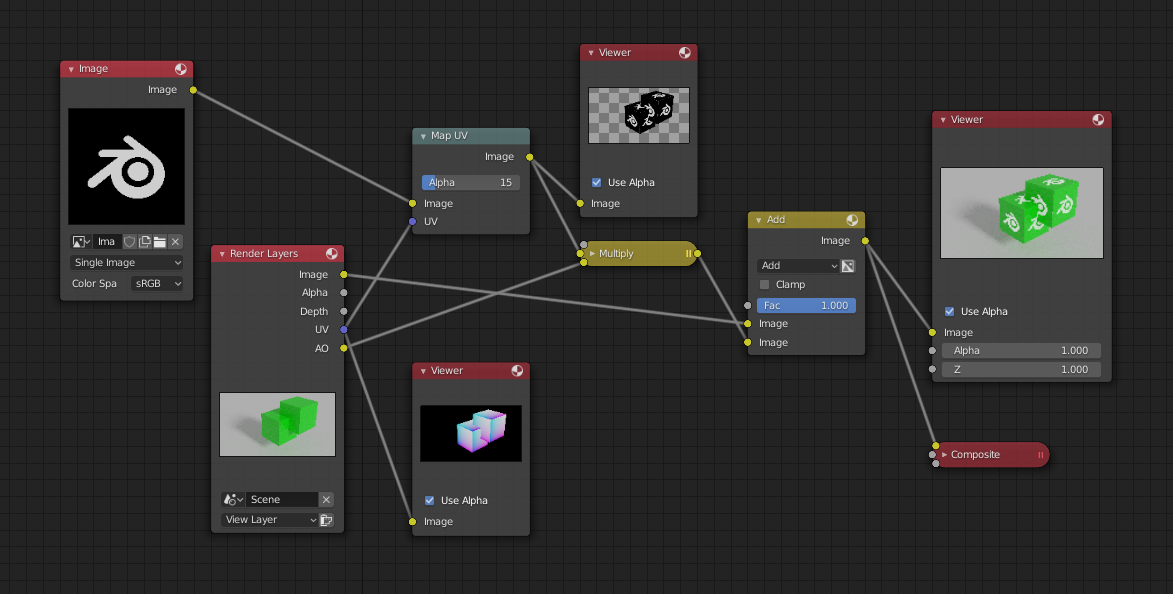
Các nút trong Trình Tổng Hợp.
Việc sử dụng Trình Tổng Hợp được giải thích trong Tổng Hợp [Compositing].
Giao Diện [Interface]
Tiêu Đề (Header)
- Node Tree
Chooses which node group (compositor node tree) to display and edit. Each Scene can have its own compositor node tree. You can also create and switch to custom node groups for reuse.
- Pinned
When enabled, the editor always displays the selected node tree, regardless of the active scene. This is useful when working with multiple scenes but wanting to keep the compositor focused on one node tree.
Gizmos
Controls the display of gizmos in the Compositor.
Clicking (Show Gizmos) toggles all gizmos in the Compositor The drop-down button displays a popover with more detailed settings, which are described below.
Gizmos của Cổng Nhìn (Viewport Gizmos)
- Active Node
Display interactive gizmos for the active node, allowing supported properties to be adjusted directly in the Node Editor.
See Node Gizmos for more information.
Giá Kệ để Tài Sản
The Asset Shelf provides quick access to compositor node assets, allowing users to drag and drop predefined node setups directly into the compositor workspace. Any node group marked as an asset will appear here automatically.
Located at the bottom of the editor, the shelf offers a compact and easily accessible interface for inserting and organizing compositor assets. Compared to the Asset Browser, it integrates more seamlessly into the compositing workflow and can be shown or hidden as needed.
The Asset Shelf helps users:
Quickly build node setups using reusable assets.
Explore common compositing techniques and effects.
Work entirely within Blender for post-processing.
The Asset Shelf can be toggled on or off from the compositor editor's header.