Tune Image Node
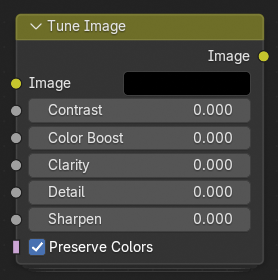
The Tune Image node provides a quick and intuitive way to enhance an image's overall appearance by adjusting key visual parameters such as contrast, clarity, and sharpness. It is designed as a compact, all-in-one correction tool for fine-tuning rendered or composited images without requiring multiple separate nodes.
Đầu Vào (Inputs)
- Hình Ảnh (Image)
Standard color input image.
- Độ/Tương Phản (Contrast)
Adjusts the difference between light and dark areas. Increasing contrast deepens shadows and brightens highlights, while decreasing it flattens the image's tonal range.
- Color Boost
Enhances the intensity of colors without oversaturating them. Useful for enriching dull or washed-out images.
- Clarity
Emphasizes midtone contrast and local details, improving the sense of depth and definition.
- Chi Tiết (Detail)
Adjusts the visibility of small-scale texture information. Higher values bring out fine details; lower values smooth them.
- Làm Sắc Nét (Sharpen)
Increases edge definition by enhancing high-frequency detail. Useful for counteracting blur from downsampling or lens effects.
- Preserve Colors
Maintains natural color balance when applying tonal adjustments. When disabled, contrast and clarity may shift the color hue or saturation.
Đầu Ra (Outputs)
- Hình Ảnh (Image)
The adjusted image with the applied tuning enhancements.