Sepia Node
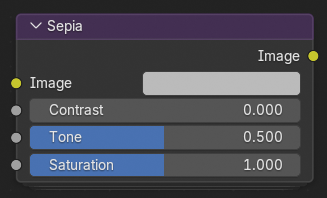
Sepia applies a warm, brownish color tint to the image, emulating the look of vintage photographs or old film prints. It can be used to create nostalgic, cinematic, or stylized color grades that mimic chemical sepia toning processes used in traditional photography.
Đầu Vào (Inputs)
- Hình Ảnh (Image)
Standard color input image.
- Độ/Tương Phản (Contrast)
Adjusts the tonal contrast of the sepia effect. Higher values produce deeper shadows and brighter highlights, enhancing the image's dynamic range.
- Tone
Controls the hue of the sepia tint. Lower values shift the tone toward reddish-brown, while higher values create a more yellow or golden sepia appearance.
- Saturation (Độ Bão Hòa)
Controls the intensity of the sepia color. A value of 0 results in a purely monochrome look, while higher values yield a richer, more pronounced color tint.
Đầu Ra (Outputs)
- Hình Ảnh (Image)
The input image with the sepia effect applied.