Vùng Nhắc Lại [Repeat Zone]
A Repeat Zone executes a set of nodes multiple times.

The zone consists of an input node on the left, an output node on the right, and an orange area in the middle for placing the nodes to repeat. When the zone executes for the first time, it evaluates its inputs and forwards them to its inner nodes. These inner nodes can then write to the output node for providing inputs to the next iteration, and for providing the result of the zone after the last iteration.
The nodes inside the zone can also take inputs from nodes outside the zone -- these inputs are then the same in every iteration. However, nodes inside the zone can't send their outputs to nodes outside the zone.
Đầu Vào (Inputs)
- Số Lần Lặp Lại (Iterations)
Number of times to execute the zone. The Iteration socket gives the index of the current iteration, starting from 0.
- Hình Học (Geometry)
Default geometry input. Further inputs can be added by connecting a node's output to the zone's blank input, or by using the Repeat Items list in the node's Properties panel.
The inputs can be renamed by clicking them with Ctrl-LMB in the zone itself or in the Repeat Items list. The latter also accepts double clicking.
Tính Chất (Properties)
Tham Chiếu [Reference]
- Trình Đơn [Menu]:
- Repeat Items
Bảng Liệt Kê (List View) for adding, removing, reordering, and renaming the inputs of the zone.
- Loại Ổ Cắm [Socket Type]
The data type of the selected input.
- Chỉ Số Thẩm Tra [Inspection Index]
The number of the iteration to show in socket inspection and in the Nút Quan Sát (Viewer Node).
Ví Dụ (Example)
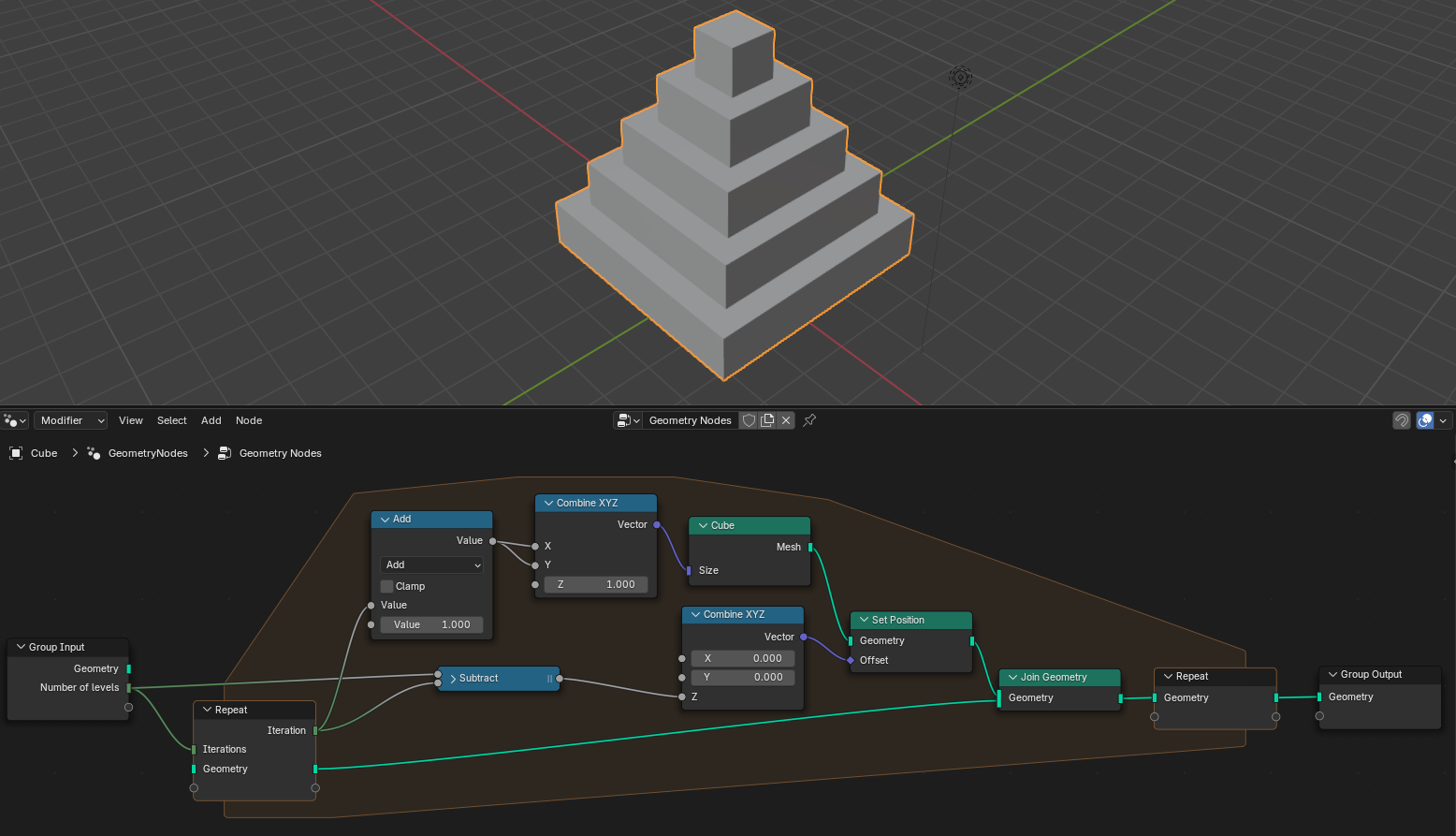
The above example generates a pyramid with a configurable number of levels. Each iteration creates a cube, brings it into position, and joins it with the result of the previous iteration.