Seleccionar bucles
Selección de bucles de bordes
Referencia
- Modo:
Modo Edición (modos de selección de vértices o bordes)
- Menú:
- Atajo:
Alt-LMB or Shift-Alt-LMB
Selecting an edge with Alt-LMB will also select the edges that are connected to it in a (topologically) straight line. Use Shift-Alt-LMB to add to the previous selection instead of replacing it.
The resulting chain of edges is called an edge loop in Blender terminology because it typically forms a closed loop around the mesh. However, as shown below, this doesn’t have to be the case.
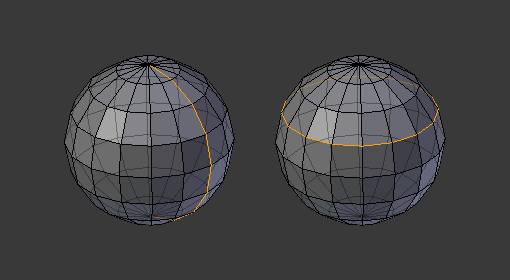
Selecting edge loops. The clicked edge is highlighted in green.
Consejo
Selecting edge loops by clicking edges is also possible in the Vertex selection mode.
Nota
When Emular ratón de 3 botones is enabled, the Alt-LMB shortcut won’t work because it serves as a replacement for MMB. To select edge loops in this case, double-click with LMB instead.
Todos los límites
Running the edge loop selection on a boundary edge twice will select the whole boundary.
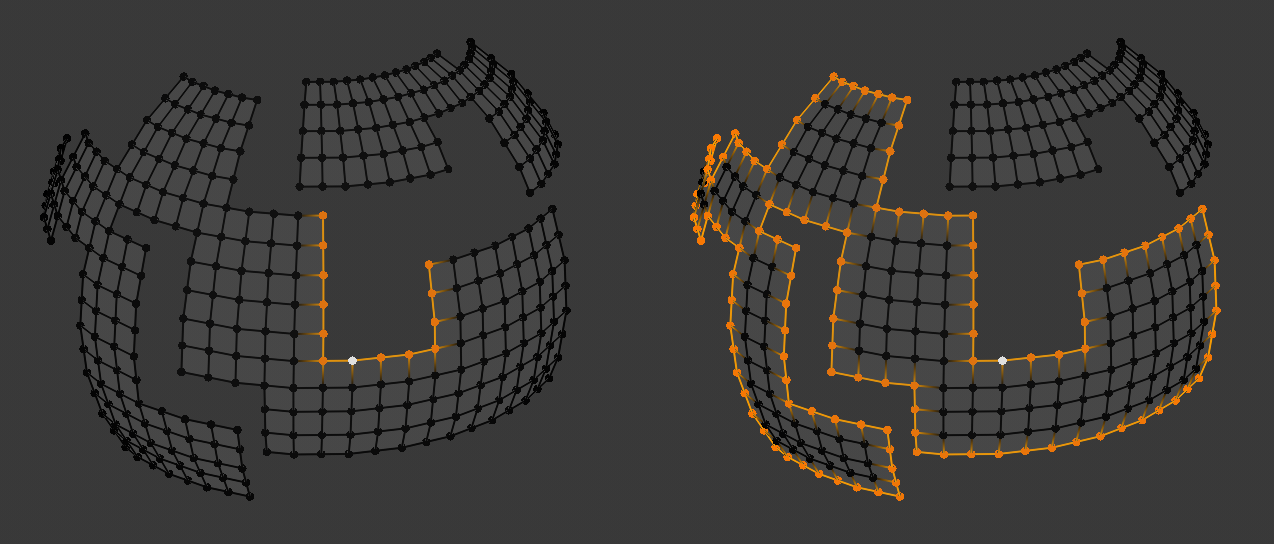
First and second edge loop selection.
See also Boundary of Selection.
Seleccionar bucles de caras
Referencia
- Modo:
Edit Mode (Face select mode)
- Atajo:
Alt-LMB or Shift-Alt-LMB
In Face selection mode, clicking an edge with Alt-LMB will select the row of faces that’s perpendicular to that edge. Use Shift-Alt-LMB to add to the previous selection instead of replacing it.
The resulting row of faces is called a face loop in Blender terminology because it typically forms a closed loop around the mesh. However, as shown below, this doesn’t have to be the case.
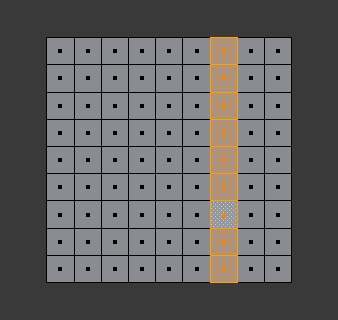
Selecting face loops. The clicked edge is highlighted in green.
In Vertex selection mode, the same can be achieved using Seleccionar anillos de bordes.
Nota
When Emular ratón de 3 botones is enabled, the Alt-LMB shortcut won’t work because it serves as a replacement for MMB. To select face loops in this case, double-click the edge with LMB instead.
Seleccionar anillos de bordes
Referencia
- Modo:
Modo Edición (modo de selección de Bordes)
- Menú:
- Atajo:
Ctrl-Alt-LMB or Shift-Ctrl-Alt-LMB
Selecting an edge with Ctrl-Alt-LMB will also select the parallel edges that lie in the face row perpendicular to the edge. Use Shift-Ctrl-Alt-LMB to add to the previous selection instead of replacing it.
The resulting set of edges is called an edge ring in Blender terminology because it typically forms a closed ring around the mesh. However, as shown below, this doesn’t have to be the case.
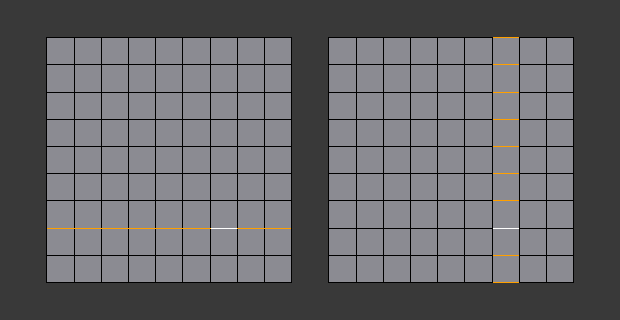
Selecting edge rings in Edge mode. The clicked edge is highlighted in green.
This shortcut also works in Vertex selection mode, but results in a face loop selection instead:

Selecting edge rings in Vertex mode.
Consejo
To convert an edge ring selection to a face loop, either switch to Vertex mode or switch to Face mode while holding Ctrl (see Expandir / contraer la selección).
Boundary Loops
Referencia
- Modo:
Edit Mode (Edge Select Mode)
- Menú:
Selects the entire boundary loop for each selected boundary edge.
A boundary edge is an edge connected to only one face. This operator expands the selection to include all connected boundary edges, forming one or more continuous loops.

Selecting Boundary Loops.
Nota
At least one boundary edge must be selected to start a boundary loop selection.
Opciones
- Extender
Adds the detected boundary loops to the existing selection instead of replacing it.
- Delimitar por
Restricts how far the boundary loop selection can propagate.
- Costura:
Stops the selection at edges marked as seams.
- Definido:
Stops the selection at edges marked as sharp.
- Enégonos:
Stops the selection when encountering faces with more than four sides.
- Inner Corners:
Stops at vertices connected to more than three edges.
- Outer Corners:
Stops at vertices connected to exactly two edges when those edges share a face that is not an n-gon.
Seleccionar región interior de un bucle
Referencia
- Modo:
Modo Edición (modo de selección de Bordes)
- Menú:
Selects all faces that are inside the selected, closed loop of edges. While it’s possible to use this operator in the Vertex and Face selection modes, results may be unexpected.
Note that if the selected edges do not form a closed loop, all connected faces will be selected.
Opciones
- Select Bigger
Select the faces outside the edge loop instead of those inside it.
Ejemplos
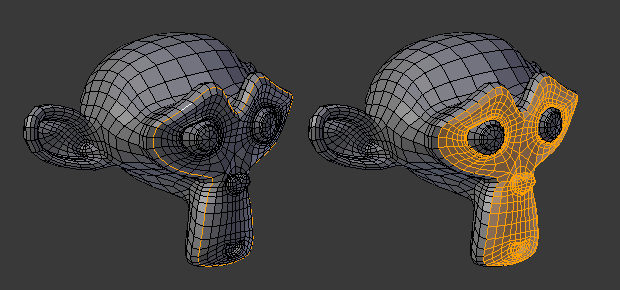
Single edge loop to region.
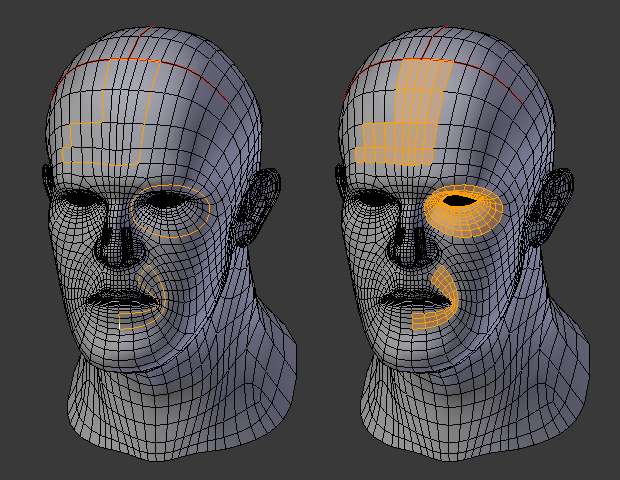
Multiple edge loops.
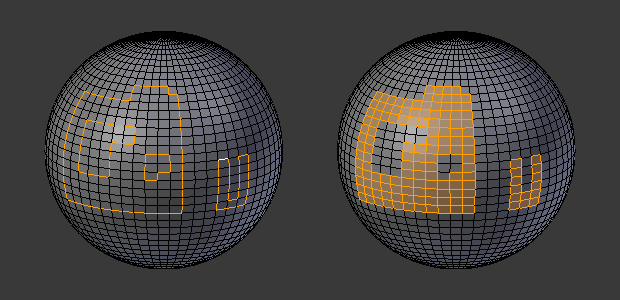
Holes are also supported.
Boundary of Selection
Referencia
- Modo:
Modo Edición
- Menú:
Replaces the current face selection by an edge selection going around the border of each face «island.» This is essentially the opposite of Seleccionar región interior de un bucle.
This operator can be run in any selection mode. When run in Face mode, it will automatically switch to Edge mode.
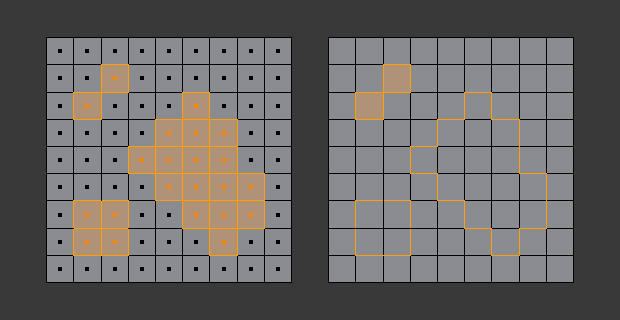
Before and after running Select Boundary Loop.