Restricción Limitar posición
The Limit Location constraint forces an object or bone to stay above a coordinate, below a coordinate, or between two coordinates along one or more axes.
Like other constraints, Limit Location only looks at the origin for objects; their geometry is not taken into account. This means that, if a cube’s origin is at its center and a Limit Location constraint is added for the coordinates of a floor plane, the cube will still be able to sink halfway into the plane.
Importante
This constraint has no effect on connected bones as their position is determined by their parent bone.
Ver también
Opciones
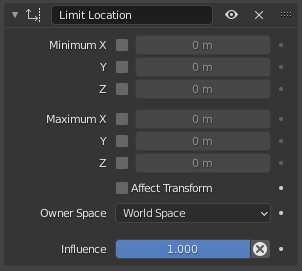
La restricción Limitar posición.
- Mínimo/Máximo X, Y, Z
The number fields determine the boundaries for each axis. The checkboxes determine whether each boundary applies.
Nota
If a Minimum is higher than the corresponding Maximum, the constraint uses the Maximum for both.
- Afectar transformaciones
When the owner is manually moved around, restrict not just its visual position but also its Location in the Editor de Propiedades’s Transform panel.
- Propietario
The space for determining and limiting the position of the owner.
- Influencia
How strongly the constraint affects the owner.