Intersect (Boolean)(交差(ブーリアン))
参照
- Mode(モード):
Edit Mode(編集モード)
- Menu(メニュー):
Performs Boolean operations between the selected and unselected geometry.
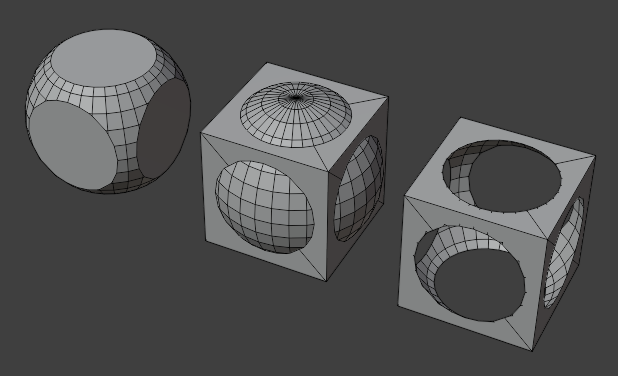
Selecting a sphere and performing an Intersection, Union, and Difference with a cube.
Tip
Hide geometry by pressing H to exclude it from the operation, then Alt-H afterwards to unhide it again.
参考
The Boolean(ブーリアン)モディファイアー can perform these same operations non-destructively between different mesh objects.
The Adjust Last Operation(最後の操作を調整) panel offers the following options:
- Boolean Operation(ブーリアン演算)
- Intersect(交差):
Only keep the volume that's inside both the selected and the unselected geometry.
- Union(合成):
Remove the interior faces between the selected and the unselected geometry.
- Difference(差分):
Cut the selected geometry out of the unselected geometry, then remove the selected geometry.
- Solver(ソルバー)
Algorithm used to perform the Boolean operation.
- Float:
Uses a simple solver which offers good performance but lacks support for overlapping geometry.
- Merge Threshold(マージのしきい値)
接触していると見なされる近接面の許容範囲。あるべき交差が検出されない場合や、辺がオーバーラップとして検出されないために余分なジオメトリが作成されている場合は、これを増やすと便利な場合があります。
警告
A threshold approaching the size of faces may cause very slow calculation. In general, keep this value small.
- Exact(正確):
Uses a complex solver which offers the best results and has full support for overlapping geometry, but is much slower.
- Swap(スワップ)
When using Difference, cut the unselected geometry out of the selected geometry instead of the other way around.
- Self Intersection(自分自身と交差)
Correctly handle self-intersection in the participating geometry, at the cost of performance.