Transform(トランスフォーム)
参照
- Mode(モード):
Object Mode(オブジェクトモード)
- Panel(パネル):
- Panel(パネル):
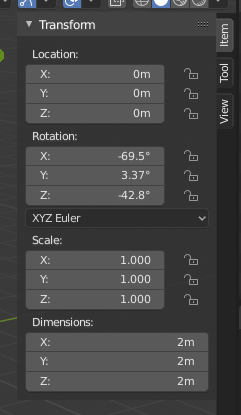
トランスフォーム プロパティ。
サイドバー領域の Transform(トランスフォーム) パネルを使用すると、 Object Mode(オブジェクト) で、オブジェクトの位置、回転、およびその他のプロパティを参照し、手動/数値で制御できます。各オブジェクトは、その位置、方向、およびスケール値を格納します。これらの値は、数値操作、リセット、または適用が必要になる場合があります。 Edit Mode(編集モード) では、主に、頂点の正確な座標、または頂点グループ(辺/面を含む)の中央を入力することを可能にします。Edit Mode(編集モード) の Transform(トランスフォーム) パネルに、オブジェクトのタイプごとに異なるオプションのセットがあります。 Modelingの章 のそれぞれの説明を参照してください。
このパネルを使用して、位置、回転、スケールなどのオブジェクトの変換プロパティを編集または表示します。これらのフィールドはオブジェクトの原点を変更し、そのすべての 頂点 と面のアスペクトに影響を与えます。
- Location(位置、場所)
ローカル座標でのオブジェクトの原点の位置。
- Rotation(回転)
グローバル軸とそれ自体の原点を基準にしたオブジェクトのローカル方向。
- Rotation Mode(回転モード)
回転を計算する方法、追加の情報は マニュアルの付録 にあります。
- Euler(オイラー):
The gizmo handles are aligned to the Euler axis, allowing you to see the discrete XYZ axis underlying the Euler rotation, as well as possible Gimbal Lock.
- Axis Angle(軸の角度):
X、Y、およびZ座標は、オブジェクトの原点を基準にした点を定義します。この点と原点は、回転を定義するW値の周りの軸を定義します。
- Quaternion(クォータニオン):
X、Y、Z、およびWの値は、 Quaternion (クォータニオン) コンポーネントに対応します。
- Scale(スケール)
ローカル軸に沿ったオブジェクトの相対スケール(例えば、Scale(スケール) X の値はローカルX軸に沿ったスケールを表します)。各オブジェクト(立方体、球など)は、作成されると、各ローカル方向に1単位のスケールを持ちます。オブジェクトを大きくしたり小さくしたりするには、目的の軸でオブジェクトをスケールします。
- Dimensions(寸法)
オブジェクトのバウンディングボックスのサイズ(ローカル軸に合わせて -- オブジェクトを入れるのに充分な大きさの段ボール箱を考えてください)。
- Transform(トランスフォーム) Properties(プロパティ) のロック
ロック切替えがロック状態の場合、対応する変換値はインタラクティブ操作で変更できません。ただし、対応する数値フィールドの編集やPythonの使用など、非対話型の操作を使用して値を変更することはできます。
例えば、Location(位置) X プロパティをロックした場合、3Dギズモを使用してオブジェクトをグローバルX軸に沿って移動することはできません。ただし、 Location(位置) X フィールドを使用して移動することはできます。ロック機能は、パネルからのみ変更可能な固定制限と考えてください。
プロパティをロックするには、ボタンの横にある南京錠のアイコンをクリックします。アイコンが開いた南京錠を示している場合はボタンのロックが解除され、アイコンが閉じた南京錠を示している場合はボタンがロックされます。
Delta Transforms(デルタトランスフォーム)
参照
- Mode(モード):
Object Mode(オブジェクトモード)
- Panel(パネル):
Delta Transforms(デルタトランスフォーム)は、上記の変換の上に適用される単純な変換です。デルタトランスフォームは、アニメーションで特に役立ちます。たとえば、プライマリ変換を使用してオブジェクトをアニメーション化し、そして、デルタトランスフォームを使用してオブジェクトを移動できます。
Parent Inverse Transform
参照
- Mode(モード):
Object Mode(オブジェクトモード)
- Panel(パネル):
- Context:
Available when the selected object is parented by another object.
The Parent Inverse transform defines how the child object's local space is offset relative to its parent. It ensures that when parenting is created, the child keeps its current world position, even though it now inherits transforms from the parent.
The matrix is displayed decomposed into Location, Rotation, and Scale values. These represent the offset needed to maintain the child's position relative to its parent. The values are read-only and shown for inspection only.
The Rotation Mode determines how the rotation component is displayed, and can be switched between systems such as XYZ Euler, Axis Angle, or Quaternion. This behaves identically to the Rotation Mode(回転モード) selector used in the main transform panel.
Clear Parent Inverse Transform
Clears the Parent Inverse matrix from the selected objects. With an empty matrix, the location, rotation, and scale properties of the children are interpreted directly in the coordinate space of the parent.
This effectively makes the child's transforms relative to the parent's origin, potentially moving the object in world space.
See Clear Parent(親子関係をクリア) for additional methods to clear or manage parent-child relationships.