Active Spline(アクティブスプライン)
参照
- Editor(エディター):
3D Viewport(3Dビューポート)
- Mode(モード):
Edit Mode(編集モード)
- Panel(パネル):
The Active Spline panel contains the properties of the active surface.
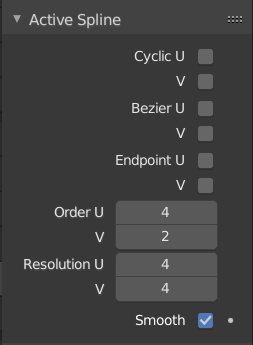
Active Spline(アクティブスプライン) パネル。
- Cyclic U/V(ループU/V)
When enabled, the last row/column of the surface will be connected back to the first, creating a closed loop.
- Bézier U/V
When enabled, the surface will be generated as a series of Bézier splines instead of a NURBS curve in the row/column direction.
- Endpoint U/V(終点U/V)
Controls whether the surface touches the borders of its control point grid.
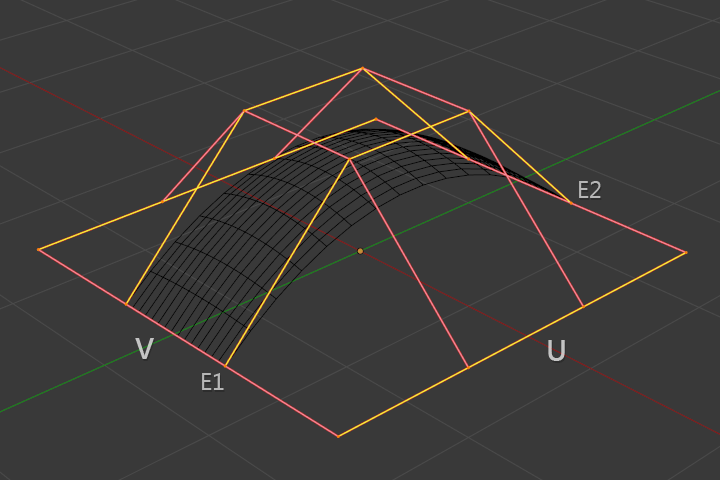
Surface with Endpoint U enabled.
- Order U/V(階数U/V)
A higher Order gives each control point a broader influence along its row/column. This makes the surface smoother, but also makes it follow the shape of the control grid less closely. See NURBS Curves Order.
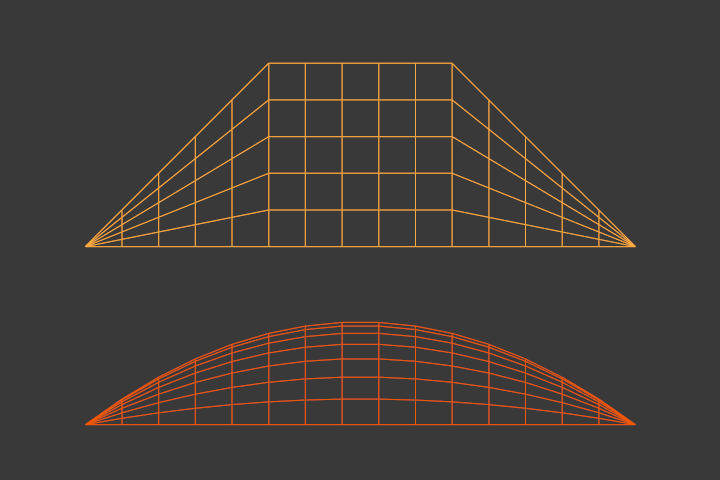
Surfaces with Order U set to 2 (top) and 4 (bottom).
If Bézier is enabled, Order determines the number of control points per spline.
The Order for a certain direction cannot be higher than the number of control points along that direction.
- Resolution U/V(解像度 U/V)
Determines the preview density of the generated surface mesh. The higher this number, the more vertices there will be and the smoother the surface will look.
This setting only affects the active surface. To change the resolution of all surfaces in the object, you can use the Resolution Preview U/V(プレビュー解像度 U/V) setting in the Shape panel instead.
If the Render U/V values in the Shape panel are nonzero, they will override these Resolution U/V values during rendering.
- Smooth(スムーズ)
Whether to apply smooth shading to the generated surface mesh.