Keying(キーイング)ノード
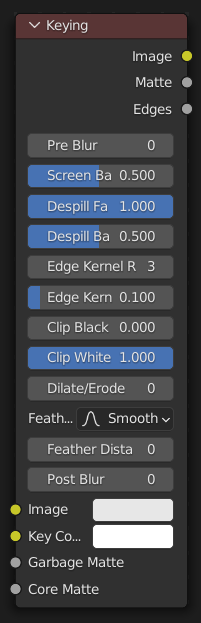
Keying(キーイング) ノードは、 "グリーンスクリーン" / "ブルースクリーン" を削除するためのワンストップショップです。背景を削除するためのクロマキーと、背景からの色かぶりを修正するためのスピル除去の両方を実行します。さらに、結果のマットを微調整するために使用される一般的な操作を実行できます。
入力
- Image(画像)
標準のカラー入力です。
- Key Color(キーカラー)
The color of content to be removed. This may be a single color, or a reference image such as generated by the Keying Screen Node.
Preprocess
- Blur Size
明度を損なわずに、指定された量の色のみをぼかすことにより、画像のカラーノイズの影響を減らします。これはマット計算にのみ影響し、結果画像には影響しません。
Key(キー)
- Balance
これは、キーカラーと比較したカラーチャンネル間のバランスです。0.5は、他のチャンネル(グリーンスクリーンの場合は赤と青)を平均化します。
これは、 Matte(マット) 出力をチェックしながら、 Clip Black(黒クリップ) と Clip White(白クリップ) と連携して微調整し、最適な分離のマスクを作成することができます。
Tweak(長押し)
- Black Level
This sets the threshold for what becomes fully transparent in the output (black in the matte). It should be set as low as possible. Uneven backdrops will require this value to be increased. Use of the Keying Screen Node can help keep this value low. You may also use a Garbage Matte to exclude problematic areas.
この値は、境界の詳細が保持されるように、境界として検出された領域には影響しません。
- White Level
This sets the threshold for what becomes fully opaque in the output (white in the matte). It should be set as high as possible. Colors close to green in the foreground may require reducing this value and/or adjusting the Screen Balance. Particularly problematic parts can be fixed with a Core Matte instead of a low Clip White.
この値は、境界の詳細が保持されるように、境界として検出された領域には影響しません。
Edges(辺)
- Size(サイズ)
エッジの検出に使用される半径をピクセル単位で定義します。
- Tolerance(許容範囲)
半径内のピクセルが現在のピクセルと同じであるかどうかを確認するために使用されるしきい値を定義します: ピクセルの色の差がこのしきい値よりも大きい場合、その点は境界と見なされます。
Tip
マットのエッジに問題がある場合は、フェザリングを調整する前に、 Edge Kernel(エッジカーネル) パラメーターの調整から始めると役立つ場合があります。検出されたエッジは、繊細なエッジの詳細を保持するために、 Clip Black(黒クリップ) / Clip White(白クリップ) のしきい値の対象ではありません。 Viewer(ビューアー)ノード を Edges(辺) 出力に接続することで、エッジ検出を確認できます。
Sharper detected edges (smaller Size, like 2 / larger Tolerance, like 0.4) will create a sharper matte, but may lose some detail like stray hairs. A sharp matte is good, but disappearing or flickering hairs are distracting.
Fat edges (larger Size, like 8 / smaller Tolerance, like 0.05) will capture more edge detail, but may also produce a halo around the subject. The halo can be adjusted with Feather controls along with Dilate/Erode.
Mask(マスク)
- Garbage Matte(ガーベジマット)
出力から常に 除外する 領域のオプションのマスク。これは、クロマキーで生成されたマットから削除されます。
- Core Matte(コアマット)
出力に常に 含める 領域のオプションのマスク。これは、クロマキーで生成されたマットとマージされます。
Postprocess
- Blur Size
背景への移行をスムーズにし、ノイズを低減するために、マットのシャープさを弱めます。
- Dilate Size
指定されたピクセル数だけマットを拡大(正の数)や縮小(負の数)します。これは、マットで Dilate/Erode(拡張/侵食)ノード を使用するのと似ています。
これは、特に Post Blur(ポストブラー) と組み合わせて、マットの境界に沿って多かれ少なかれ含めるための簡単な方法です。
- Feather Size
マットを内側(負の数)か外側(正の数)にどれだけフェザーするかを制御します。
- Feather Falloff(フェザー減衰タイプ)
境界の詳細を管理するための、フェザー時のマットの境界での減衰率です。
Despill
- Strength(強さ)
Controls how much color bleed from the key color is removed from the input image: 0 means no despilling, 1 means all possible spilling will be removed. The underlying implementation is the same as adjusting the Unspill amount of the Color Spill Node.
- Balance
This controls how the color channels are compared when computing spill, affecting the hue and shade of the corrected colors. It is similar to setting the Limiting Channel in the Color Spill Node.
出力
- Image(画像)
画像の Alpha Channel(アルファチャンネル) に Matte(マット) を適用して処理された画像。
- Matte(マット)
Output matte to use for checking the quality of the key, or to manually apply using a Set Alpha Node or Mix Node.
- Edges(辺)
Shows what edges were detected on the matte. Useful for adjusting the Edge Size and Tolerance.