Displace(ディスプレイス)ノード
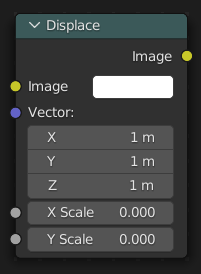
Displace(ディスプレイス)ノード は、入力ベクトルに基づいてピクセル位置を移します。
このノードは、熱風の歪み、不均一なガラスの屈折などの現象をモデル化するため、またはシュールなビデオエフェクトのために使用できます。
入力
- Image(画像)
標準のカラー入力です。
- Displacement
Input of the displacement map. If the input is color it's implicitly converted in the vector input, the first channel (red) value determines displacement along X axis. The second channel (green) the displacement along Y axis. If the input is a grayscale image, where both the channel values are equal, the input image will be displaced equally in both X and Y directions.
Sampling(サンプリング)
- Interpolation(補間)
Determines how pixel values are interpolated when scaling or transforming images.
- Nearest(最も近い):
Uses the value of the closest pixel with no smoothing. This is the fastest method and is well-suited for pixel art or low-resolution images where sharp, blocky edges are desirable. In animations, motion appears in single-pixel steps, which can cause visible jittering.
- Bilinear(バイリニア):
Averages the values of surrounding pixels to create a smoother result than Nearest. Provides a good balance between performance and visual quality.
- Bicubic(バイキューブ):
Computes a weighted average of a larger neighborhood of pixels for even smoother results. Ideal for photographic images or gradients where preserving fine detail is important.
- Anisotropic:
Adjusts interpolation based on the direction and scale of the transformation. Helps reduce blurring or aliasing when scaling at steep angles or uneven resolutions, especially useful in textures viewed at oblique angles or in detailed 3D projections.
- Extension X/Y
The extension mode applied to the X axis.
- Clip(クリップ):
Areas outside of the image are filled with transparency.
- Extend(拡張):
Areas outside of the image are filled with the closest boundary pixel in the image.
- Repeat(リピート):
Areas outside of the image are filled with repetitions of the image.
注釈
This option is not available for the Anisotropic Interpolation mode.
出力
- Image(画像)
標準のカラー出力です。