Multiresolution(マルチレゾリューション)モディファイアー
The Multiresolution modifier (often shortened to "Multires") gives you the ability to subdivide a mesh similarly to the Subdivision Surface modifier, but also allows you to edit the new subdivision levels in Sculpt Mode.
注釈
Multiresolution is the only modifier that cannot be repositioned in the stack after any modifier that will change geometry or other object data (i.e. all Generate, some Modify and some Simulate modifiers cannot come before the Multiresolution).
Deform modifiers will be applied onto the Multires subdivision levels instead of the base mesh, if they come after the Multires.
Tip
This is especially useful for re-projecting details from another sculpt with a Shrinkwrap modifier. For the best result make sure to set the wrap method to Project, snap mode to Above Surface and enable Negative.
Options(オプション)
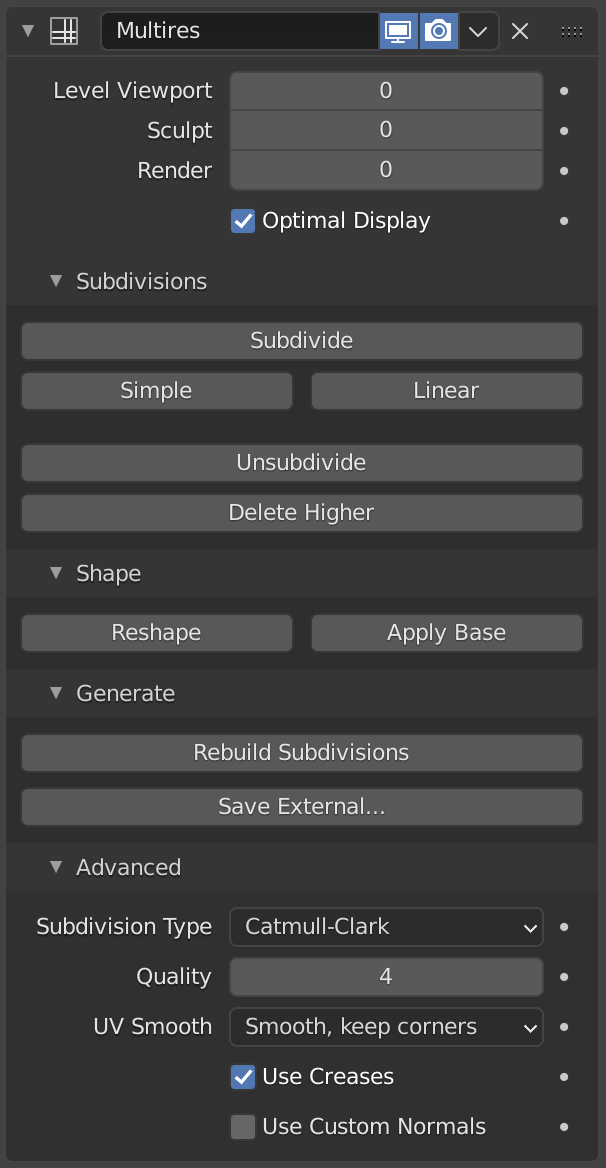
Multiresolution(マルチレゾリューション)モディファイアー。
- Levels Viewport(ビューポートのレベル数)
Set the level of subdivisions to show in the viewport.
- Sculpt(スカルプト)
Set the level of subdivisions to use specifically in Sculpt Mode. While in Sculpt mode use Alt-1 to decrease the level or Alt-2 to increase.
- Render(レンダー)
レンダリング時に表示するサブディビジョンのレベルを設定します。
- Sculpt Base Mesh(ベースメッシュをスカルプト)
Deform the unsubdivided base mesh instead of the higher levels. Meanwhile the set level will be previewed. This allows you to make much broader changes in visual context to higher sculpted details without creating surface noise and artifacts.
- Optimal Display(最適化表示)
Only display the edges of the original geometry. So when rendering the wireframe of this object, the wires of the subdivided edges will be skipped.
Subdivision(細分化)
- Subdivide(細分化)
Creates a smooth level of subdivision (using the default Catmull-Clark algorithm).
- Simple(シンプル)
Creates a level of subdivision with unsmoothed base mesh edges (using a simple interpolation by subdividing edges without any smoothing).
- Linear(リニア)
Creates a completely unsmoothed level of subdivision (using linear interpolation of the current sculpted displacement).
- Unsubdivide(細分化を復元)
現在のベースメッシュの下位サブディビジョンレベルを再構築します。
- Delete Higher(高いレベルを削除)
現在のサブディビジョンレベルよりも高いサブディビジョンレベルをすべて削除します。
Shape(シェイプ)
- Reshape(再形成)
Copy the shape of another object onto the multires levels by copying its vertex coordinates.
これを使用するには、最初にトポロジと頂点インデックスが一致する別のメッシュオブジェクトを選択し、次に頂点座標をコピーするオブジェクトを Shift 選択して、 Reshape(再形成) をクリックします。
- Apply Base(ベースに適用)
Modifies the original unsubdivided mesh to match the form of the subdivided mesh. This operation applies a heuristic to the base mesh vertices that assumes that a Subdivision Surface modifier will be added to the mesh.
- Conform Base
Modifies the original unsubdivided mesh to match the form of the subdivided mesh. The resulting positions of the base mesh vertices will match their subdivided positions.
Generate(生成)
- Rebuild Subdivisions(細分化を再生成)
Rebuilds all possible subdivisions levels to generate a lower resolution base mesh. This is used to create an optimized multiresolution version of a preexisting sculpt. This option is only available when no subdivision level have been created through the modifier.
- Save External(外部に保存)
変位を外部の
.btxファイルに保存します。
高度な設定
- Quality(品質)
頂点の(理論上の位置に対する)配置の正確さを低くして、高ポリメッシュで作業するときのパフォーマンスを向上させることができます。
- UV Smooth(UVスムーズ)
細分化中にUVを処理する方法。
- None(なし):
UVは変更されません。
- Keep Corners(コーナーを維持):
UVアイランドはスムージングされますが、境界は変更されません。
- Keep Corners, Junctions(コーナーと接点を維持):
UV がスムージングされ、不連続な境界のコーナーと、3つ以上の領域の接点がシャープなまま維持されます
- Keep Corners, Junctions, Concave(コーナー、接点、凹面を維持):
UV がスムージングされ、不連続な境界のコーナーと、3つ以上の領域の接点、ダーツと凹面のコーナーがシャープなまま維持されます
- Keep Boundaries(境界を維持):
UVがスムージングされ、境界がシャープに保たれます。
- All(全て):
UVとその境界はスムージングされます。
- Boundary Smooth(境界スムーズ)
開いた境界(およびコーナー)をスムージングする量をコントロールします。
- All(全て):
コーナーを含む境界をスムージングします。
- Keep Corners(コーナーを維持):
境界をスムージングしますが、コーナーはシャープなままにします。
- Use Creases(クリースを使用)
辺に保存されている 重み付けした辺クリース の値を使用して、辺の滑らかさを制御します。
- Use Custom Normals(カスタム法線を使用)
結果のメッシュの既存の カスタム分割法線 を補間します。
使用方法
Baking(ベイク)
Baking converts high-resolution geometry details, such as sculpted displacement or surface normals, into 2D texture maps. These maps can then be applied to a lower-resolution mesh to reproduce the appearance of fine surface detail without the performance cost of dense geometry.
This process is essential for workflows where high-resolution sculpting data is transferred to low-resolution meshes for rendering or game engines.
To generate a normal or displacement map, use the Bake from Multires option in the Render panel. This feature compares two resolution levels of the Multiresolution modifier:
Viewport Levels: Used as the low-resolution base mesh.
Render Levels: Used as the high-resolution detail mesh.
The difference between these two levels is baked into a texture map.
Bake Types
The Bake Type determines what kind of surface information is extracted from the Multiresolution modifier.
Normals: Bakes surface normal direction differences between the base and detailed levels. The resulting normal map encodes lighting information that reproduces fine sculpted detail in shading without modifying the actual geometry. Ideal for use with normal-mapped materials in Cycles, Eevee, and real-time engines.
Displacement: Bakes height differences between the base and high-resolution mesh as a grayscale image. Lighter areas represent raised regions and darker areas represent recessed areas. This map can be used for true displacement in render engines or for parallax/height-based shading.
Vector Displacement: Bakes 3D displacement vectors representing the full spatial offset from the base to the detailed surface. Unlike regular displacement, this method can capture overhangs and non-vertical displacements, providing a more accurate representation of complex sculpted details.
The resulting texture encodes XYZ displacement in the RGB color channels.
重要
To ensure a correct bake:
Set the Viewport Levels of the Multiresolution modifier to 0, so the base mesh is truly low-resolution.
Set the Render Levels to the highest sculpt level that contains the desired detail.
The object must have proper UV unwrapping and a selected Image Texture node in the Shader Editor to receive the baked map.
If the Viewport Level is higher than 0, part of the sculpted displacement will already be applied, resulting in incorrect bakes.
Tip
Use 16-bit or 32-bit image formats (e.g., OpenEXR or TIFF) for displacement or vector displacement maps to preserve precision.
Always verify that the image's color space is set to Non-Color in the Image Editor or Shader Editor.
参考
For more details on general baking settings and workflow, see Render Baking.