Ellipse Mask(楕円マスク)ノード
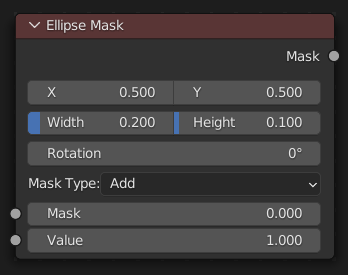
Ellipse Mask(楕円マスク) ノードは、単純なマットやビネットマスクとして使用するのに適した画像を作成します。
入力
- Operation(処理)
入力マスクに対して使用する操作。
- Add(追加):
これにより、入力マスクと生成されたマスクの 合成 が生成されます。生成されたマスクによってカバーされる領域は、指定された 値 に設定されます。入力マスクの他の部分は変更されずに通過するか、入力マスクがない場合は黒に設定されます。
- Subtract(減算):
入力マスクの値には、指定された 値 が差し引かれます。
- Multiply(乗算):
これにより、この生成されたマスクと入力マスクの 交差 が生成されます。入力マスクの値に、生成されたマスクでカバーされる領域に指定された 値 が乗算されます。他のすべての領域は黒になります。
- Not(否定):
入力マスクと生成されたマスクの両方で覆われている領域はすべて黒になります。生成されたマスクでカバーされ、入力マスク上で黒である領域は、指定された 値 になります。生成されたマスクによってカバーされていない領域は変更されません。
- Mask(マスク)
マスク操作のベースとして使用するオプションのマスク。
- Value(値)
生成されたマスクの強度。
- Position(位置)
全幅または全高さの一部としての楕円の中心の位置。(0.5, 0.5は中央に楕円を作成し、0.0, 0.0は中心が左下にある楕円を作成します。)
- Size(サイズ)
Width/Height of the ellipse as a fraction of the total image width, not height. Equal Width and Height values with produce a circle.
- Rotation(回転)
中央点を中心とした楕円の回転。
出力
- Mask(マスク)
生成された楕円形のマスクが入力マスクとマージされます。作成されたマスクは、現在のシーンのレンダー寸法のサイズです。
Tip
For soft edges, pass the output mask through a slight Blur node. For a vignette, pass the output of this through a heavy blur.
使用方法
The Ellipse Mask node supports an interactive gizmo in the node editor. To enable it, make sure Active Node gizmo is enabled, and select the Ellipse Mask node in the Compositor.
The gizmo allows direct manipulation of the mask shape:
Drag edges to adjust the width or height individually.
Drag corners to adjust width and height simultaneously.
Drag the center cross (X) to move the mask's position.
Drag the center dot to rotate the mask.
Hold Shift while dragging edges or corners to preserve the current aspect ratio.