Vertex Weight Proximity(頂点ウェイト(近傍))モディファイアー
このモディファイアーは、オブジェクト(またはその頂点)と別のターゲットオブジェクト(またはそのジオメトリ)の間の距離に基づいて、指定された頂点グループのウェイトを設定します。
警告
このモディファイアーは、標準(0.0〜1.0)の範囲のウェイト値の暗黙的なクランプを実行します。0.0未満の値はすべて0.0に設定され、1.0を超える値はすべて1.0に設定されます。
注釈
変更したウェイトは、Weight Paint Mode(ウェイトペイントモード)で表示できます。これは、編集している頂点グループの元のウェイトを表示したい場合は、 Vertex Weight Proximity(頂点ウェイト(近傍)) モディファイアーを無効にする必要があることも意味します。
Options(オプション)
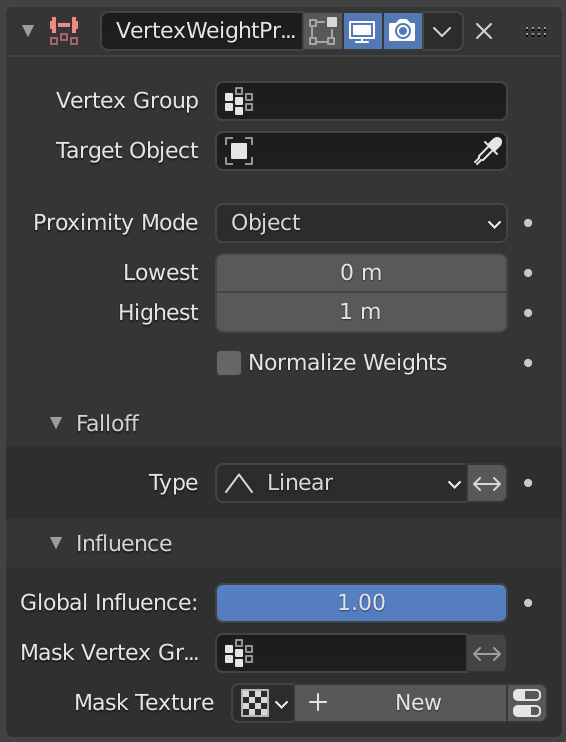
Vertex Weight Proximity(頂点ウェイト(近傍))モディファイアー
- Vertex Group(頂点グループ)
影響する頂点グループ。
- Target Object(ターゲットオブジェクト)
距離を計算するオブジェクト。
- Proximity Mode(近接モード)
Defines how distances are measured.
- Object(オブジェクト):
Uses the distance between the modified object origin and the target object origin.
All affected vertices receive the same weight value.
- Geometry(ジオメトリ):
Uses the distance between each vertex and the target object's geometry.
- Geometry Geometry Mode
Defines which geometric elements of the target object are used when computing distances.
- Vertex(頂点):
Uses the distance to the nearest vertex of the target object.
- Edge(辺):
Uses the distance to the nearest edge of the target object.
- Face(面):
Uses the distance to the nearest face of the target object.
注釈
When multiple geometry types are enabled, the shortest distance is used.
If the target object has no geometry, such as an empty or camera, the object origin is used instead.
- Lowest(最低)
Distance value mapped to a weight of
0.0.- Highest(最高)
Distance value mapped to a weight of
1.0.
Tip
マッピングを逆にするには、 Lowest(最低) を Highest(最高) より上に設定できます。
- Normalize Weights(ウェイトを正規化)
相対的なウェイトを維持するために頂点グループの重みをスケールしますが、最小値と最大値は完全な0〜1の範囲に従います。
Falloff(減衰)
- Type(タイプ)
Defines how distances are converted into weight values.
- Linear(リニア):
Uses a direct linear mapping.
- Custom Curve(カスタムカーブ):
Uses a user-defined curve for the mapping.
- Sharp(シャープ):
Creates a sharper transition.
- Smooth(スムーズ):
Creates a smoother transition.
- Root:
Biases the mapping toward higher values.
- Sphere(球):
Creates a rounded spherical-style falloff.
- Random(ランダム):
Assigns random weights to vertices.
- Median Step(中央値ごと):
Produces binary weights of either
0.0or1.0, using0.5as the threshold.
- Invert
減衰を反転します。
Influence(影響)
これらの設定は、3つの Vertex Weight(頂点ウェイト) モディファイアーで同じです。Vertex Weight Edit(頂点ウェイト編集)モディファイアー のページを参照してください。
例
この例は、ターゲットオブジェクトからの距離を使用して、変更された頂点グループで Wave(波) モディファイアーを動的に制御する方法を示しています。
The blend-file, TEST_1 scene.