Select More/Less(選択の拡大縮小)
選択を拡張
参照
- Mode(モード):
Edit Mode(編集モード)
- Menu(メニュー):
- ショートカットキー:
Ctrl-NumpadPlus
Grows the selection to include the elements at its border. Specifically, this adds the neighbors of the currently selected elements, with the type of those neighbors (vertices, edges, or faces) depending on the Selection Mode.
Options(オプション)
- Face Step(面をまたぐ)
Add whole neighboring faces even if they only share a single vertex.
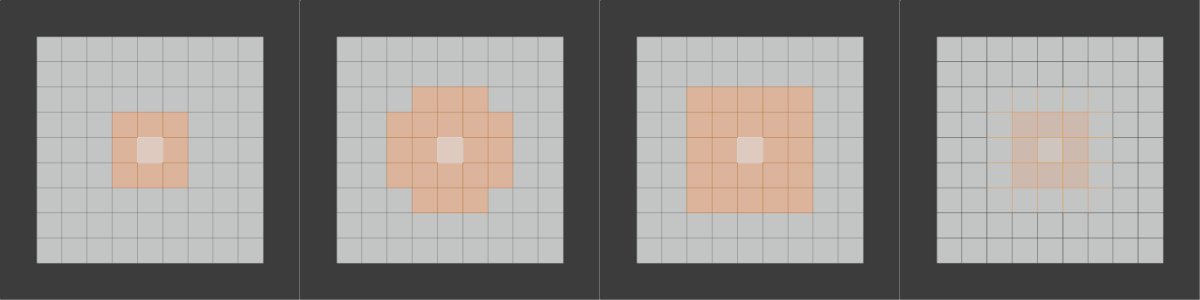
From left to right: initial selection -- Select More -- Face Step enabled
選択を縮小
参照
- Mode(モード):
Edit Mode(編集モード)
- Menu(メニュー):
- ショートカットキー:
Ctrl-NumpadMinus
Shrinks the selection to exclude the elements at its border. Specifically, this deselects elements that have any unselected neighbors, with the type of those neighbors (vertices, edges, or faces) depending on the Selection Mode.
Options(オプション)
- Face Step(面をまたぐ)
Deselect elements that share a vertex with an unselected face.
Select Next Active
参照
- Mode(モード):
Edit Mode(編集モード)
- Menu(メニュー):
- ショートカットキー:
Shift-Ctrl-NumpadPlus
Selects the element that "logically follows" the two most recently selected ones.
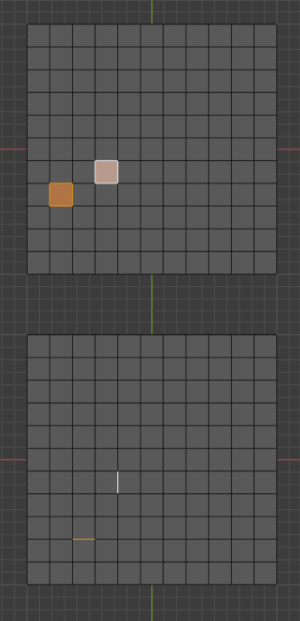
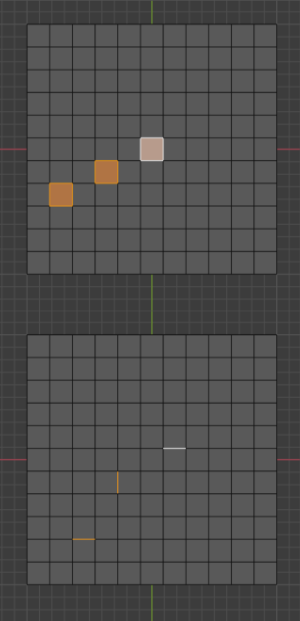
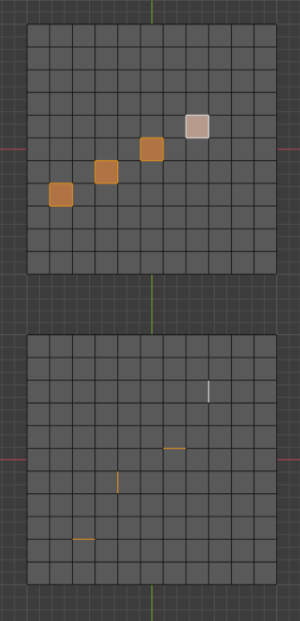
Select Previous Active
参照
- Mode(モード):
Edit Mode(編集モード)
- Menu(メニュー):
- ショートカットキー:
Shift-Ctrl-NumpadMinus
Deselects the last selected element and makes the next-to-last one active again.