Image(画像)ノード
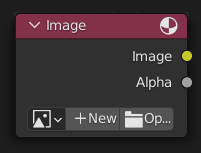
Image(画像) ノードは Blenderでサポートされているフォーマット の画像を注ぎ込みます。
入力
このノードには入力は有りません。
Properties(プロパティ)
- Image(画像)
さまざまな種類のメディアの選択。コントロールについては、 データブロックメニュー を参照してください。オプションについては、 画像の設定 を参照してください。
- Source(ソース)
Type of image (Single Image, Movie...). See 画像の設定.
- Frames(フレーム)
How many frames of the Movie-type image (video) to play. Past this point, the video will be paused (unless Cyclic is enabled).
If you want to play the whole video, you can click Match Movie Length in the Image Editor's Sidebar, then copy the Frames from there to the node.
- Start Frame(開始フレーム)
Scene frame at which the video should start playing.
- Offset(オフセット)
Number of frames to offset the video to an earlier point in time. (Put differently: how many frames at the start of the video to skip.)
ヒント
Blender plays video textures at the scene frame rate, not their original frame rate, meaning they'll be faster or slower than intended if these frame rates don't match up. You can put a Driver on the Offset to work around this. Simply type the following into the field, replacing StartFrame, VideoFrameRate and SceneFrameRate by their respective numbers:
#(frame - StartFrame) * (VideoFrameRate - SceneFrameRate) / SceneFrameRate
- Cyclic(ループ)
Start over after the last frame to create a continuous loop.
- Auto-Refresh
Update the video texture in the 3D Viewport when moving through the timeline.
- Color Space(色空間)
The Color Space the image file was saved in. See Image Settings for details.
- Alpha(アルファ)
How the image uses its Alpha Channel. See Image Settings for details.
出力
最初の2つのソケットは最小です。
- Image(画像)
標準のカラー出力です。
- Alpha(アルファ)
個別のアルファ値。
注釈
マルチレイヤーフォーマット
EXR のようなマルチレイヤーファイルフォーマットが読み込まれると、各レイヤーがソケットとして使用できるようになります。