はじめに
参照
- Menu(メニュー):
- ショートカットキー:
Ctrl-Comma
この章では、 Preferences(プリファレンス) エディタでBlenderのデフォルト設定を変更する方法について説明します。
The Blender Preferences contains settings to control how Blender behaves. At the left of the editor, the available options are grouped into sections. A search field above the section list allows filtering preferences by name.
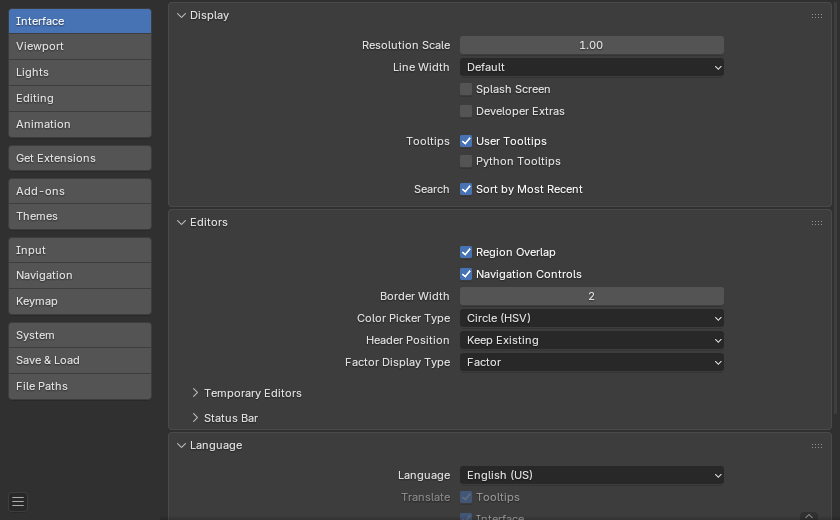
Blender Preferences(プリファレンス) ウィンドウ。
Preferences(プリファレンス) の管理
デフォルト設定は、 Preferences(プリファレンス) ウィンドウの メニューで管理されます。
このメニューでは、次のアイテムを使用できます。
- Auto-Save Preferences(プリファレンスを自動保存)
By default changes to preferences are saved on exit, this allows changes to the keymap and Quick Favorites menu to be stored and used between Blender Sessions.
無効にすると、手動で操作を実行するための Save Preferences(プリファレンスを保存) ボタンが表示されます。
- Revert to Saved Preferences(保存したプリファレンスに戻す)
保存されていない変更を元に戻し、以前に保存された状態をロードします。
- Load Factory Preferences(初期プリファレンスを読み込む)
preferences(プリファレンス)に加えられたすべての変更を完全に元に戻し、カスタマイズを行う前の状態にリセットします。
注釈
After running Load Factory Preferences, auto-save will be disabled for the current session.
これにより、手動で構成した Preferences(プリファレンス) を誤って自動保存するリスクなしに、テストやチュートリアルのフォローなどのために初期のPreferences(プリファレンス)に戻すことができます。
Preferences(プリファレンス)を保存する場合は、 Save Preferences(プリファレンスを保存) を手動で実行します。
注釈
この操作は Preferences(プリファレンス)をリセットするだけで、スタートアップファイルに保存されている設定には影響しません。スタートアップファイルには、アプリケーションテンプレート、エリアの位置、および、Preferences(プリファレンス)の一部ではないBlenderのプロパティが含まれます。
These must be reverted through .
Searching Preferences
The search field at the top of the Preferences editor filters sections and panels based on the entered text.
Matching categories and panel headers are highlighted, this makes it easy to locate specific settings in large sections.
Ctrl-F focuses the search field.
Alt-F clears the search text.
注釈
The Extensions and Add-ons sections are excluded from this filter, as they provide their own search functionality.
Tip
構成を失った場合に備えて、Preferences(プリファレンス) のバックアップを作成しておくとよいです。
Preferences(プリファレンス) が保存されている場所については、 directory layout のセクションを参照してください。