Displace Geometry Node
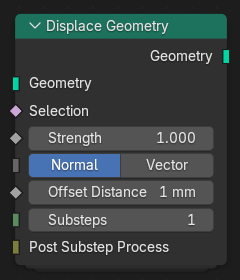
The Displace Geometry node moves geometry elements along a specified direction or vector, offsetting their positions to create deformations or surface displacements. It can be used to apply procedural surface detail, simulate wave-like motion, or modify shapes based on fields such as textures or vertex attributes.
入力
- Geometry(ジオメトリ)
The input geometry to displace.
- Selection(選択)
Determines which elements of the geometry are affected by the displacement. Unselected elements remain unchanged.
- Strength(強さ)
The distance to move each element along the chosen offset direction or vector.
- Offset Method
Determines how the displacement direction is defined.
- Normal(ノーマル):
Offsets elements along their surface normal direction.
- Vector(ベクトル):
Offsets elements according to a custom input vector.
- Offset Distance Normal
The displacement distance when using Normal mode.
- Offset Vector Vector
The displacement vector when using Vector mode. The vector is normalized internally unless otherwise specified.
- Substeps
The number of intermediate steps to divide the displacement into. Fields, including normal and position, are re-evaluated at each substep for more stable or accurate iterative results.
- Post Substep Process
A Node Closures that defines a geometry operation to apply after each substep of the displacement. This allows additional geometry processing to be performed during the iterative displacement.
The closure has the following parameters:
Geometry -- The geometry at the current substep.
Selection -- The selected elements at that stage.
Strength -- The displacement strength for the substep.
Substep Index -- The current substep iteration number.
出力
- Geometry(ジオメトリ)
The displaced geometry after applying the offset according to the specified method and parameters.