Geometry Input Node
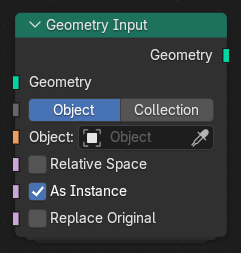
The Geometry Input node provides geometry from an external object, collection, or input connection to be used inside a node group. It is useful for referencing other geometry data or injecting custom geometry into a procedural setup.
入力
- Geometry(ジオメトリ)
The geometry input to the node group, used when the node is connected to another geometry socket.
- Input Type
Determines the source type of the geometry.
- Object(オブジェクト):
Uses a single object as the geometry source.
- Collection(コレクション):
Uses all objects within a collection as the geometry source.
- Object / Collection
Specifies the object or collection to use as the geometry input, depending on the selected Input Type.
- Relative Space
When enabled, the input geometry is transformed relative to the modifier or main geometry's local space, rather than using its original world-space transform.
- As Instance(インスタンスとして)
When enabled, the geometry is added as an instance instead of being merged into the main geometry. Some operations require realized (non-instance) geometry, so use this option accordingly.
- Replace Original(オリジナルを置換)
When enabled, the incoming geometry is replaced by the selected input geometry.
When disabled, the input geometry is added alongside the existing one.
出力
- Geometry(ジオメトリ)
The resulting geometry from the selected object, collection, or input connection.