Node Editors
ヘッダー
ヘッダー には、現在のノードツリータイプに一部基づいた、さまざまなメニューとボタン、およびオプションが含まれています。

一般的なノードエディタのヘッダーオプション。
- View(ビュー)
エディタの表示を変更します。
- Select(選択)
ノードまたはノードグループを選択します。
- Add(追加)
ノードを追加します。
- Node(ノード)
選択しているノードへの操作を行います。
- Pinned
When enabled, the editor always displays the currently selected node tree, regardless of changes in the active object or scene. This allows you to edit a material, texture, or compositor node tree independently of what is selected in the 3D Viewport or which scene is active. Useful when working across multiple objects or scenes but wanting to keep the editor focused on one specific node tree.
- Parent Node Tree(親ノードツリー)
Leaves the current node group and returns to the parent node group/tree.
- Snapping(スナップ)
Change options for snapping node positions to achieve a cleaner node tree layout. See ノードの配置.
Overlays(オーバーレイ)
オーバーレイは、ノードとノードツリーの上に表示される情報です。オーバーレイポップオーバーの横にあるノードエディタのすべてのオーバーレイを表示または非表示にするトグルがあります。
- Wire Colors(ワイヤカラー)
接続されているソケットに基づいてノードのリンクに色を付けます。
- Reroute Auto Labels
Label Reroute Nodes based on the label of connected reroute nodes.
- Context Path(コンテクストパス)
Display breadcrumbs in the upper left corner indicating the hierarchy location of the node tree/group that's currently being displayed.
- Annotations(アノテーション)
プレビュー領域に Annotations(アノテーション) を表示します。
- プレビュー
Display each node's Preview(プレビュー) if the node's preview is also toggled.
- Timings
Display each node's last execution time. This option is only available for compositing and geometry nodes.
In the context of geometry nodes, see ノードのタイミングのオーバーレイ表示.
- Render Region(レンダー領域)
Displays a border showing the final render region defined in the scene. Space outside the render region appear shaded for reference.
- Passepartout Alpha
Controls the opacity of the shaded area outside the render region. Higher values darken the outside area more, making the render region stand out.
Toolbar(ツールバー)
ツールバー には、ノードエディタで使用できる一連のツールが含まれています。
- Select(選択)
Select or move nodes and links.
- Select Box(ボックス選択)
Select nodes or links by dragging a box around them.
- Select Circle(サークル選択)
Select nodes or links by clicking or dragging with a circular brush.
- Select Lasso(投げ縄選択)
Select nodes or links by drawing a free-form lasso.
- Annotate(アノテート)
フリーハンドのアノテーションを描画します。
- Annotate Line(アノテートライン)
直線のアノテーションを描画します。
- Annotate Polygon(アノテートポリゴン)
ポリゴンのアノテーションを描画します。
- Annotate Eraser(アノテート消しゴム)
書いたアノテーションを消します。
- Link Cuts
Delete connections between nodes by drawing a line across the links. See Cut Links(リンクをカット) for more information.
- Mute Links(リンクをミュート)
Mute connections between nodes by drawing a line across the links. Muted links are kept in place but ignored in evaluation. See Mute Links(リンクをミュート) for more information.
- Add Reroute
Insert a Reroute(リルート) ノード point on links by drawing a line across them. Reroute nodes help organize complex node trees by redirecting connections.
Sidebar(サイドバー)
The Sidebar region contains properties for the currently selected node as well as node editor-specific settings.
Node(ノード)
参照
- Panel(パネル):
The Node tab in the Sidebar contains properties that control the behavior and appearance of the active node. Available options depend on the node type and the editor.
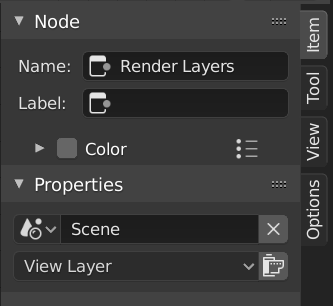
コンポジットレンダリングレイヤーノードが選択されたノードタブ。
Node(ノード)
- Name(名前)
A unique identifier for the node within its node tree. This name must be unique and is used internally for references.
- Label(ラベル)
A custom title displayed at the top of the node. Unlike the Name, this does not need to be unique and is useful for organizing complex node trees.
- Color(カラー)
By default, the node background color is defined by the current theme. Enable this option to override it with a custom color.
Custom colors can provide visual cues to distinguish related nodes or highlight important parts of a node tree.
The preset button next to the color field allows saving and reusing custom colors.
- Show Options
Shows or hides additional node-specific options in the node header, when available for that node type.
- Mute(無効化)
Temporarily disables the node without removing it. When possible, the node is bypassed and its inputs are passed directly to its outputs.
- Propagation Geometry Nodes
Controls which messages from this node are propagated to the parent node group or modifier.
- All Messages:
Propagate informational messages, warnings, and errors.
- Errors and Warnings:
Propagate only warnings and errors.
- Errors:
Propagate only error messages.
- None(なし):
Do not propagate any messages.
Properties(プロパティ)
表示されるプロパティは、選択したノードの種類により異なります。例えば、Mix(ミックス) ノードには Mask(マスク) ノードとは異なるプロパティがあります。
カスタムプロパティ
Create and manage your own properties to store data in the active node. See the Custom Properties page for more information.
Tool(ツール)
参照
- Panel(パネル):
Active Tool(アクティブツール)
このパネルの情報は、選択したツールにより変わります。
View(ビュー)
参照
- Panel(パネル):
Annotations(アノテーション)
ツールバーの Annotate(アノテート) ツールを選択して、ノードエディタでアノテーションを付けることができます。詳細については、 Annotate(アノテート) ツール を参照してください。
ノードの追加
参照
- Menu(メニュー):
- ショートカットキー:
Shift-A
Nodes are added via the Add menu in the editor's header or using a keyboard shortcut.
Nodes can also be added by dragging a connection from an existing node's input or output socket and dropping the connection above an empty space instead of connecting to another socket. This action will open a search menu with a list of compatible nodes and their sockets that can be added and connected to the existing node. Confirming the menu selection will add the node which can then be moved and placed.