Ограничитель «Трансформация» (transformation constraint)#
This constraint is more complex and versatile than the other «transform» constraints. It allows you to map one type of transform properties (i.e. location, rotation or scale) of the target, to the same or another type of transform properties of the owner, within a given range of values (which might be different for each target and owner property). You can also switch between axes, and use the range values not as limits, but rather as «markers» to define a mapping between input (target) and output (owner) values.
So, e.g. you can use the position of the target along the X axis to control the rotation of the owner around the Z axis, stating that 1 unit along the target X axis corresponds to 10 units around the owner Z axis. Typical uses for this include gears (see note below), and rotation based on location setups.
Опции (options)#
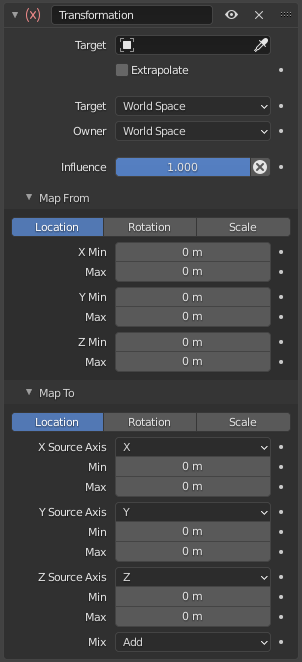
Панель ограничителя Transformation.#
- Цель (target)
Идентификатор данных используемый для выбора цели ограничителя, который в свою очередь не функционирует (красное состояние), пока цель не будет определена. Для получения дополнительной информации см. раздел по общим свойствам ограничителей.
- Экстраполировать (extrapolate)
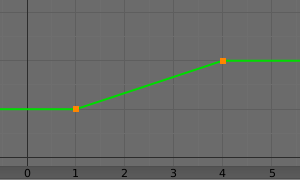
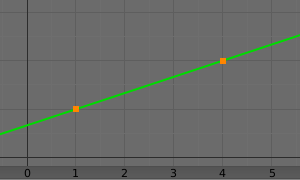
By default, the Min and Max values bound the input and output values; all values outside these ranges are clipped to them. When you enable this button, the Min and Max values are no longer strict limits, but rather «markers» defining a proportional (linear) mapping between input and corresponding output values. Let us illustrate that with two graphs Fig. The Extrapolate principles.. In these pictures, the input range (in abscissa) is set to (1.0 to 4.0), and its corresponding output range (in ordinate), to (1.0 to 2.0). The yellow curve represents the mapping between input and output.
- Цель/Владелец (target/owner)
Выбор пространства в котором будут производится расчёты. Для получения дополнительной информации см. раздел по общим свойствам ограничителей.
- Влияние (influence)
Управляет степенью влияния ограничителя на объект. Для получения дополнительной информации см. раздел по общим свойствам ограничителей.
Разметка от (map from)#
It contains the input (from target) settings.
- Положение, Вращение, Масштаб (location, rotation, scale)
The radio buttons allow you to select which type of property to use.
- Mode (Rotation)
Allows specifying the type of rotation input to use, including different Euler orders, Quaternion, and other Rotation Channel Modes. Defaults to using the Euler order of the constraint owner.
In the Quaternion mode the channels are converted to weighted angles in the same way as the swing angles of the Swing and X/Y/Z Twist modes.
- X/Y/Z - Мин., Макс. (X/Y/Z min, max)
Independently for each axis (X, Y, and Z) the min and max number fields control the lower and upper bounds of the input value range. Note that if a min value is higher than its corresponding max value, the constraint behaves as if it had the same value as the max one.
Разметка до (map to)#
It contains the output (to owner) settings.
- Положение, Вращение, Масштаб (location, rotation, scale)
The three radio buttons allow you to select which type of property to control.
- Order (Rotation)
For rotation, allows specifying which Euler order to use during evaluation of the constraint. Defaults to using the order of the constraint owner.
- Исходная ось X/Y/Z (X/Y/Z source axis)
The three axis selectors allow you to select which input axis to map to, respectively (from top to bottom), the X, Y and Z output (owner) axes.
- Минимум, Максимум (min, max)
The Min and Max number fields control the lower and upper bounds of the output value range, independently for each mapped axis. Note that if a min value is higher than its corresponding max value, the constraint behaves as if it had the same value as the max one.
- Смешать (mix)
Указывает, как результат ограничения будет комбинироваться с существующей трансформацией. Набор доступных вариантов варьируется в зависимости от типа трансформации.
- Заменить (replace)
Результат ограничения заменяет существующую трансформацию.
- Multiply (Scale)
Новые значения умножаются на существующие значения осей.
- Add (Location, Rotation)
Новые значения добавляются к существующим значениям осей.
- Before Original (Rotation)
Новое вращение добавляется перед существующим вращением, как если бы оно было применено к родительскому элементу владельца ограничителя.
- After Original (Rotation)
Новое вращение добавляется после существующего вращения, как если бы оно было применено к дочернему элементу владельца ограничителя.
Примечание
По историческим причинам режим „Mix“ по умолчанию имеет значение „Add“ для положения и вращения и „Replace“ для масштаба.
When using the rotation transform properties of the target as input, whatever the real values are, the constraint will always «take them back» into the (-180 to 180) range. E.g. if the target has a rotation of 420 degrees around its X axis, the values used as X input by the constraint will be:
\(((420 + 180) modulo 360) - 180 = 60 - ...\)
This is why this constraint is not really suited for gears!
Аналогично, при трансформации с использованием параметров масштаба цели в качестве входных данных, какими бы реальными ни были значения, – ограничитель всегда будет принимать их абсолютные значения (т.е. инвертировать отрицательные).
When a min value is higher than its corresponding max one, both are considered equal to the max one. This implies you cannot create «reversed» mappings…