Введение#
Renders can be separated into layers, to composite them back together afterwards.
Some example usages are applying compositing effects to characters separately, blurring the background and foreground layers separately for depth of field, or rendering different lighting variations of the same scene.
Using View Layers can also save you from having to re-render your entire image after each change, allowing you to instead re-render only the layer(s) that you have altered.
Слои визуализации (view layers)#

View Layers.#
In the top of the screen there is a list of all the View Layers in the active scene.
- Имя (name)
The name of the active view layer, click to edit the name.
- Добавить слой визуализации (:bl-icon:`duplicate`)
Will add a new view layer to the active scene.
- Создать* (new)
Adds a new view layer.
- Копировать настройки (copy settings)
Adds a new view layer with all the settings of current view layer.
- Пустое (blank)
Adds a new view layer with all collections disabled.
- Удалить слой визуализации (:bl-icon:`x`)
Will remove the selected view layer from the active scene.
Примечание
A scene must have at least one view layer.
Использование#
Each Scene has an associated set of Collections. The visibility settings of each collection can be changed per View Layer to separate the rendering of different objects and lights into layers.
Коллекции (collections)#
Per collection you can adjust the way how the render engine needs to render the objects inside. Based on the render engine different options can be set.
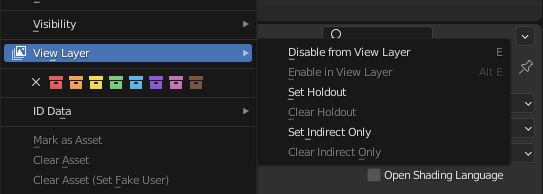
Настройки «Коллекция/Cлой визуализации».#
- Выключить в слое визуализации (disable from view layer)
Удалить эту коллекцию из активного слоя визуализации. Объекты, находящиеся только в этой коллекции, не будут отображаться для активного слоя визуализации. Данная опция полезна, чтобы иногда исключать влияние некоторых объектов на определённый слой визуализации.
- Включить в слое визуализации (enable in view layer)
Добавить эту коллекцию в активный слой визуализации. Рендеринг объектов внутри коллекции будет производиться с использованием активного слоя визуализации.
- Пометить удержание (set holdout)
Объекты внутри этой коллекции будут создавать задержку/маску в слое активного вида.
- Удалить удержание (clear holdout)
Clear the Set Holdout flag.
- Установить «Только в отражениях» (set indirect only) Только Cycles
Объекты внутри этой коллекции будут влиять только на окончательное изображение косвенно через тени и отражения.
- Убрать «Только в отражениях» (clear indirect only) Только Cycles
Clear the Indirect Only flag. Objects inside this collection will contribute normally to the final image.
Cycles#
Ссылка
- Панель:
This section covers only the Render Layer settings appropriate for the Cycles renderer. For the engine-independent settings, see this section.
Фильтр (filter)#
- Включить (include)
- Окружающая среда (environment)
Отключает отрисовку прохода „Environment“ в финальном рендере.
- Поверхности (surfaces)
Отключает отрисовку материалов объектов в финальном рендере.
- Кривые (curves)
Отключает отрисовку прядей-кривых в финальном рендере.
- Объём* (volume)
Отключает отрисовку объёмов в финальном рендере.
- Включить (use)
- Размытие движения (motion blur)
Render motion blur for this Layer, if enabled in the Render Settings.
Переопределение (override)#
- Переопределение материала (material override)
Заменяет все материалы на слое визуализации.
- Переопределение мира (world override)
Переопределяет фон мира в слое рендеринга.
- Сэмплы (samples)
View layer samples to override the scene samples. Controlled by the layer samples in the Sampling panel.