Ràng Buộc Động Học Ngược (Inverse Kinematics Constraint)
The Inverse Kinematics constraint makes not just one bone, but a whole chain of bones rotate to follow a target. A common example is automatically rotating the bones in a character's arm to achieve a desired hand position. See Inverse Kinematics for details.
The constraint can be added quickly using the shortcut Shift-I. See Add IK to Bone.
Ghi chú
The IK constraints are special in that they modify multiple bones. For this reason, they ignore their position in the stack and always run after all other constraints on the affected bones. To apply constraints after IK, it is necessary to first copy the final transformation to a new bone chain, e.g. using Copy Transforms.
Các Tùy Chọn (Options)
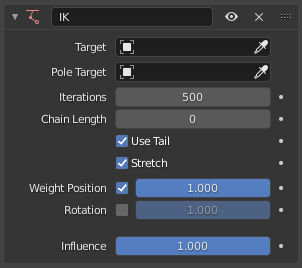
Inverse Kinematics constraint.
- Target
The object or bone which the IK chain should point towards.
Mẹo
Unlike other constraints which require a valid Target, the Inverse Kinematics constraint can work without one. In this case, the "chain tip" bone can be moved and rotated freely, and only its ancestors will be constrained.
- Cực Mục Tiêu (Pole Target)
The object or bone that determines the roll of the IK chain. For example, when applying IK to a character's arm and using the Target to determine the position of the hand, the Pole Target determines the rotation of the arm, or put differently, the position of the elbow.
- Số Lần Lặp Lại (Iterations)
Số lần tối đa lặp lại quá trình giải nghiệm.
- Chiều Dài của Dây Chuyền (Chain Length)
The number of bones affected by the constraint, starting with the owner bone and walking up its chain of ancestors. A value of 1 will only rotate the bone itself, a value of 2 will rotate the bone and its parent, and so on.
A value of 0 will include all of the bone's ancestors (up to the root).
- Dùng Đuôi (Use Tail)
Use the bone's tail as the end of the chain. Unchecking this will use the bone's head instead.
- Kéo Giãn (Stretch)
Whether bones are allowed to scale up or down in order to reach the Target. This only applies to bones with an Kéo Giãn IK (IK Stretch) value that's greater than 0.
- Trọng Lượng Vị Trí (Weight Position)
The checkbox determines whether the end of the chain should (try to) match the position of the Target.
The slider determines how strongly this chain affects its bones, compared to other IK chains that affect those same bones. This kind of structure is called a "tree", likening the chain tip bones to branches and their shared parents to a trunk. If a branch bone has a Weight of 1, it will "pull" on the trunk twice as hard as a branch with a Weight of 0.5.
- Xoay Chiều (Rotation)
The checkbox determines whether the end of the chain should match the rotation of the Target.
The slider determines how strongly this chain affects its bones, compared to other IK chains that affect those same bones.
- Tác Động/Ảnh Hưởng (Influence)
How strongly the constraint affects the bone.
bộ Giải Nhiệm iTaSC (iTaSC Solver)
If the armature is configured to use the iTaSC IK Solver, the constraint has the following additional parameters:
- Loại IK (IK Type)
- Sao Chép Tư Thế (Copy Pose):
Just as with the Standard IK solver, the chain tip matches the location and/or rotation of the Target.
- Tham Chiếu Trục (Axis Reference)
The meaning of the axes in the Lock settings below.
- Bone (Xương):
The chain tip should be positioned (or rotated) so that the Target has an X/Y/Z coordinate (or angle) of 0 in the space of the bone.
- Mục Tiêu (Target):
The chain tip should be positioned (or rotated) so that it has an X/Y/Z coordinate (or angle) of 0 in the space of the Target.
- Lock Position/Rotation X/Y/Z
Whether the chain tip is constrained to match the Target along each axis.
Ghi chú
Despite their name, these settings do not lock the bones to a fixed pose. For that, see the Khóa (Lock) settings in the bones' Inverse Kinematics properties.
- : Distance:
The end of the chain stays inside, on the surface of, or outside a sphere centered on the Target.
- Chế Độ Giới Hạn (Limit Mode)
- Bên Trong (Inside):
The chain tip stays close to the target.
- Bên Ngoài (Outside):
The chain tip stays away from the target.
- Trên Bề Mặt (On Surface):
The chain tip stays at an exact distance from the target.
- Khoảng Cách (Distance)
The distance to maintain.