Sao Chép Ràng Buộc về Tỷ Lệ (Copy Scale Constraint)
The Copy Scale constraint forces an object or bone to match the scale of a target.
Các Tùy Chọn (Options)
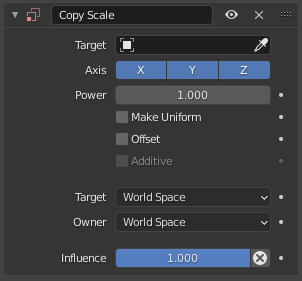
Copy Scale constraint.
- Target
The object or bone whose scale to copy.
- Axis (Trục)
The axes for which to copy scale factors.
- Công Suất/Năng Lượng/Sức Mạnh/Lũy Thừa (Power)
Raises the target's scales to the specified power. This is done before applying the Offset.
- Đồng Đều Hóa (Make Uniform)
Instead of applying the scale for each individual axis, apply a uniform scale to all axes that achieves the same overall change in volume.
- Dịch Chuyển (Offset)
When enabled, the target's current scale (from all its constraints) is not copied over, but multiplied with the owner's original scale (from its preceding constraints).
- Bổ Sung/Cộng (Additive)
When Offset is enabled, don't use multiplication, but add the owner's scales minus 1. This option is kept for backwards compatibility, but generally makes no sense and should not be used.
- Target/Owner
The spaces for retrieving the scales from the target and for applying them to the owner.
- Tác Động/Ảnh Hưởng (Influence)
How strongly the constraint affects the owner.
Mẹo
Depending on the settings, Power can be used instead of Influence to get a better-looking result.
Mẹo
To copy the scale from one axis of the target to all axes of the owner, disable the other axes, enable Make Uniform, and set Power to 3.