Nút Đoạn Phim Quay (Movie Clip Node)
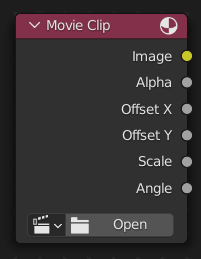
This node is a special node that uses some of the values taken from footage cameras and trackings and links them to the output. It is possible to load image sequences, but only Image and Alpha values will be available, because the other outputs will not have any values associated with them. When a tracked clip is chosen, Blender will fulfill the outputs using internal values taken from the tracking. So the controls for start and end frames will be defined in the Movie Clip editor.
Đầu Vào (Inputs)
Nút này không có ổ cắm đầu vào.
Tính Chất [Properties]
- Đoạn Phim (Movie Clip)
Used to select the movie clip. For controls see Trình Đơn Khối Dữ Liệu (Data-Block Menu).
Đầu Ra (Outputs)
Hai ổ cắm đầu tiên là đầu ra tối thiểu.
- Hình Ảnh (Image)
Cung cấp toàn thể hình ảnh trong không gian màu sắc chỉ định.
- Độ Đục (Alpha)
Giá trị alpha lấy ra từ đoạn phim hoặc từ hình ảnh.
- Dịch Chuyển X (Offset X)
Giá trị vị trí dịch chuyển X từ đoạn phim trong máy quay phim hoặc từ giám sát.
- Dịch Chuyển Y (Offset Y)
Giá trị vị trí dịch chuyển Y từ đoạn phim trong máy quay phim hoặc từ giám sát.
- Tỷ Lệ (Scale)
Tỷ lệ của hình ảnh được lấy ra từ đoạn phim, hoặc từ giám sát.
- Góc Độ (Angle)
Góc độ của ống kính được lấy ra từ đoạn phim, hoặc từ giám sát.