Light Settings (Cycles)
Tham Chiếu [Reference]
- Panel (Bảng):
and
Bên cạnh sự bố trí ánh sáng từ nền và từ bất cứ đối tượng nào với bộ tô bóng phát xạ, các đèn/nguồn sáng khác là những phương tiện để cho thêm ánh sáng vào trong cảnh. Sự khác biệt là ở chỗ chúng không trực tiếp nhìn thấy được trong hình ảnh kết xuất, và có thể dễ dàng quản lý như những đối tượng với thể loại riêng của mình.
Nguồn/Ánh Sáng/Sáng Nhạt [Light]
Các sắp đặt về nguồn sáng (Light settings) for all renderers.
Hình Dạng Tia Đèn Pha (Beam Shape)
- Spread Area Lights
How wide the emitted light fans out controlling how diffused the area light is. Larger values create soft shadows while smaller values create sharper light simulating a gridded softbox.
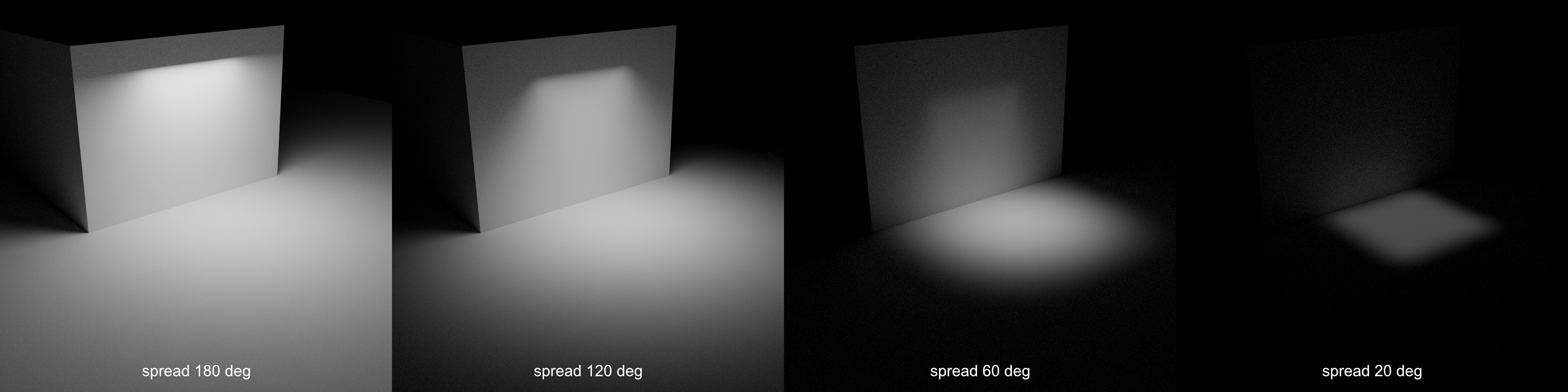
Cho phép làm việc với các thang đo khác nhau.
Các Sắp Đặt (Settings)
- Số Lần Bật Nẩy Tối Đa (Max Bounces)
Maximum number of times light from the light is allowed to Bounce. Limited by scene-wide bounce settings.
- Bóng Tối Ngả Xuống (Cast Shadow)
By disabling this option, light from lights will not be blocked by objects in between. This can speed up rendering by not having to trace rays to the light source.
- Lấy Mẫu Đa Cân Trọng (Multiple Importance Sample)
By default lights use only direct light sampling. For area lights and sharp glossy reflections, however, this can be noisy, and enabling this option will enable indirect light sampling to be used in addition to reduce noise.
- Tụ Quang Bóng Tối (Shadow Caustics)
Mark a light as a refractive caustic caster. This setting can be used in conjunction with the Cast and Receive caustics object settings to selectively speed up refractive caustic rendering of select objects.
- Portals Area Lights
Area lights can also function as light portals to help sample the environment light, and significantly reduce noise in interior scenes. Note that rendering with portals is usually slower, but as it converges more quickly, less samples are required.
Light portals work by enabling the Portal option, and placing areas lights in windows, door openings, and any place where light will enter the interior.
In outdoor scenes most rays do not bounce much and just fly off into the sky and therefore, light portals are not helpful for outdoor scenes.
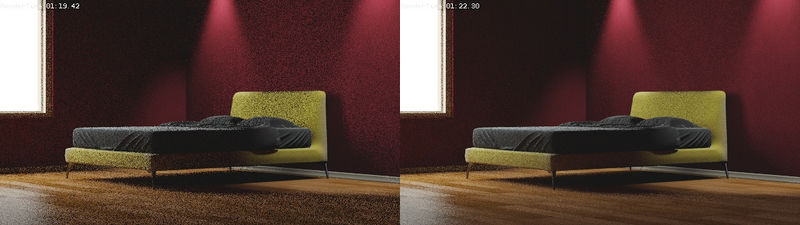
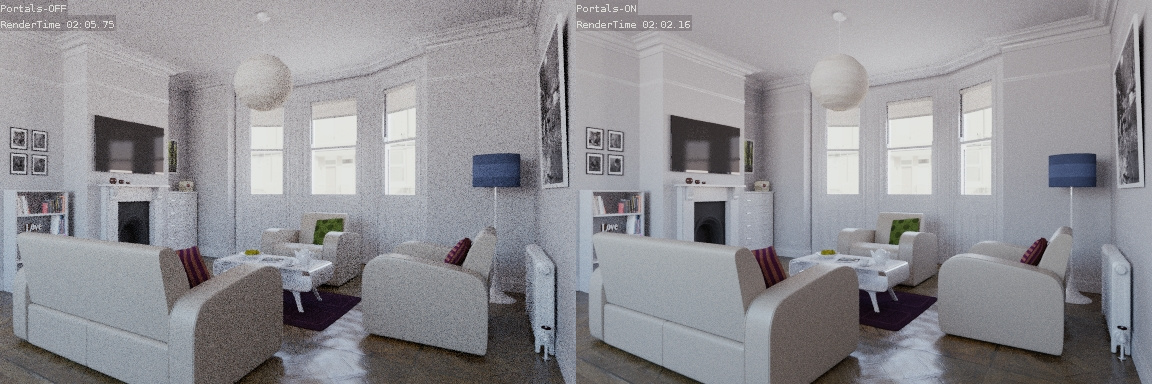
White Room model by Jay Hardy.
Nút (Nodes)
In Cycles, lights can be fully defined using shader nodes. This allows creating complex, physically based light behavior that goes beyond the basic light settings.
Ghi chú
The basic Light settings are applied on top of the light output node.
Light shader nodes are edited in the Shader Editor when the editor is set to Light context and a light object is selected.
Emission Shader
Light objects use an Emission shader to define their output.
The Emission shader controls:
Color: The spectral color of the emitted light.
Strength: The intensity of the emitted light.
The output of the Emission shader must be connected to the Light Output node.
Using Shader Nodes
By default, lights use a simple node setup consisting of an Emission shader connected directly to the Light Output.
More advanced setups can be created using additional shader and utility nodes, for example:
Mixing multiple Emission shaders to create layered light colors.
Using Texture nodes to vary light color or intensity across the light surface.
Driving light intensity or color using math nodes or animation.
This makes it possible to create effects such as patterned lights, animated flicker, or lights that change color based on time or other inputs.
Light Output
The Light Output node defines the final shader used by the light object. Only shader nodes connected to this output affect the light's appearance in Cycles.
Những Giới Hạn (Limitations)
Shader-based light definitions are only supported in Cycles. EEVEE uses simplified light models and ignores light shader node trees.
Only Emission-based shading contributes to lighting. Other shader types (such as BSDF shaders) have no effect when used on lights.
Using shader nodes for lights provides fine-grained control and enables procedural lighting workflows that are not possible with standard light settings alone.