UV Overlays
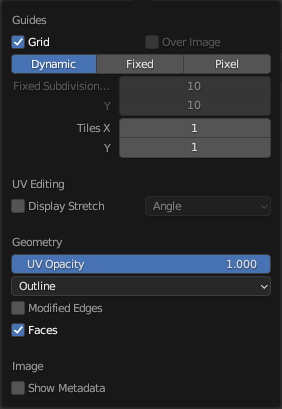
The Overlays pop-over.
Vào/trong the tiêu đề, there được một nút bấm tới chuyển hướng/rẽ tắt toàn bộ lớp vẽ lồng cho/đối với the Trình Biên Soạn UV. This tùy chọn đồng thời bật/tắt the ẩn-hiện/tầm nhìn của UDIM thông tin
The drop-down button opens a pop-over with more detailed settings. The following categories are available:
Hướng Dẫn (Guides)
- Khung Lưới Đồ Thị (Grid)
Hiển Thị khung lưới đồ thị
- Trên Hình Ảnh (Over Image)
Hiển Thị the khung lưới đồ thị trên cùng/đỉnh của hình ảnh rather than behind it.
- Nguồn Hình Dạng Khung Lưới (Grid Shape Source)
How the row and column counts are determined.
- Năng Động (Dynamic):
The grid starts at 8×8 cells that are automatically subdivided further as you zoom in.
- Cố Định (Fixed):
The row and column counts are fixed and can be configured manually.
- Pixel (Điểm Ảnh):
Each grid cell matches one image pixel.
- Mức Phân Chia Cố Định X, Y (Fixed Subdivisions X, Y)
Số/Lượng của các cột/số hàng trong khung lưới đồ thị.
- Số Ô X, Y (Tiles X, Y)
Số lượng ô trong đồ thị UDIM (U-Dimension: Bố Trí các Hình Ảnh Chất Liệu cho Uv thành các Ô như Ô Cờ) để hiển thị theo từng chiều hướng chính.
UV Stretch
- Hiển Thị Sự Kéo Giãn (Display Stretch)
Visualize UV distortion by comparing the UV mapping to the original 3D mesh.
Blue indicates little distortion, while red indicates high distortion.
- Display Stretch Type
Method used to measure distortion.
- Góc Độ (Angle):
Compare the angles of mesh faces with their corresponding UV faces. This highlights angular distortion introduced by the UV mapping.
- Khu Vực/Diện Tích:
Compare the area of mesh faces with their corresponding UV faces. This highlights differences in scale between the 3D mesh and the UV layout.
- Độ Đục (Opacity)
Adjust the opacity of the stretch visualization overlay.
Hình Học (Geometry)
- Display UVs Object Mode
Show the active UV map as an overlay in the UV Editor.
- Khuôn Mặt [Faces]
Adjust the opacity of face fill colors in UV overlays.
- Cạnh (Edges)
Adjust the opacity of edge colors in UV overlays.
- UV Opacity Edit Mode
Độ Đục của cạnh và các mặt.
- Display As Edit Mode
Điều Khiển how cạnh sẽ được shown.
- Đường Viền (Outline):
Hiển Thị cạnh vào/trong màu xám với một màu đen đường viền.
- Nét Gạch Ngang (Dash):
Hiển Thị cạnh as dashed màu đen-màu xám đường nét/thẳng.
- Màu Đen (Black):
Hiển Thị cạnh vào/trong màu đen.
- Màu Trắng (White):
Hiển Thị cạnh vào/trong màu trắng.
- Modified Edges Edit Mode
Additionally show the edges as they look after applying modifiers (in gray).
- Faces Edit Mode
Hiển thị các mặt trên hình ảnh.
Hình Ảnh (Image)
- Hiển Thị Siêu Dữ Liệu (Show Metadata)
Hiển Thị siêu dữ liệu giới thiệu the đã chọn Kết Quả Kết Xuất. Xin xem Đầu Ra thẻ's Siêu Dữ Liệu (Metadata) bảng tới thay đổi cái gì siêu dữ liệu tới include/bao gồm.