Ràng Buộc Co-Bọc (Shrinkwrap Constraint)
The Shrinkwrap constraint snaps an object or bone to the surface of a mesh. It's similar to the Bộ Điều Chỉnh Co Bọc (Shrinkwrap Modifier), which snaps every vertex of a mesh to the surface of another.
Like other constraints, the Shrinkwrap constraint ignores the geometry of its owner object and purely works with its origin. This means that, if the origin is at the object's center, the object will clip into the target mesh instead of sitting on its surface. This can be mitigated with the Distance setting.
Các Tùy Chọn (Options)
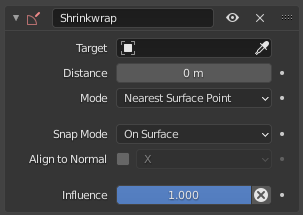
Shrinkwrap constraint.
- Target
The mesh object to snap to.
- Khoảng Cách (Distance)
How far to stay away from the surface.
- Chế Độ [Mode]
How to find the point to snap to.
- Điểm Gần Nhất Trên Bề Mặt (Nearest Surface Point):
Snap to the surface point that's closest to the constraint owner's original location.
- Phóng Chiếu (Project):
Project the owner's original location along a certain axis and snap to the first intersection with the target surface. See Project Mode Settings.
- Đỉnh Gần Nhất (Nearest Vertex):
Snap to the mesh vertex that's closest to the owner's original location.
- Phóng Chiếu theo Pháp Tuyến của Mục Tiêu (Target Normal Project):
Snap to the nearest surface point that, if projected along its normal, intersects the constraint owner's original location.
This mode produces better results than Nearest Surface Point but is also slower to calculate. In addition, the surface normal is obtained by interpolating the surrounding vertex normals, which may not match the expected normal if the mesh uses flat shading.
- Chế Độ Bám Dính (Snap Mode)
Determines how the Distance offset is applied.
- Trên Bề Mặt (On Surface):
Snap to the point that's Distance away from the surface and is on the same side as the owner's original location: if the owner was previously outside the mesh, it stays outside, and if it was inside, it stays inside.
- Ngoài Bề Mặt (Outside Surface):
Snap to the point that's Distance away from the surface and is on the outside, regardless of where the owner was originally.
- Trên Bề Mặt (Above Surface):
Like Outside Surface, but applies the offset along the interpolated surface normal. (The other modes apply it along the line between the constraint owner's original location and the snapping point on the target surface).
- Bên Trong (Inside):
"Shrinks" the mesh by Distance and traps the owner inside it. (If the owner was already inside the shrunk volume, the constraint does nothing.)
- Bên Ngoài (Outside):
"Inflates" the mesh by Distance and pushes the owner out of it. (If the owner was already outside the inflated volume, the constraint does nothing.)
The Inside and Outside modes can be used for very crude collision detection. Because they only check the closest face of the target mesh, they won't give the expected result near sharp corners.
If Mode is set to Nearest Vertex, this setting is not available and the constraint owner is simply snapped to the nearest location that's Distance away from the nearest vertex, regardless of any surface normals.
- Căn Chỉnh theo Pháp Tuyến (Align To Normal)
Aligns the specified local axis of the owner to the interpolated surface normal of the target. This is done using a swing rotation.
Not available for the Nearest Vertex mode.
- Tác Động/Ảnh Hưởng (Influence)
How strongly the constraint affects the owner.
Project Mode Settings
- Trục Phóng Chiếu (Project Axis)
The axis and direction to project along. If no intersection is found, the owner's location is left unchanged.
- Phân Khoảng Cách/Trống/Không Gian (Space)
Coordinate space for the projection axis.
- Khoảng Cách (Distance)
Distance cutoff after which projection is assumed to have failed, leaving the location unchanged. A value of 0 means there's no limit.
- Phóng Chiếu Đối Diện (Project Opposite)
Also project in the opposite direction (along the same axis).
- Loại Bỏ Mặt (Face Cull)
- Tắt (Off):
Snap to the first encountered face regardless of its normal.
- Đằng Trước (Front):
Don't snap if the projection hit the front side of a face (specifically, if the normal of the face points towards the constraint owner). In general, this means the owner will get snapped to the surface if it's inside the target mesh, and keep its original location otherwise.
- Sau Lưng/Quay Trở Lại:
Don't snap if the projection hit the back side of a face (specifically, if the normal of the face points away from the constraint owner). In general, this means the owner will get snapped to the surface if it's outside the target mesh, and keep its original location otherwise.
- Đảo Ngược Loại Bỏ (Invert Cull):
If Project Opposite is enabled and an intersection is found in this opposite direction, use the opposite Face Cull option (so Back if Front was chosen and vice versa).